AI Talking Photo GeneratorMake a photo talk with audio — free to try
Turn any portrait into a talking video. Upload a photo and an audio clip (or use voice), then generate natural lip movements and subtle facial expressions in minutes.
Make Photos Talk, Naturally
Upload → add audio → generate
A simple workflow to create a talking photo for social content, training, product demos, or presentations.
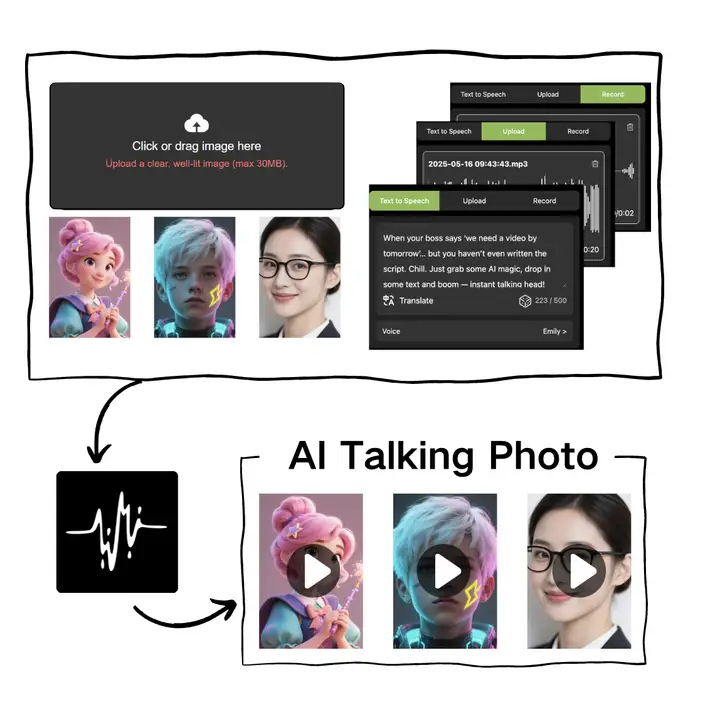
Portrait-First Animation
Best results on a clear, front-facing photo with good lighting.
Accurate Lip Sync
Match mouth movements to speech for a more believable talking video.
Natural Expressions
Subtle facial motion and stability that keeps identity consistent.
Fast Export
Generate and download a share-ready video for your project.
Talking Photo FAQ
Quick answers before you start
Tips to get clean, realistic results when turning a photo into a talking video.
Still have questions? Contact our support team
Make Your Photo Talk Now
Free to try in your browser
Upload a portrait, add audio, and generate a realistic talking video in minutes.
- Photo + audio to talking video
- Natural lip sync and expressions
- Fast generation and download
- Great for content and demos