Overview
What is Prefect Semi-Real?
A concise source description, a distinct visual style, and an SDXL foundation.
Mage presents Prefect Semi-Real as a model designed for producing high-quality semi-realistic images, attributed to creator Goofy Ai. The model's details list its architecture as SDXL. The name is consistently spelled 'Prefect' on its source page, which is key for locating it.
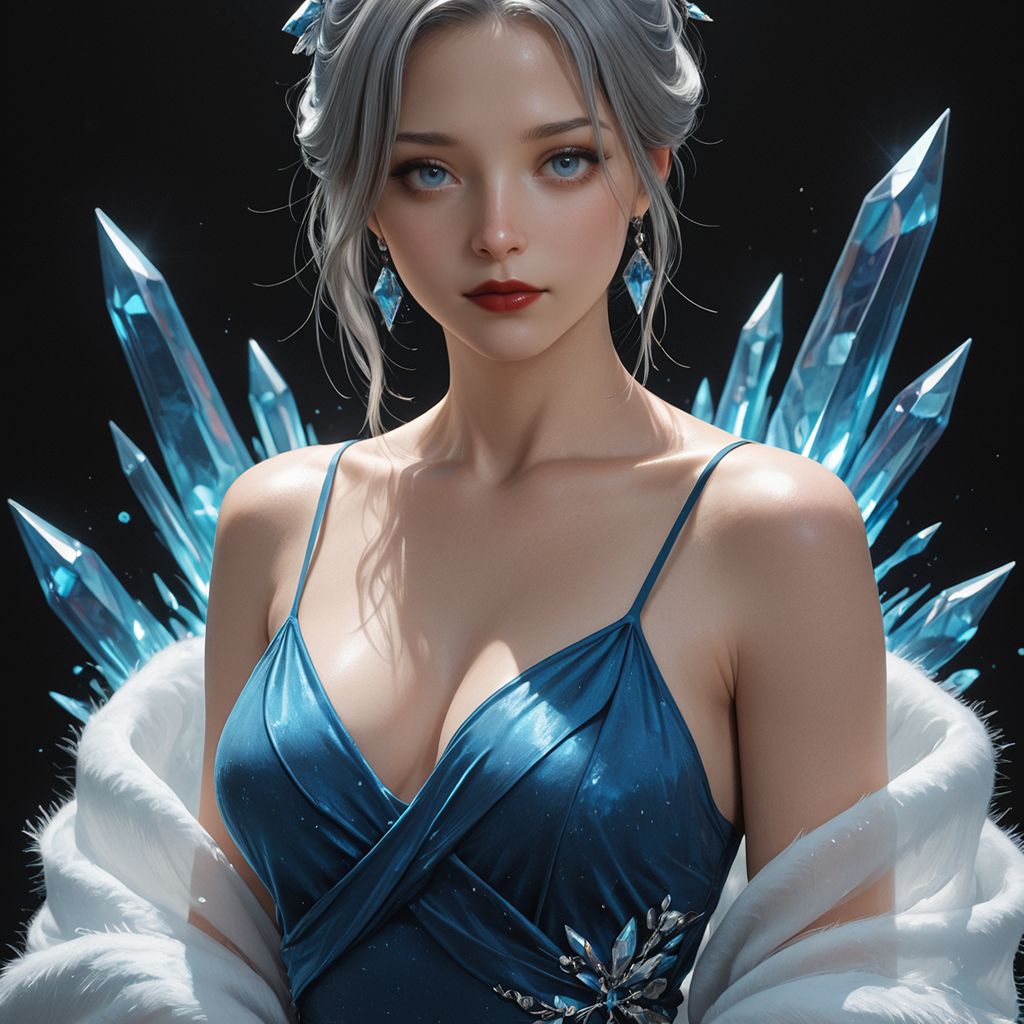
The model's visual signature is its intriguing balance. Semi-realism allows for credible lighting, textures, and depth to coexist with artistic or fantastical elements. The provided preview image clearly demonstrates this: an adult woman with silver hair, adorned in a blue dress with matching crystals, set against a dark backdrop, featuring glossy textures and subtly stylized facial characteristics.
This guide translates the model's brief description and visual example into a practical prompting method. The prompt examples provided here serve as starting points, not direct reproductions of model settings or source-page prompts.
Visual direction
Transform the source preview into a detailed brief
Focus on describing specific visual elements instead of generic quality requests.
| Visible choice | What to describe | Example direction |
|---|---|---|
| Subject framing | The character's age, crop, and expression | An adult fantasy figure, bust-up shot, direct gaze |
| Blended realism | Natural illumination with an artistic rendering | Semi-realistic illustration with refined facial features and convincing shadows |
| Defined color scheme | A primary hue and a contrasting background | Deep sapphire accents against a muted, dark background |
| Material interaction | Which surfaces reflect light or show texture | Lustrous satin, translucent crystal, and soft, flowing fabric |
| Subject-background separation | How the main subject stands out from its environment | Gentle frontal lighting, subtle edge lighting, uncluttered backdrop |
The preview showcases a particular aesthetic; it is an illustrative example, not a guarantee that every prompt will yield identical results.
Workflow
Construct a semi-realistic prompt in distinct layers
Maintain clarity for the subject, visual finish, lighting, and scene elements.
Start by defining your subject and its framing. Next, introduce the desired image style, followed by the setting, color palette, and material descriptions. Place the most critical details early in your prompt. A single character against a clear background offers a manageable initial test before attempting more complex fantasy scenes.
Portrait starting point: “An adult silver-haired fantasy character, chest-up portrait, semi-realistic illustration, sapphire accessories, charcoal backdrop, soft frontal light, subtle rim light, detailed satin fabric, calm direct gaze.”
Environment starting point: “An adult traveler standing in a crystal conservatory, semi-realistic fantasy artwork, blue glass and stone textures, soft daylight, clear silhouette, medium-wide composition.”
Editorial starting point: “An adult fashion model in a blue satin jacket, semi-realistic editorial portrait, muted studio background, believable fabric folds, soft diffused lighting, relaxed pose.”
Practical checkpoints
- Choose one primary style direction.
- Specify the crop and number of subjects.
- Name the materials and lighting that define the look.
- Change one major prompt element per test.
Workflow
From the Mage model page to a repeatable image
Verify the chosen model, test a simple brief, and save a successful outcome.
Access the original Prefect Semi-Real page to examine its preview and model specifications. Use the 'Create with this' control when you intend to use this specific source model, then confirm the active model before generating. The page identifies the model as SDXL; the model title and selection are more reliable than assuming a generic image preset.
Begin with a concise portrait brief and the aspect ratio required for your final use. Inspect the generated image at full resolution, paying attention to facial structure, hands (if visible), jewelry, clothing edges, and lighting consistency. Once you achieve a promising direction, save it and make only one targeted revision at a time.
For a broader workflow within VideoAny, navigate to Text to Image and select an available model suitable for your image concept. Reuse the same subject, framing, palette, and lighting to effectively compare visual results. Model choice and settings significantly impact the output, so document them alongside your saved prompt.
If your image is intended for video, finalize the still first. A distinct silhouette, clear facial features, and an uncluttered background simplify the next motion brief evaluation. Proceed to Image to Video for the animation stage and describe the desired movement.
Practical checkpoints
- Record the prompt, selected model, format, and useful settings.
- Compare a small set of results with the same brief.
- Resolve distracting details before starting animation.
Workflow
Select semi-realism for appropriate projects
This visual style is ideal when you need convincing detail combined with creative freedom.
Character concepts for fantasy settings are a natural fit for this approach. A stylized face, unique accessories, or an ethereal environment can blend seamlessly with realistic lighting and fabric textures. Maintain a consistent character description while experimenting with costumes or scenes.
Portrait illustrations, role-playing game character cards, and polished social media artwork are other practical applications. Determine the final crop early: a character card demands a different composition than a wide scene. Incorporate empty space if headlines or interface elements will be added later.
When your task requires precise product branding, legible text, or documentary accuracy, assess those needs separately. An appealing semi-realistic finish is one creative decision; exact text, identity representation, and production layout need their own specific review.
Practical checkpoints
- Fantasy portraits: focus on silhouette, palette, and costume.
- Character cards: choose a consistent crop and background.
- Scene concepts: add complexity gradually after a simple test.
FAQ
Questions before you create
Is the model called Perfect Semi-Real or Prefect Semi-Real?
The official page title and model details consistently use 'Prefect Semi-Real.' Always use this spelling when searching for the model.
Which architecture does Mage show for this model?
The model details on Mage indicate SDXL as its architecture. The page does not provide a comprehensive technical model card, training specifics, or detailed inference parameters.
What does semi-realistic mean in the context of this guide?
It refers to a visual balance: believable lighting, materials, and depth combined with stylized or illustrated features. The source preview exemplifies this balance in a blue-toned fantasy portrait.
Where can I use the exact Prefect Semi-Real model?
The linked Mage model page is the direct platform for using Prefect Semi-Real. For a VideoAny project, select an available model in Text to Image and compare its output using the same visual brief.
Can I animate a semi-realistic image?
You can use a finalized still image as input for a separate image-to-video tool. Choose a simple motion brief and carefully review how the face, costume, and background maintain consistency throughout the animation.
Are the example prompts copied from Mage?
The prompts provided here are original starting points, developed from the source description and visible preview. Adjust the subject, style, and composition to suit your specific project needs.
Create
Transform a clear visual direction into your next image
Start with a simple portrait brief, select an available model, and refine the details crucial to your project.
- Define the subject and crop
- Control the palette and lighting
- Save a useful prompt before scaling