Overview
What Mage's Nano Banana 2.1 description highlights
Key quality improvements and flexible resolution options.
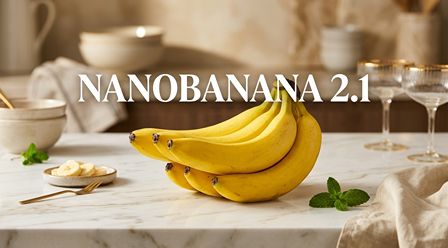
Mage's official listing identifies this iteration as Nano Banana 2.1. Its summary emphasizes improved image sharpness, more faithful adherence to input prompts, better consistency for characters, and greater legibility for text across output resolutions ranging from 1K to 4K. The model's illustrative preview features a still life of bananas prominently labeled 'NANOBANANA 2.1'.
The source also notes that this model consumes approximately half the 'Gems' compared to Nano Banana 2. This is a platform-specific cost comparison by Mage. VideoAny utilizes a distinct credit system based on resolution, detailed below, which should be considered separately when planning your projects.
Nano Banana 2.1 is accessible within VideoAny's Text to Image and Image to Image tools. Start with a written brief for new concepts, or use reference images when your subject, product, or compositional structure is already defined. The quality benchmarks highlighted by Mage serve as excellent criteria for evaluating your generated images: does the output align with the brief, retain crucial details, render text clearly, and possess sufficient detail for its intended use?
Source priorities
Transforming source claims into practical evaluation methods
Apply identical briefs and references for comparative analysis.
| Source emphasis | A useful test | What to inspect |
|---|---|---|
| Visual detail | A product shot or portrait with intricate surfaces | Sharpness of edges, fabric textures, hair detail, and background separation |
| Instruction adherence | A scene with specific framing, color scheme, and object placement | Whether all requested elements and their arrangement are present in the result |
| Character persistence | An established character placed in a new scenario using a reference | Facial features, hairstyle, attire, and unique identifying characteristics |
| Text rendering | A sign or poster featuring a concise, provided headline | Accuracy of spelling, readability of characters, positioning, and visual hierarchy |
| Resolution scalability | The same creative brief executed at various output tiers | Final dimensions, level of useful detail, and flexibility for cropping |
These are practical evaluation tasks based on Mage’s description, not promises that every generation will pass them.
Workflow
Choose generation or reference-guided editing
Make the input match the decision you are trying to make.
Choose Text to Image when generating an entirely new visual. Clearly describe the subject, its purpose, framing, environment, lighting, and any specific text. For instance: 'A ceramic coffee mug resting on a light-colored stone countertop, illuminated by morning window light, viewed at eye level, mug positioned on the right, ample clear space on the left for a headline, using a warm cream and blue color palette.'
Select Image to Image when an existing visual provides the primary subject or layout. VideoAny supports one to fourteen reference images for Nano Banana 2.1's editing capabilities. Specify what each reference contributes and which elements should maintain consistency.
A precise editing instruction might state: 'Use image 1 as the product reference and image 2 for the color scheme. Position the mug in a sunlit kitchen. Preserve its silhouette, handle, printed design, and camera angle.' For a character, identify the facial characteristics, hair style, clothing, and other distinguishing traits to be retained.
Before generating extensive variations, verify continuity. While references guide the output, significant details can still fluctuate between generations. Maintain a strong primary reference and alter only one major scene or editing instruction per iteration.
Practical checkpoints
- A new visual direction: start with Text to Image.
- An existing subject: add relevant references in Image to Image.
- A variation series: keep the subject description and references stable.
VideoAny settings
Nano Banana 2.1 resolution and credit costs
These are VideoAny’s current rates for both generation and image editing.
| Resolution | Credits per image | A practical use |
|---|---|---|
| 1K | 15 credits | Ideal for exploring compositional ideas, comparing prompt variations, and producing everyday visuals. |
| 2K | 20 credits | Suitable for generating larger outputs for a chosen concept or executing a more detailed edit. |
| 4K | 40 credits | Request the maximum available output size for visuals requiring extensive detail or greater cropping flexibility. |
Web search and image search do not add credits to these resolution rates. Verify the displayed cost before generating.
Mage’s Gems comparison belongs to the source platform; it is separate from these VideoAny credit rates.
Workflow
Set the format before generating
Choose a canvas and enable search only when it helps the brief.
VideoAny offers fourteen aspect ratios for Nano Banana 2.1: 1:1, 3:2, 2:3, 3:4, 4:3, 4:5, 5:4, 9:16, 16:9, 21:9, 1:4, 4:1, 1:8, and 8:1. Choose the format that matches your image's final destination so the model can compose effectively from the outset.
Square formats are often effective for many social media posts, portrait orientations suit story assets and posters, and landscape formats are ideal for banners or covers. Extreme tall or wide ratios need a deliberate composition: specify the subject's placement and how the remaining space should be used.
Web search and image search are independent controls within both VideoAny image tools, starting in the off position. Web search incorporates online context, while image search provides visual context. Activate the option that directly addresses a specific need in your brief, then review factual accuracy and visual appropriateness in the generated output.
Higher resolution is beneficial when a larger image is required, but it does not substitute for a clear brief. Establish your creative direction at 1K, review the results, and then select a larger tier for next generations when the output size aligns with your project requirements.
Practical checkpoints
- Choose the aspect ratio for the final placement.
- Check the selected resolution and credit charge.
- Use search for a specific context or reference need.
Workflow
Write clearer text and character instructions
The source’s text and consistency claims work best with a precise review plan.
For elements like posters or labels, enclose the exact wording in quotation marks. Specify the language, placement, desired font mood, and hierarchical arrangement. For initial tests, keep the headline brief and the layout simple to easily identify any errors.
Example poster brief: 'A travel poster depicting a coastal scene, with an illustrated lighthouse and sailboats at sunset, featuring the headline 'SOLMARE' prominently at the top in large, clear letters, and a smaller subtitle 'A quieter coast', using a cream, coral, and navy color palette, in a 4:5 layout.' Always proofread every character before final publication.
For recurring characters, begin with a suitable reference image and a concise list of defining characteristics. Describe any requested changes separately from these constant features. Modifying a location, lighting, or pose is simpler to evaluate when other aspects of the brief remain consistent.
Example character edit: 'Use the provided adult character reference. Maintain the facial features, hairstyle, blue jacket, and silver earrings. Position the character on a rain-slicked street, holding a transparent umbrella, with a medium portrait crop.' Examine the face, attire, jewelry, and interaction with the background at full size.
Practical checkpoints
- Quote the exact text and proofread the output.
- State which character details to preserve.
- Keep the references relevant to the same visual goal.
- Change one major instruction per iteration.
FAQ
Questions before you create
Is the model named Nano Banana 21 or Nano Banana 2.1?
The official source page and model designation consistently use Nano Banana 2.1. While the URL might abbreviate it as 'nano-banana-21', the displayed name includes the decimal point.
What specific enhancements does Mage highlight for this model?
Mage emphasizes improvements in image sharpness, greater prompt adherence, more consistent character generation, and enhanced text legibility, with output capabilities from 1K to 4K. These points serve as valuable criteria for evaluating your own creative outputs.
Is Nano Banana 2.1 accessible on VideoAny?
Yes, Nano Banana 2.1 is available. You can select it in Text to Image for generating visuals from written descriptions, or in Image to Image for editing with one to fourteen reference images. The links within this guide will pre-select the model for you.
What is the cost of using Nano Banana 2.1 on VideoAny?
Currently, the cost is 15 credits for 1K resolution, 20 credits for 2K, and 40 credits for 4K per image. These rates apply uniformly to both image generation and editing. Activating web search or image search does not incur additional credit charges.
Does Mage's 'half-price' claim pertain to VideoAny's pricing?
Mage states that Nano Banana 2.1 uses approximately half the 'Gems' of Nano Banana 2 on its own platform. VideoAny operates with a distinct credit system, and its resolution-based rates are detailed within this guide, separate from Mage's comparison.
Can it reliably produce accurate text and consistent characters?
These are stated quality priorities from the source description. To achieve the best results, provide exact wording, relevant references, and explicit instructions, then carefully review the output. Individual generations can still contain text errors or variations in character details.
What does the architecture field on the source page indicate?
The Mage model details list 'Nano Banana 2' in the architecture field, while the listing itself is named Nano Banana 2.1. When selecting this version, use the displayed listing name; that field alone does not provide a comprehensive technical lineage.
Does Nano Banana 2.1 generate video content?
The VideoAny workflows discussed here are for generating or editing still images. To add motion, approve a still image and then use a separate Image to Video workflow.
Create
Create or edit with Nano Banana 2.1
Start with a clear brief, select the format and resolution, and evaluate the result against the details that matter.
- Generate from words
- Edit with one to fourteen references
- Choose 1K, 2K, or 4K output