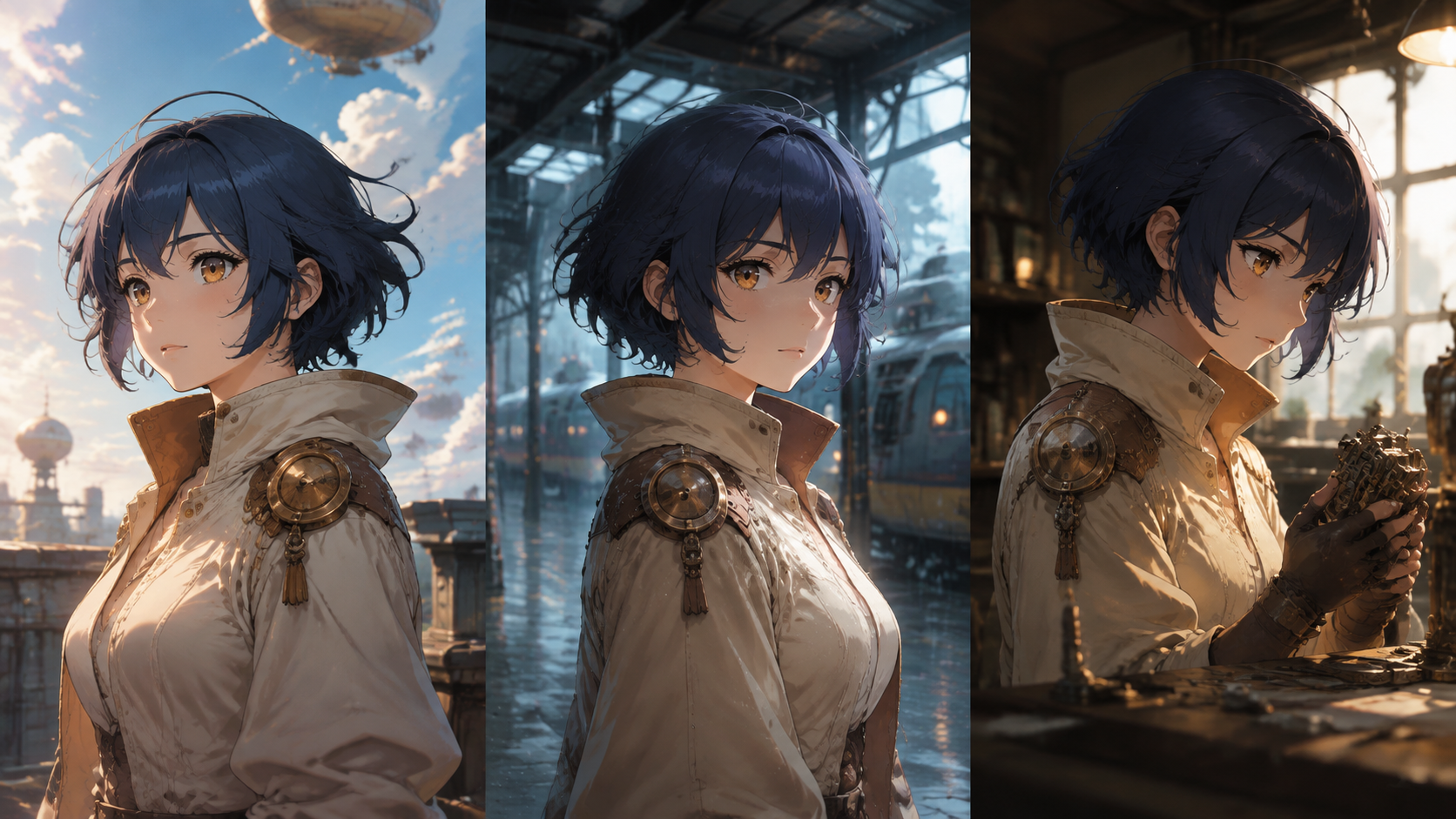
An image can be beautifully finished and still depict the wrong character. This challenge becomes apparent when a creator attempts to combine several pictures: individual portraits might be convincing, yet the character appears to change their face, costume, or even age across different scenes. Maintaining visual consistency is crucial for any narrative project involving multiple images of the same character.
The fundamental discipline for consistent character generation involves establishing a clear reference, defining immutable characteristics, varying scene elements deliberately, and rigorously comparing new outputs against the approved design. Composition, anatomical accuracy, and the intended publishing size are all critical factors alongside facial resemblance. It is essential to keep the character reference and all design decisions organized, providing a clear target for subsequent image generations.
Our original worked example features Nera, a fictional sky courier. She is characterized by a squared indigo fringe, amber eyes, a cream jacket with a distinctive copper clasp, and a triangular satchel. We will plan three illustrations for Nera: a rooftop departure, a scene at a rainy station, and a workshop delivery. This exercise focuses on editorial planning and design principles, rather than promising specific generated outcomes.
Building a Character Reference Packet for Consistency
The first step in achieving character consistency is to compile a comprehensive reference packet. This packet should contain the minimum information necessary for someone else to recognize Nera without needing further clarification. It should include an approved image, a written description detailing her distinctive features and shapes, specific color references, and notes indicating which details are optional or subject to variation.
Crucially, separate the character's core identity from temporary clothing or environmental states. For instance, Nera's triangular satchel can be depicted open or closed, but its fundamental construction and shape should remain recognizable. Similarly, her jacket might appear wet in the rain, but this environmental effect should not justify altering its collar design or introducing a different fastening mechanism. This distinction allows scenes to change dynamically without every variation being flagged as an error.
A well-structured reference packet should also include a "not yet decided" section. If the initial reference images do not show the back of Nera's jacket, for example, mark the back design as unresolved. This prompts a deliberate design decision for that element before accepting any accidental interpretations that might arise from early generations. Without this, an attractive but unintended detail could mistakenly become a "rule" simply because it appeared in an appealing picture.
Defining Relationships for Robust Identity Across Angles
Striving for exact pixel matching across different viewpoints is often an impractical and counterproductive goal. Instead, focus on describing the relationships between elements that survive changes in angle and perspective. For example, describe that Nera's fringe ends above her eyebrows, the copper clasp is positioned near her left collar, and her satchel is narrower than her torso. These relational descriptions provide a more useful framework for review than subjective statements like "the face feels different."
An identity ledger helps formalize these decisions. Here’s an example for Nera:
| Element | Stable decision | Permitted variation | Reject when |
|---|---|---|---|
| Hair | Squared indigo fringe and short outer silhouette | Wind-blown individual strands, minor flyaways | A different haircut alters the overall silhouette |
| Jacket | Cream panels with one copper collar clasp | Folds, shadows, rain-darkened fabric, minor wear | Fastenings multiply, change material, or shift sides |
| Satchel | Triangular body and broad shoulder strap | Open flap, worn surface texture, contents visible | Shape changes to a rectangular backpack or fanny pack |
| Expression | Consistent facial construction and proportions | Concern, relief, concentration, mild surprise | Expression appears to significantly change the character's age or fundamental features |
These are illustrative design decisions. Their primary value lies in enabling consistent application by collaborators or automated tools. It's not necessary to preserve every decorative detail with the same priority; a background stitch is far less critical for character recognition than the distinctive silhouette of the courier.
Integrating Continuity Questions into Scene Design
Each planned scene should pose a specific continuity question that tests a different aspect of the character's design. The rooftop image, for instance, might ask whether Nera remains clearly discernible against an open sky backdrop. The station scene could investigate whether the wet, low-light conditions unduly alter her established color palette. The workshop image might examine whether leaning over a counter affects the jacket's construction or the satchel's placement.
By designing each scene to test a unique requirement, you avoid the pitfall of creating a series of images that are merely flattering portraits from similar angles. While such a collection might be aesthetically pleasing, it wouldn't confirm whether the character's design is robust enough for the diverse situations your story demands.
For exploring still-image directions, you can utilize tools like VideoAny's text-to-image page. Remember to keep your character reference packet in your own project files and carefully verify the input capabilities of any chosen workflow. A tool designed for image creation should not be assumed to possess inherent persistent character memory.
Crafting Scene Requests that Reinforce Design Choices
When writing prompts or scene requests, explicitly refer back to the established character design. This adaptable example describes the station scene, demonstrating how to integrate character details without simply copying a previous prompt:
Illustrate Nera waiting beneath the roof of a small elevated railway station. Use the approved character reference for her squared indigo fringe, amber eyes, cream jacket with one copper collar clasp, and triangular satchel. Her attention is on a paper ticket in her hand. Wet pavement reflects the station lights. The jacket can show rain-darkened folds, but its construction should remain recognizable. Frame the scene so the ticket, face, and satchel each have a clear visual role.
This prompt doesn't guarantee consistency, but it clearly articulates what you intend to check for. If a generation tool offers reference-image inputs, consult its specific instructions and limitations before relying on them. If such features are absent, anticipate a greater need for manual comparison and correction, rather than assuming text alone will ensure identity.
Diagnosing Mismatches and Iterating Effectively
Imagine a candidate image for the station scene depicts Nera with a rounded fringe and a silver zipper. Simply labeling the entire image "inconsistent" oversimplifies the problem. This output actually presents two distinct issues: a change in hair silhouette and an alteration in costume construction.
It's more effective to document each failure separately. Preserve any successful compositional elements in your notes, then determine whether a local correction using an appropriate image editor or another controlled generation is the most practical next step. It's important not to assume that every generation interface supports advanced features like local masking or selective repairs.
Now, consider a second candidate image that maintains Nera's design but appears darker under the station lamps. Before rejecting it, compare the jacket in context. A difference in lighting does not automatically equate to a palette error. The key question is whether the image still effectively communicates the intended cream fabric, not whether its sampled color perfectly matches a daylight reference.
Utilize side-by-side contact sheets and inspect images at two distinct scales. A full-size view helps identify subtle issues like duplicated clasps or anatomical inaccuracies. A small preview, however, is crucial for determining whether Nera still reads as the same courier when the images are presented as cards, thumbnails, or panels in a sequence.
Packaging Approved Images for Subsequent Production Stages
Once an image is approved, save it along with its scene brief, the version of the identity ledger used, and a brief acceptance note. It's important to name this approved reference distinctly from experimental outputs. An accepted station image can serve as valuable production material without replacing the original, foundational design reference.
Before transitioning a still image into an image-to-video workflow, identify which character details motion might challenge. For example, Nera's satchel strap might cross her jacket clasp during a gesture, creating a continuity issue that was not apparent in the still image. Plan the intended action and review the resulting video clip independently; stable illustrations do not automatically guarantee stable motion.
Always keep source-art permissions and collaboration notes within the same project packet. Prioritize using original characters and assets for which you have appropriate rights, and avoid mistaking a visual resemblance to an existing commercial character as a shortcut to a unique design.
For a final review, hide the filenames and mix the three planned scenes with several rejected candidates. Ask an impartial reviewer which images they believe belong to the same character and what specific details informed their judgment. Their explanation will reveal whether your established identity anchors are effectively communicating the character's consistency, rather than existing solely within your prompt history.
Frequently Asked Questions
Which tools are best for creating consistent still anime images?
For generating still images, a dedicated text-to-image or image-to-image tool is generally most effective. Workflows for animating images are typically best utilized after a stable still design has been achieved.
Do I need professional drawing or editing skills?
No, professional drawing or editing skills are not strictly required. However, a clear creative brief and a willingness to meticulously review details are essential. A basic understanding of composition, visual continuity, and file formats will significantly improve your results more than advanced software proficiency.
How many versions should I generate for each iteration?
Begin with a small, controlled batch, often three or four images. If none of these iterations resolve the structural problem you're addressing, revise your source material or prompt before generating more.
Can I use the generated results commercially?
Commercial use depends on several factors. Always review the platform's current terms of service and verify the rights associated with your source material, characters, brands, and any references used. For client work, a documented rights review is highly recommended.