Schnelle Antwort
Was KI-Lippensynchronisation ist und warum Kreative sie nutzen
Eine quellengerechte Übersicht, wie aus einem Standbild ein sprechendes Video wird.
KI-Lippensynchronisation projiziert gesprochene Audioinhalte auf ein statisches Porträt und animiert Mund, Kiefer sowie umliegende Gesichtsbewegungen, sodass die Figur natürlich zu sprechen scheint.
Der Quellleitfaden hebt einen praktischen Vorteil hervor: Sie behalten ein konsistentes Erscheinungsbild über viele Clips hinweg bei, da jedes Video vom selben Bild ausgeht.
Für Kreative schließt dies die Lücke zwischen statischem Charakterdesign und veröffentlichungsfertigem, sprechendem Inhalt für soziale Medien, Bildung und Marken-Storytelling.
Warum dieser Workflow wichtig ist
- Verwandelt ein einzelnes Porträt in wiederholbare sprechende Videos
- Bewahrt die Charakteridentität über Episoden hinweg stabil
- Reduziert die Produktionskomplexität im Vergleich zu traditioneller Animation
- Beschleunigt die Veröffentlichung von Kurzvideos mit Sprechbeiträgen
Die Bildklarheit und eine saubere Audioqualität sind die beiden wichtigsten Qualitätsfaktoren für VideoAny.
Methode
Schritt für Schritt: Erstellen Sie ein sprechendes KI-Video mit VideoAny
Quellbasierter Prozess: Bildeinrichtung, Audio-Vorbereitung, dann Generierung.
Schritt 1: Wählen Sie ein klares Frontalbild einer Person. Sie können ein Ergebnis eines Gesichtsgenerators, ein Porträt aus einem Fotoshooting oder ein anderes gut beleuchtetes Porträtfoto verwenden.
Schritt 2: Sprachaudio als MP3 oder WAV vorbereiten. Eine saubere Sprachnotiz in einem ruhigen Raum funktioniert oft besser als rauschende Studioaufnahmen mit Hintergrundgeräuschen.
Schritt 3: Laden Sie Bild und Audio in das Lip-Sync-Tool, starten Sie die Generierung und prüfen Sie anschließend Mundbewegung, Timing und Ton. Die Bearbeitungszeit hängt von Cliplänge und Auslastung ab; 15–45 Sekunden sind lediglich ein Richtwert.
Praktische Anforderungen an das Ausgangsmaterial
- Das Gesicht sollte einen großen Teil des Bildausschnitts einnehmen
- Verwenden Sie eine gleichmäßige Beleuchtung und vermeiden Sie harte Schatten um den Mund
- Sonnenbrillen, Masken oder Haare, die den Lippenbereich verdecken, vermeiden
- Halten Sie Clips für eine stabile und schnelle Ausgabe prägnant
Ein natürliches Sprechtempo verbessert die Synchronisationsstabilität im Vergleich zu einer überhasteten Wiedergabe.
Rangliste
Was Sie erstellen können: Anwendungsfälle und Vorlagen mit Quellenausrichtung
Diese Karten spiegeln die Quellbeispiele und Erstellerszenarien wider, anstatt externe **VideoAny**-Tool-Rankings zu verwenden.
Büropersona — Morgen-Check-in-Inhalte
Ein konsistenter sprechender Moderator für Update-Videos, kurze Erklärvideos und professionelle Social-Media-Beiträge.
Ausführung des Vorgangs
- Verwenden Sie ein neutrales Porträtfoto von vorne
- Kombinieren Sie mit prägnantem Skript-Audio
- Sorgen Sie für ein konversationelles Tempo für eine saubere Lippensynchronisation
- Wiederverwendung desselben Charakterbildes über Episoden hinweg
- Pricing model
- Die benötigten Credits hängen vom gewählten Modell und den Ausgabeeinstellungen ab.
- Trade-offs
- Übermäßig dramatische Gesichtsausdrücke können die Realitätsnähe mindern.
- Best fit
- Ersteller, die wiederkehrende Talking-Head-Serien aufbauen.
Lifestyle-Persona — Event-Storytelling
Ein eleganter Sprecher für Lifestyle-Erzählungen, Event-Zusammenfassungen und inspirierende Storytelling-Clips.
Ausführung
- Wählen Sie ein Porträt, das zum Szenarioton passt
- Verwenden Sie saubere Erzählaudios mit minimalem Rauschen
- Gesichtsausdruck an die Skriptabsicht anpassen
- MP4 direkt für die Verbreitung exportieren
- Pricing model
- Die benötigten Credits hängen vom gewählten Modell und den Ausgabeeinstellungen ab.
- Trade-offs
- Lange Clips erhöhen das Drift-Risiko, wenn die Audioqualität schwach ist.
- Best fit
- Lifestyle-Content-Ersteller und Marken-Storytelling-Teams.
Urbaner Schöpfer – Kurzkommentar
Ein Charakter im Streetstyle für schnelle Kommentare, Trendreaktionen und Produkt-Drop-Inhalte.
Wie man ausführt
- Verwenden Sie eine kontrastreiche, aber gut ausgeleuchtete Porträtaufnahme
- Halten Sie einzelne Clips kurz und prägnant
- Vermeiden Sie starken Hall oder Musik, die die Sprache überdeckt
- Mehrere Skripte für denselben Charakter stapelweise verarbeiten
- Pricing model
- Läuft innerhalb Ihres üblichen **VideoAny**-Guthaben-Workflows.
- Trade-offs
- Belebte Hintergründe können von der Mundbewegung ablenken.
- Best fit
- Kurzvideo-Ersteller, die häufig **VideoAny** veröffentlichen.
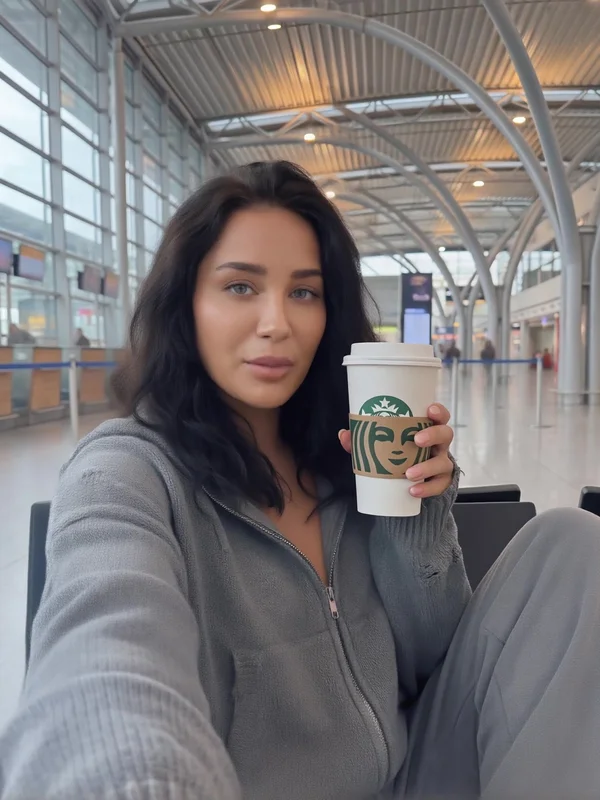
Vorlage: Starbucks & Terminal-Atmosphäre
Ein Persona-Konzept, das zu Produktivitäts- und Reise-Lifestyle-Narrativen passt.
Wann es eingesetzt wird
- Tagebuch oder Check-in-Clips des Erstellers
- Professioneller, aber lockerer Sprachstil
- Konsistente visuelle Identität über Beiträge hinweg
- Schnelle Iteration für wöchentliche Veröffentlichung
- Pricing model
- Verwendet normale Generierungsguthaben.
- Trade-offs
- Die Vorlagentonlage erfordert möglicherweise eine Skriptanpassung für formelle Kontexte.
- Best fit
- Ersteller testen schnell wiederkehrende Sprecher-Personas.
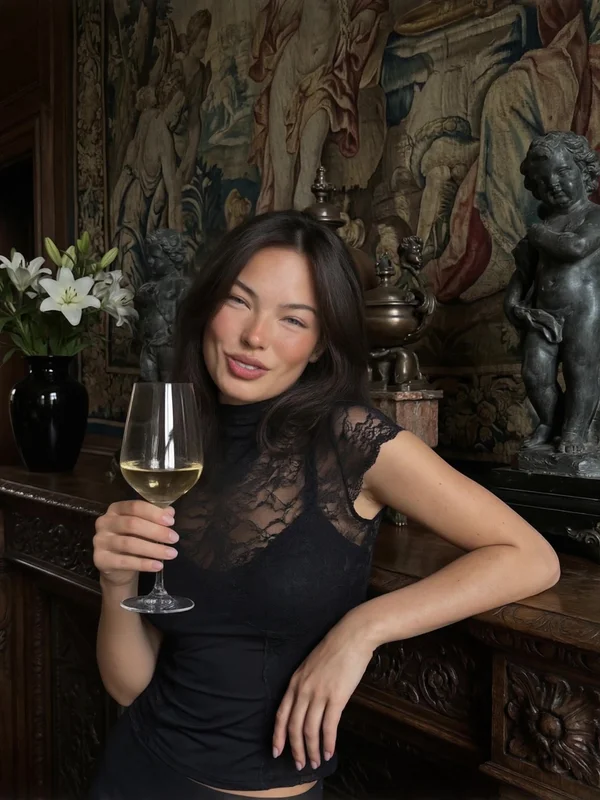
Vorlage: Einen Toast im Château aussprechen
Ein Premium-Lifestyle-Talking-Character-Setup, nützlich für Event-Zusammenfassungen und luxuriöses Storytelling.
Wann es zu verwenden ist
- Skripte für Veranstaltungen oder Feiern
- Ambitioniertes Marken-Storytelling
- Hochwertiger Ton für Kampagneninhalte
- Funktioniert gut mit prägnantem Voice-over
- Pricing model
- Verwendet normale Generierungsguthaben.
- Trade-offs
- Erfordert eine passende Tonlage in der Audioausgabe, um authentisch zu wirken.
- Best fit
- Lifestyle- und Luxus-Kurzvideos.
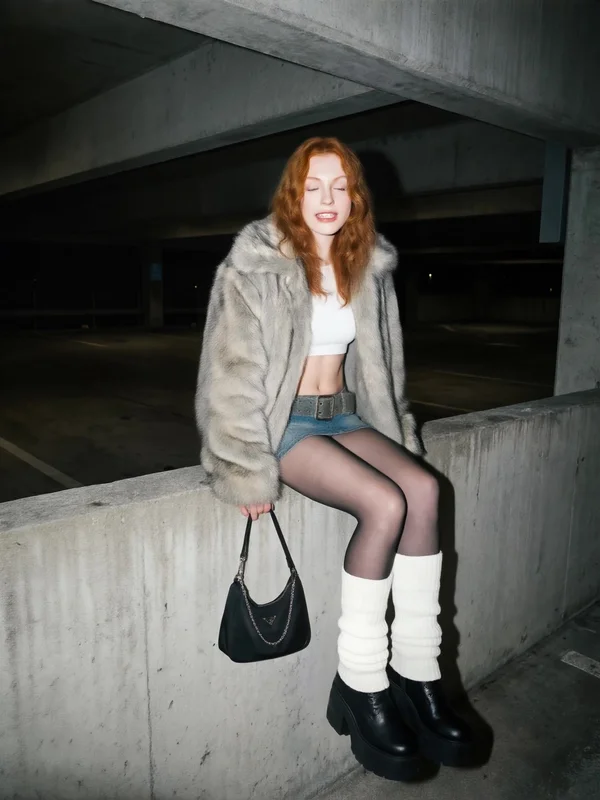
Vorlage: Königin des Großstadtdschungels
Eine Vorlage für sprechende Charaktere im urbanen Stil, ideal für Modekommentare und trendorientierte Kurzvideos.
Wann ist VideoAny sinnvoll?
- Modekommentare und Stadtführer
- Produktankündigungen im Streetwear-Stil
- Charaktergesteuerte Trendreaktionsbeiträge
- Wiederholbare episodische Persona-Veröffentlichung
- Pricing model
- Verwendet normale Generierungsguthaben.
- Trade-offs
- Funktioniert am besten mit prägnanten Skripten und kurzer Dauer.
- Best fit
- Trendorientierte Creator, die häufig Kurzvideos veröffentlichen.
Vergleich
Schnellvergleich der praktischen Workflows
Eine kompakte Checkliste für Bildvorbereitung, Audiovorbereitung und Generierungsqualität.
| Arbeitsschritt | Was vorzubereiten ist | Wichtige Empfehlung | Häufiges Problem | So beheben Sie | Ausgabe | Typische Zeit |
|---|---|---|---|---|---|---|
| Schritt 1: Charakterbild | Frontalporträt | Neutraler Ausdruck und gleichmäßige Beleuchtung | Mundartefakte | Vermeiden Sie Okklusion im Lippenbereich | Stabile Gesichtsidentität | 1-3 Minuten Einrichtung |
| Schritt 2: Audiodatei | MP3- oder WAV-Sprachspur | Klare Sprachausgabe mit geringer Hintergrundgeräuschkulisse | Synchronisationsversatz | Verwenden Sie ein natürliches Sprechtempo und eine saubere Aufnahme | Präzisere Phonem-Ausrichtung | 1-5 Min. Vorbereitung |
| Schritt 3: Lippen-Synchronisation generieren | Bild + Audio hochladen | Halten Sie den Clip für Stabilität prägnant | Unnatürliche Mundkadenz | Clip kürzen und Audio optimieren | Sprecher-Video (MP4) bereit zur Veröffentlichung | 15-45 Sekunden Generierung |
Saubere Ausgangsdateien verbessern die Lippensynchronisation meist stärker als eine aufwendige nachträgliche Korrektur.
Entscheidungsrahmen
Tipps für bessere Lippensynchronisationsergebnisse
Aus der Quelle abgeleitete Qualitätsregeln, die Realismus und Zuverlässigkeit verbessern.
Halten Sie den Mundbereich des Charakters frei und vermeiden Sie extreme Gesichtsausdrücke im Quellbild.
Sprechen Sie in einer ruhigen Umgebung und vermeiden Sie starke Hintergrundmusik, Hall oder abgeschnittene Audiospitzen, wenn Sie mit **VideoAny** aufnehmen.
Für wiederholbare Serien verwenden Sie dasselbe Basisporträt und halten Sie das Skript-Timing über alle Episoden hinweg konsistent.
Checkliste zur Optimierung mit hoher Wirkung
- Gesichtssichtbarkeit und Beleuchtungskonsistenz zuerst
- Sprachklarheit statt dramatischer Stimmeffekte
- Kürzere Clips für schnellere und sicherere **VideoAny**-Generierung
- Testen Sie ein Muster vor der Stapelveröffentlichung
Quellrichtlinien priorisieren stets saubere Eingaben gegenüber aggressivem Post-Processing.
Häufig gestellte Fragen
Häufig gestellte Fragen
Schnelle Antworten zur uneingeschränkten KI-Bilderzeugung und zum Akzeptanzverhalten von Prompts.
Was ist KI-Lippensynchronisation?
KI-Lippensynchronisation animiert Mund- und Gesichtsbewegungen auf einem Standbild, sodass gesprochene Audioinhalte natürlich von der Figur wiedergegeben werden.
Wie lange dauert die Generierung üblicherweise?
Der Quell-Workflow meldet ein typisches Generierungsfenster von etwa 15 bis 45 Sekunden, abhängig von der Länge des Videoclips und der Eingabequalität.
Welche Audioformate werden empfohlen?
MP3 und WAV sind gleichermaßen geeignet. Klare Sprachaufnahmen mit minimalen Hintergrundgeräuschen führen stets zu einer besseren Synchronisation.
Welche Bildqualität eignet sich am besten für Lippensynchronisation?
Verwenden Sie ein klares, frontal aufgenommenes, gut ausgeleuchtetes Porträt mit sichtbarem Mundbereich und minimaler Verdeckung durch Haare oder Accessoires.
Kann dieser Workflow wiederkehrende Inhaltsserien unterstützen?
Ja. Die Wiederverwendung desselben Charakterporträts und derselben Produktionseinstellungen ist einer der Hauptvorteile für wöchentliche oder episodische Inhalte von Kreatoren.
Fazit
Fazit
Die Freiheit auf der Eingabeseite variiert stark, und nur wenige Tools bleiben unter anspruchsvollen Prompt-Sets zuverlässig.
Der Quellleitfaden stellt KI-Lippensynchronisation als praktische Brücke vom statischen Charakterdesign zur wiederholbaren **VideoAny**-Ausgabe dar.
Wenn Sie die Bildqualität, die Audioklarheit und die Clip-Länge kontrollieren, kann der 3-Schritte-Workflow realistische sprechende Clips schnell genug für regelmäßige Veröffentlichungszyklen mit **VideoAny** erstellen.
Für Ersteller, die wiederkehrende KI-Personas entwickeln, ist die Konsistenz der Basisporträt- und Spracheinstellungen der wichtigste Hebel für langfristige Qualität.
Zusammenfassung der Stufe
- VideoAny: Ideal für allgemeine, hochwertige Lippensynchronisation aus Bildern.
- ElevenLabs/Murf.ai: Unverzichtbar für die Erzeugung hochwertiger Audioeingaben.
- Synthesys AI Studio/HeyGen: Gut geeignet für die Erstellung breiterer KI-Avatar- und Moderatorenvideos.
Experimentieren Sie mit verschiedenen Bild- und Audiokombinationen, um die optimale Lösung für Ihre spezifischen Inhalte zu finden.
Jetzt erstellen
Optimieren Sie Ihren Workflow mit VideoAny
Nutzen Sie **VideoAny**, um von quellbasierten Ideen zu wiederholbaren Creator-Outputs zu gelangen.
- Verwandeln Sie jedes Foto mühelos in ein sprechendes Video mit VideoAny.
- Erzielen Sie realistische Lippensynchronisation für fesselnde Inhalte.
- Optimieren Sie Ihre Videoproduktion mit intuitiven Tools.
Verwandte Seiten
Verwandte Seiten
Entdecken Sie verwandte Tools, wenn Sie auch unzensierte Ausgaben oder **VideoAny**-Workflows benötigen.