概要
VideoAnyにおけるKling 2.1、2.5、2.6:比較ガイド
KlingはKuaishouのAI動画生成ファミリーであり、VideoAnyでは映画品質の主要エンジンとして機能し、バージョン2.6では視聴覚出力が統合されています。このガイドでは、Kling 2.1(迅速なドラフト作成用)、Kling 2.5(速度とアイデンティティ保持のバランス)、Kling 2.6(最高品質と音声統合用)という3つの主要バージョンを直接比較します。
ここに提示されているすべてのビデオ例は、VideoAnyで、3つのモデルすべてにわたって同一のプロンプトとソース画像を使用して生成されました。観察される違いは、モデル固有の能力によるものです。
ヒーローコンテンツや統合オーディオが必要な場合は、Kling 2.6が推奨されます。低コストで一貫したアイデンティティ保持を伴う大量生成が必要な場合は、Kling 2.5が理想的です。最終的な品質がそれほど重要ではない迅速なイテレーションには、Kling 2.1が高速なドラフト作成ツールとして機能します。
再現性のある成果が必要な場合、単発の実験ではなく、実用的なプレイブックとしてご活用ください。
このガイドの主要なポイント
- モデル間の違いを示す並列動画比較
- プロジェクトに最適なKlingバージョンを選択するための推奨事項
- モデル間で一貫した結果を得るためのプロンプトエンジニアリングの洞察
- Kling 2.6の独自のオーディオ機能について
このガイドでは、VideoAnyでKlingモデルを活用するための実践的な洞察を提供します。
モデル機能
品質: リアリズム、肌、ライティング
私たちは、現実感、肌の質感、布地のディテール、花びらの物理、そして滑らかなカメラの動きを評価するために設計されたプロンプトでモデルをテストしました。「映画のような編集シーン — 豪華な桜の部屋で、女性が赤いリンゴをゆっくりとカメラに向かって差し出す。」
| Klingバージョン | 主な強み | 所見 | 評価 |
|---|---|---|---|
| Kling 2.6 | 最高の質感、最も滑らかな動き | 詳細な生地(フィッシュネット、花柄)、半透明の花びら、滑らかなリンゴの拡張、スムーズなドリー。 | 映画のような編集コンテンツに最適な選択肢。 |
| Kling 2.5 | 優れたカメラワーク、アイデンティティ保持 | カメラの動きにはよく追従しますが、細かい布地や髪の毛のディテールはやや劣ります。 | 品質とコストのバランスに優れた有力候補。 |
| Kling 2.1 | 迅速な反復、基本的なシーン処理 | シーンを処理しますが、花びらの物理演算がより硬く、カメラドリーに目に見えるマイクロジッターがあります。 | スピードが最優先される初期ドラフトに適しています。 |
| VideoAnyワークフロー | 統合ツールチェーン | 低レベルなパラメータ調整を削減 | クリエイターが迅速に成果物をリリース |
Kling 2.6は、優れた視覚的忠実度と動きの流動性を一貫して提供します。
プロンプトへの準拠
複数ステップのアクションシーケンス
プロンプトの忠実性を評価するため、「手のジェスチャー、話す、キス」という4段階のアクションチェーンを使用しました。これは、モデルがアクションを崩すことなく、遊び心のあるシーケンスに従う能力をテストするものです。

Source visual 1 from kling-video-complete-guide guide
Kling 2.6
正しい順序と自然なタイミングで一連の動作(ピースサイン→下げる→話す→投げキッス)を完璧にこなす。
優れている点
- 複雑なアクションチェーンの確実な実行
- ステップ間の自然なタイミングと遷移
- 動的で複数パートからなる物語に最適
- 速度と出力品質の最適なバランス
- Pricing model
- 高品質、高クレジットコスト。
- Trade-offs
- 尺度の長いクリップには、より多くのクレジットが必要になる場合があります。
- Best fit
- リアクション動画、リール、感情豊かなジェスチャー。
Source visual 2 from kling-video-complete-guide guide
Kling 2.5
ピースサインとスピーチは問題なく処理されますが、投げキッスはしばしば弱々しく見えたり、遅延したりします。
Klingが選ばれる理由
- よりシンプルなシーケンスを効果的に管理
- 重要度の低いアクションチェーンに適しています
- 中程度の複雑さのプロジェクトに費用対効果が高い
- 単発でも際立った成果を創出
- Pricing model
- バランスの取れた信用コスト。
- Trade-offs
- 最終的なアクションのニュアンスに苦慮しています。
- Best fit
- 厳密な順序が重要ではない一般的なコンテンツ。

Source visual 3 from kling-video-complete-guide guide
Kling 2.1
通常、1つのアクション(例:ピースサイン)を選択し、それを保持し、残りのシーケンスを途中でやめてしまうことがよくあります。
高速である理由
- シングルアクションプロンプトの迅速な生成
- 基本的な動きの迅速なプロトタイピングに役立つ
- シンプルな出力に最適な低コストのクレジット
- チーム間での委任が容易
- Pricing model
- 最低クレジット費用。
- Trade-offs
- 複数ステップの指示には適していません。
- Best fit
- 迅速な反復と単一アクションテスト。
ハイブリッド制作ワークフロー
テンプレートから始めて迅速に作成し、プロンプトを調整して品質と一貫性を高めます。
成功の理由
- 迅速な反復制御を両立
- 長期的な一貫性を向上
- 多様なコンテンツ形式に対応
- 無駄な生成サイクルを削減
- Pricing model
- ボリュームに応じて中程度から高程度。
- Trade-offs
- 明確な社内プロセス標準が必要です。
- Best fit
- 品質と公開頻度のバランスを取るチーム。
モーション範囲
アクティブな身体の動きと複雑な物理演算
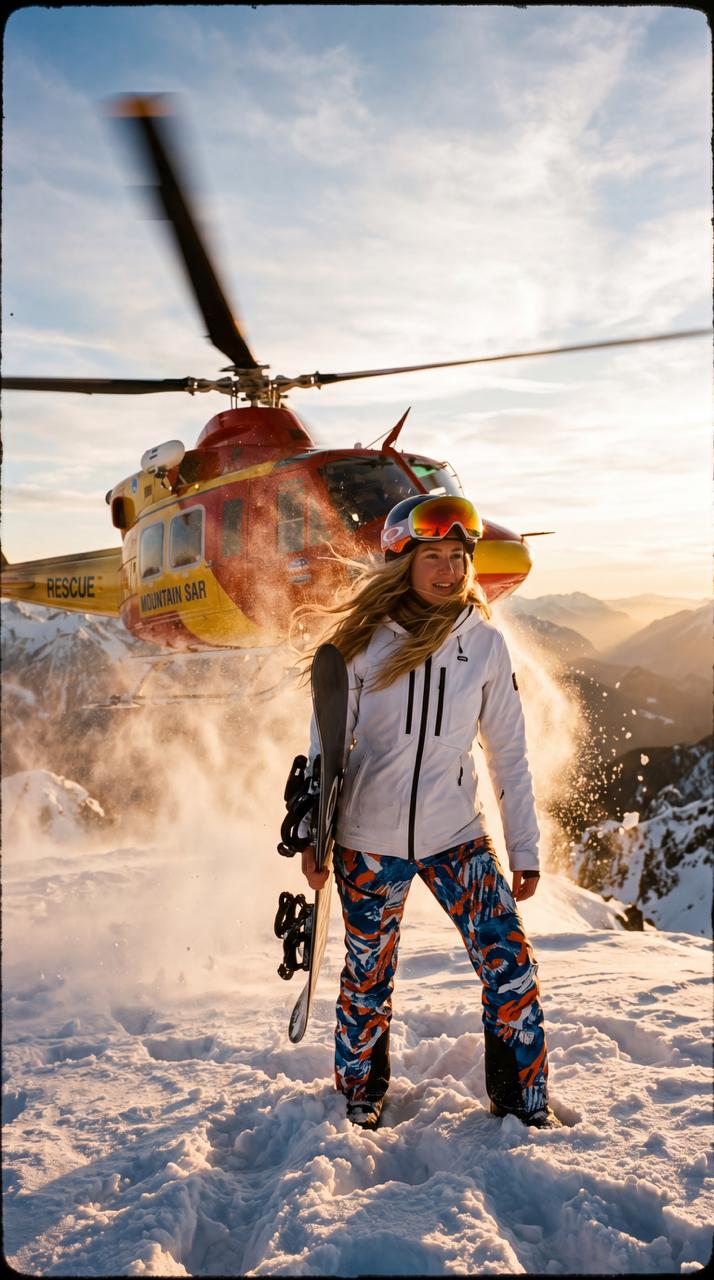
物理シミュレーションのストレステストとして、モデルを非常に複雑な映画のようなシーンにかけました。「スノーボーダーの後ろでヘリコプターがゴールデンアワーに離陸し、雪の粒子が舞い、髪がなびき、フォーカスが合う」というものです。これにより、風、雪、布地、カメラの揺れ、被写界深度の移行がテストされます。
このプロンプトは、バージョン間の大きなギャップを明らかにする過酷なストレステストです。
Kling 2.6は、ヘリコプターのダウンウォッシュをリアルな雪の粒子物理、説得力のある髪の動き、滑らかで自然なタイミングのヘリコプターへの頭の向き、そして被写体からヘリコプターへの効果的な被写界深度シフトでレンダリングします。複数の同時物理システムを伴う複雑なシネマティックシーンにおいて、独自の地位を確立しています。
Kling 2.5は雪や風に対応していますが、ヘリコプターのような動きが硬く、フォーカス送りも不自然な点が見られます。
モーションと物理に関する重要な考察
- Kling 2.6: 優れた物理シミュレーションと自然な動き。
- Kling 2.5:複雑なインタラクションにおいては、能力は高いものの洗練さに欠ける。
- Kling 2.1: 複雑な要素を簡素化し、基本的なモーションに適しています。
- 非常にダイナミックでリアルなシーンには、Klingが断然優れています。
複雑な物理演算をシミュレートする能力は、Kling 2.6の主要な差別化要因です。
スピードと費用対効果
生成速度とコストの最適化
直感に反する洞察ですが、Kling 2.5は実際には2.1よりも費用対効果が高いです。快手は2.5の推論パイプラインを最適化し、クリップあたりのコストを抑えつつ、より高品質な出力が可能になりました。これにより、Kling 2.1はコスト削減の選択肢ではなく、純粋な速度を求めるニッチな用途に特化したものとなります。
Kling 2.6では、独自の機能として視聴覚コンテンツの同時生成が導入されました。このモデルは、一度の処理で映像、自然なナレーション、効果音、そして環境音を生成します。これにより、個別のオーディオトラック、リップシンク、またはポストプロダクションでの統合作業が不要になります。
この機能は、足音、風の音、カフェの環境音、登場人物のセリフなど、音がシーンに不可欠なあらゆるクリップにとって極めて重要です。Kling 2.6では、これらをMP4出力に直接組み込みます。
ただし、コンテンツが純粋に視覚的で、重ねられた音楽トラックとともにリールのようなプラットフォーム向けである場合、音声生成はスキップできます。そのような場合、Kling 2.5は視覚品質を損なうことなくコストを節約します。
音声生成とコストに関する考慮事項
- Kling 2.5は、2.1と比較して、より低コストで高品質な提供します。
- Kling 2.6は、統合されたサウンドスケープのための同時視聴覚生成を提供します。
- VideoAnyでは、Kling 2.6の音声生成機能がデフォルトで有効になっています。
- 純粋な視覚コンテンツの場合、Kling 2.5はより費用対効果が高い場合があります。
品質、速度、統合オーディオに関する特定のニーズに基づいて、最適なKlingバージョンをお選びください。
プロンプトのベストプラクティス
あらゆるKlingバージョンで効果的なプロンプトを作成する
プロンプトはどのように構成すべきですか?
常に被写体、次に動き、最後に環境の順で記述します。例えば、「女性がカメラの方に振り向き、優しく微笑む、自然な窓の光」は、「女性が振り向いている自然な窓の光の設定」よりも効果的です。Klingは最初の要素を優先します。
複数のカメラの動きを指定できますか?
クリップごとにカメラの意図は1つだけ指定するのが最適です。複数のカメラワーク(例:静止、スローオービット、ドリーイン、手持ちフォロー)を重ねると、すべてのKlingバージョンでドリフトや一貫性のない結果が生じる可能性があります。
シネマティックな映像を制作するには?
「24fps、シャッター速度1/48、マイルドな粒子感」といった技術仕様を組み込み、Klingをフィルムのような美学へと導きます。ソーシャルメディア向けの滑らかな出力には、これらの仕様を省略します。
ほとんどのユーザーにとって最適なKlingのバージョンはどれですか?
Kling 2.6は、その優れた品質、プロンプトへの忠実性、モーションの滑らかさ、独自の音声生成能力から、一般的に推奨されます。特定のコスト削減や迅速な反復が必要な場合にのみ、2.5または2.1をご検討ください。
Klingにはコンテンツフィルターがありますか?
はい、Klingは特定の動きや衣装を含むプロンプトを拒否する可能性のある安全フィルターを適用します。最大限のコンテンツの自由を得るには、VideoAnyのWanが制限のない代替手段を提供します。
プラットフォームデータと推奨事項
VideoAnyに関するプラットフォームデータが示すもの
当社のライブテンプレートライブラリデータは、Klingのバージョン採用に関する実用的な洞察を提供します。Kling 2.6は品質リーダーであるにもかかわらず、最も使用されているKlingテンプレートは依然として2.1で動作しています。これは主に「Kisses-10s」がプラットフォームの初期テンプレートであり、2.6が利用可能になる前にユーザーを獲得したためです。しかし、新しいテンプレートは排他的に2.6をデフォルトとしており、バージョンバランスは急速に変化しています。
VideoAnyの実際の利用状況に基づき、推奨事項を以下に示します。
キャンペーンやブランドのクリエイターにとって、Kling 2.6は、その品質と統合されたオーディオ機能により、独占的な選択肢となっています。
大量ソーシャルコンテンツの場合、Kling 2.5は2.1よりも30%安価で、最高の品質対コスト比を提供します。
VideoAnyの利用に基づく実践的な推奨事項
- キャンペーン/ブランドクリエイター向け: Kling 2.6 (品質 + オーディオ)
- 大量ソーシャルコンテンツ:Kling 2.5(費用対効果の高い品質)
- プロンプト実験: Kling 2.1 (最速、ドラフト作成に最も安価)
- 音声付きクリップ:Kling 2.6(音声付きバージョンのみ)
プロジェクトの特定の目標と制約に合致するKlingバージョンを選択してください。
結論
実践する準備はできましたか?
VideoAnyでKling 2.1、2.5、2.6の違いを並べて比較してみましょう。画質、プロンプトへの忠実度、モーション範囲における実際のビデオ比較をご覧ください。さらに、Kling 2.6の同時視聴覚生成機能もご紹介します。
- 単一ブラウザワークフローで生成・洗練
- バッチ間で出力品質を一貫して維持
- テスト実行から本番稼働まで対応可能