Overview
Kling 2.1, 2.5, 2.6 on VideoAny: A Comparative Guide
Kling is Kuaishou's AI video generation family, and on VideoAny, it's a primary engine for cinematic quality and, with 2.6, integrated audio-visual output. This guide offers a direct comparison of three key versions: Kling 2.1 (for rapid drafting), Kling 2.5 (balancing speed with identity retention), and Kling 2.6 (for top-tier quality and audio integration).
All video examples presented here were generated on VideoAny using identical prompts and source images across all three models. Any observed differences are solely due to the model's inherent capabilities.
For hero content or anything requiring integrated audio, Kling 2.6 is the recommended choice. If you need high-volume generation with consistent identity retention at a lower cost, Kling 2.5 is ideal. For quick iterations where final quality is less critical, Kling 2.1 serves as a fast drafting tool.
Use this as a practical playbook when you need repeatable outputs instead of one-off experiments.
Key takeaways from this guide
- Side-by-side video comparisons demonstrating model differences
- Recommendations for choosing the optimal Kling version for your project
- Insights into prompt engineering for consistent results across models
- Understanding the unique audio capabilities of Kling 2.6
This guide provides practical insights for leveraging Kling models on VideoAny.
Model Capabilities
Quality: Realism, Skin, and Lighting
We tested the models with a prompt designed to evaluate realism, skin texture, fabric detail, petal physics, and smooth camera movement: 'cinematic editorial scene — a woman in a luxurious cherry-blossom room, slowly extending a red apple toward camera.'
| Kling Version | Key Strengths | Observations | Verdict |
|---|---|---|---|
| Kling 2.6 | Richest textures, smoothest motion | Detailed fabric (fishnet, floral patterns), translucent petals, fluid apple extension, smooth dolly. | Clear pick for cinematic editorial content. |
| Kling 2.5 | Good camera movement, identity retention | Matches camera movement well, but slightly less detail in fine fabric and hair strands. | Strong contender for balanced quality and cost. |
| Kling 2.1 | Fast iteration, basic scene handling | Handles the scene, but stiffer petal physics and visible micro-jitter in camera dolly. | Suitable for early drafts where speed is paramount. |
| VideoAny workflow | Integrated toolchain | Less low-level parameter tuning | Creators shipping fast |
Kling 2.6 consistently delivers superior visual fidelity and motion fluidity.
Prompt Adherence
Multi-Step Action Sequences
To assess prompt adherence, we used a 4-step action chain: 'hand gesture, speaking, kiss.' This tests the model's ability to follow a playful sequence without collapsing actions.

Source visual 1 from kling-video-complete-guide guide
Kling 2.6
Nails the full sequence (peace sign → lower → speak → blow kiss) in correct order and with natural timing.
Why it excels
- Reliable execution of complex action chains
- Natural timing and transitions between steps
- Ideal for dynamic, multi-part narratives
- Good balance between speed and output quality
- Pricing model
- Premium quality, higher credit cost.
- Trade-offs
- May require more credits for longer clips.
- Best fit
- Reaction clips, Reels, and expressive gestures.
Source visual 2 from kling-video-complete-guide guide
Kling 2.5
Handles the initial peace sign and speech, but the blown kiss often appears weak or delayed.
Why it's good
- Manages simpler sequences effectively
- Good for less critical action chains
- Cost-effective for moderate complexity
- Can produce standout one-off results
- Pricing model
- Balanced credit cost.
- Trade-offs
- Struggles with the nuance of final actions.
- Best fit
- General content where perfect sequence isn't critical.

Source visual 3 from kling-video-complete-guide guide
Kling 2.1
Typically picks one action (e.g., the peace sign) and holds it, often dropping the rest of the sequence.
Why it's fast
- Quick generation for single-action prompts
- Useful for rapid prototyping of basic movements
- Lowest credit cost for simple outputs
- Easy to delegate across teams
- Pricing model
- Lowest credit cost.
- Trade-offs
- Not suitable for multi-step instructions.
- Best fit
- Fast iterations and single-action tests.
Hybrid production workflow
Start from templates for speed, then tune prompts for quality and consistency.
Why it works
- Combines speed with iterative control
- Improves consistency over time
- Scales across content formats
- Reduces wasted generation cycles
- Pricing model
- Moderate to high depending on volume.
- Trade-offs
- Needs clear internal process standards.
- Best fit
- Teams balancing quality and publication cadence.
Motion Range
Active Body Movement and Complex Physics
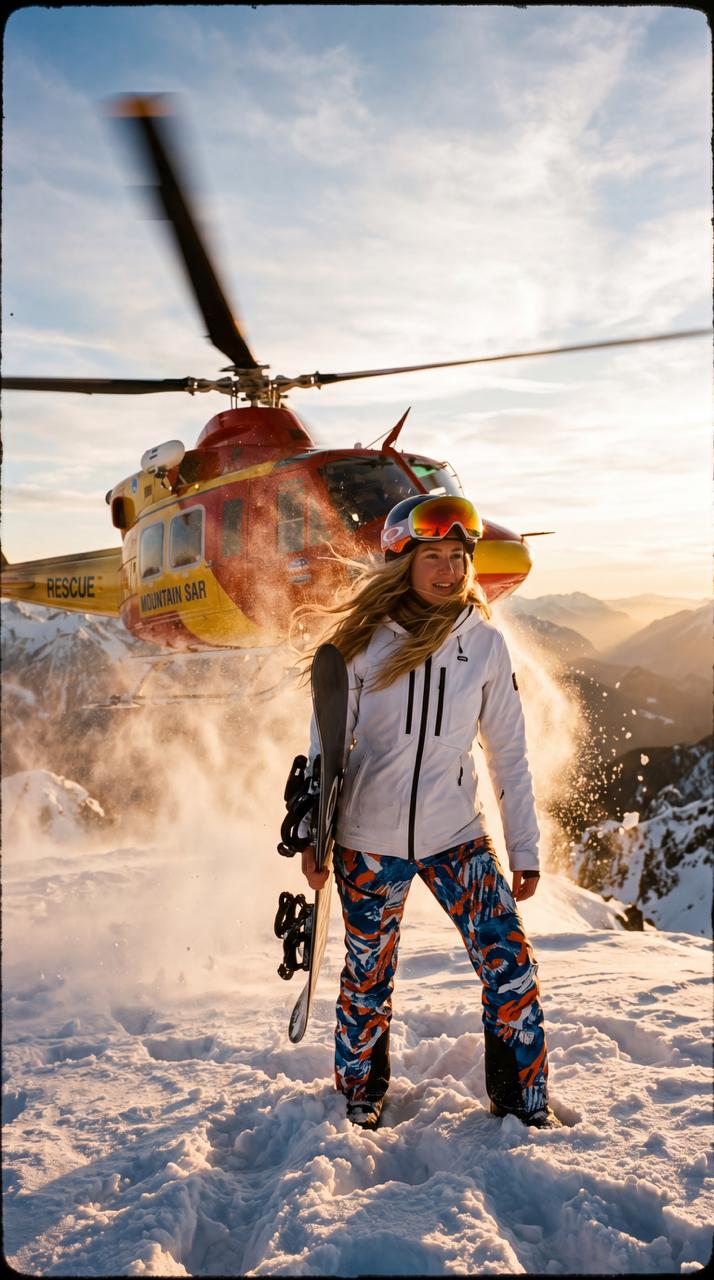
We subjected the models to a hyper-complex cinematic scene to stress-test physics simulation: 'helicopter takeoff behind a snowboarder at golden hour, with flying snow particles, hair blowing, focus pulls.' This tests wind, snow, fabric, camera shake, and depth-of-field transitions.
This prompt is a brutal stress test, revealing significant gaps between versions.
Kling 2.6 renders the helicopter downwash with realistic snow particle physics, convincing hair movement, smooth and naturally timed head-turns toward the helicopter, and effective depth-of-field shifts from subject to helicopter. It's in a league of its own for complex cinematic scenes with multiple simultaneous physics systems.
Kling 2.5 handles snow and wind but exhibits stiffer helicopter motion and less convincing focus pulls.
Key observations on motion and physics
- Kling 2.6: Superior physics simulation and natural motion.
- Kling 2.5: Competent but less refined in complex interactions.
- Kling 2.1: Simplifies complex elements, suitable for basic motion.
- For highly dynamic and realistic scenes, 2.6 is the clear winner.
The ability to simulate complex physics is a major differentiator for Kling 2.6.
Speed and Cost Efficiency
Optimizing for Generation Speed and Cost
A counterintuitive insight: Kling 2.5 is actually more cost-effective than 2.1. Kuaishou optimized the inference pipeline for 2.5, allowing it to deliver better quality at a lower cost per clip. This positions Kling 2.1 as a niche choice primarily for pure speed, rather than a cost-saving option.
Kling 2.6 introduced a unique feature: simultaneous audio-visual generation. In a single pass, the model produces visuals, natural voiceover, sound effects, and ambient atmosphere. This eliminates the need for separate audio tracks, lip-syncing, or post-production merging.
This feature is crucial for any clip where sound is integral to the scene, such as footsteps, wind, cafe background noise, or character dialogue. Kling 2.6 bakes these directly into the MP4 output.
However, if your content is purely visual and destined for platforms like Reels with an overlaid music track, you can skip the audio generation. In such cases, Kling 2.5 saves cost without compromising visual quality.
Audio generation and cost considerations
- Kling 2.5 offers better quality at a lower cost than 2.1.
- Kling 2.6 provides simultaneous audio-visual generation for integrated soundscapes.
- Audio generation is enabled by default for Kling 2.6 on VideoAny.
- For purely visual content, Kling 2.5 can be more cost-efficient.
Choose your Kling version based on your specific needs for quality, speed, and integrated audio.
Prompting Best Practices
Writing Effective Prompts Across All Kling Versions
How should I structure my prompts?
Always lead with the subject, then the motion, and finally the environment. For example, 'A woman turns toward camera with a soft smile, natural window light' is more effective than 'Natural window light setting with a a woman turning.' Kling prioritizes the initial elements.
Can I specify multiple camera movements?
It's best to specify only one camera intent per clip. Stacking multiple camera moves (e.g., static, slow orbit, dolly-in, handheld follow) can lead to drift and inconsistent results across all Kling versions.
How can I achieve a cinematic look?
Incorporate technical specifications like '24fps, shutter 1/48, mild grain' to guide Kling towards a film aesthetic. Omit these for smooth, social media-ready output.
Which Kling version is best for most users?
Kling 2.6 is generally recommended due to its superior quality, prompt adherence, motion fluidity, and unique audio generation. Only consider 2.5 or 2.1 for specific cost savings or faster iteration needs.
Does Kling have content filters?
Yes, Kling applies safety filters that may reject prompts involving certain motion or wardrobe. For maximum content freedom, WAN on VideoAny offers an unrestricted alternative.
Platform Data & Recommendations
What Our Platform Data Shows on VideoAny
Our live template library data provides real-world insights into Kling version adoption. Despite 2.6 being the quality leader, the most-used Kling template still runs on 2.1. This is largely because 'Kisses-10s' was an early template on the platform and gained users before 2.6 was available. However, new templates exclusively default to 2.6, and the version balance is rapidly shifting.
Based on practical usage patterns on VideoAny, here are our recommendations:
For campaign and brand creators, Kling 2.6 is the exclusive choice due to its quality and integrated audio.
For high-volume social content, Kling 2.5 offers the best cost-per-quality ratio, being 30% cheaper than 2.1.
Practical recommendations based on VideoAny usage
- Campaign / brand creators: Kling 2.6 (quality + audio)
- Social content at volume: Kling 2.5 (cost-effective quality)
- Prompt experimentation: Kling 2.1 (fastest, cheapest for drafts)
- Any clip with sound: Kling 2.6 (only version with audio)
Choose the Kling version that aligns with your project's specific goals and constraints.
Conclusion
Ready to put this into practice?
Explore the differences between Kling 2.1, 2.5, and 2.6 side-by-side on VideoAny. Witness real video comparisons across quality, prompt adherence, and motion range—plus Kling 2.6's simultaneous audio-visual generation capabilities.
- Generate and refine in one browser workflow
- Keep output quality consistent across batches
- Scale from test runs to production volume