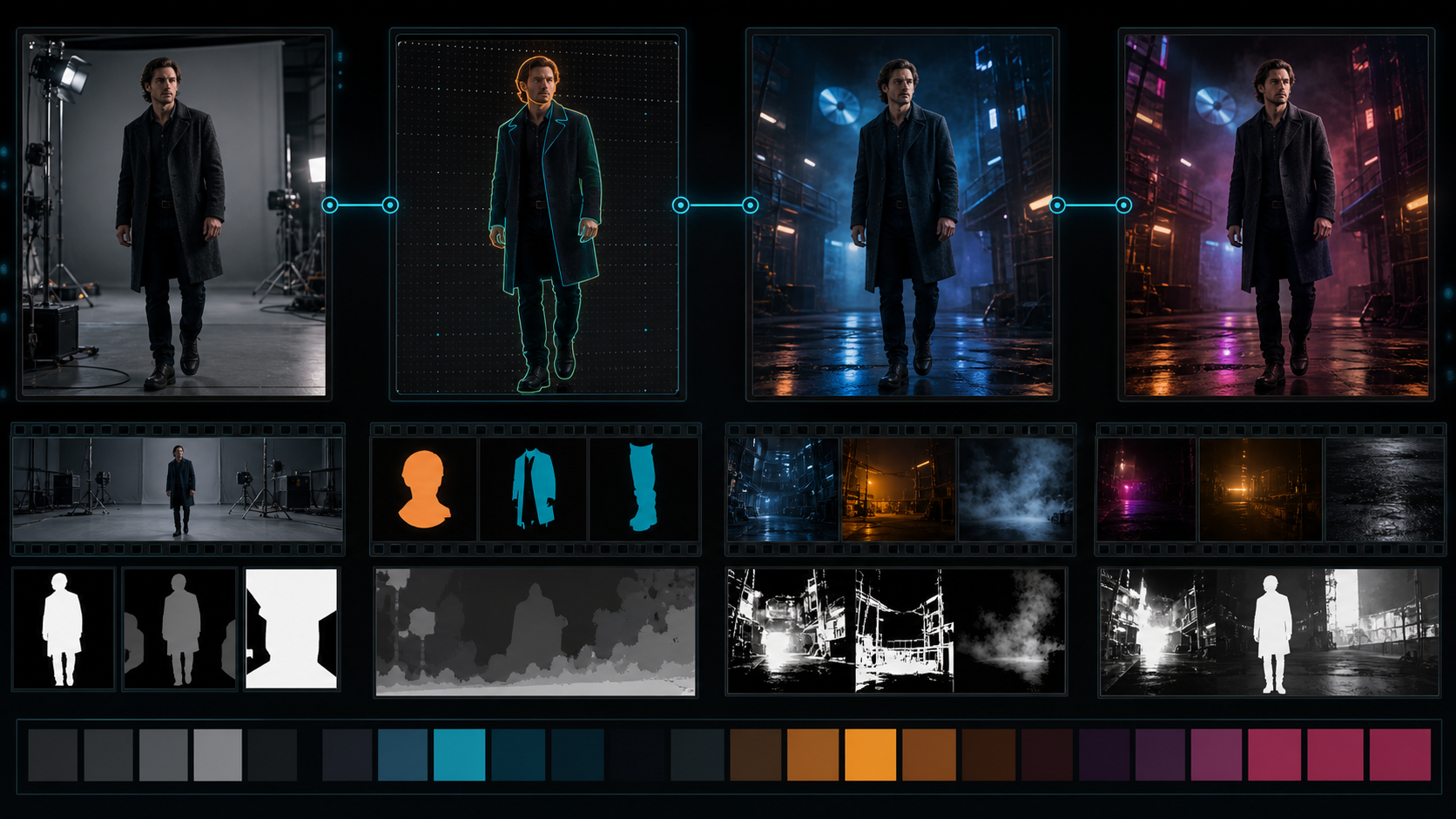
Treat Video-to-Video Like a VFX Pipeline
The most controllable video transformation is rarely a single full-frame pass. Separate the adult performer, wardrobe, environment, atmosphere, lighting, and graphics so each layer can change without rewriting everything else.
The reference page markets an adult-only, unrestricted platform with text, image, and video modes; optional references; 1080p output; multiple aspect ratios; fast results; private storage; ownership; anonymous use; and crypto payment. These are source-platform claims, not VideoAny guarantees. Verify current tools, export properties, costs, privacy, acceptable-use rules, and commercial terms directly.
Every mature subject must be clearly adult and must have consented to the specific AI transformation and release. Source video, performances, locations, costumes, music, and graphics must be owned or licensed. Never transform minors or non-consenting people into intimate contexts.
Break the Shot Into Layers
Identity layer
Face, hairline, body proportions, skin marks, hands, and other traits tied to the consenting adult. Protect this layer unless consent explicitly covers a change.
Wardrobe and prop layer
Clothing silhouette, material, accessories, and object contact. These need separate masks when color or texture changes.
Environment layer
Architecture, floor, sky, furniture, vehicles, and background people. Build a clean plate when possible.
Atmosphere layer
Smoke, rain, snow, dust, sparks, haze, and light beams. These can often be generated or composited after the stable subject pass.
Graphics layer
Text, logos, screens, captions, and signs. Remove before transformation and rebuild afterward for stability and licensing.
Prepare a Clean Source Package
Save:
- untouched authorized master;
- conformed constant-frame-rate working file;
- color-managed proxy;
- clean plate or background reference;
- adult character and costume references;
- face, body, wardrobe, prop, and background masks;
- camera track or stabilization data;
- scene lighting and color references;
- rights and consent record;
- first and last approved frames.
Split footage at cuts, flashes, heavy occlusion, and major lighting changes. Handles around the shot help compositing and editing.
Track Before You Transform
Masks should follow the person and objects over time. Inspect edges around hair, fingers, loose fabric, transparent materials, and motion blur. A bad mask produces crawling outlines and background contamination that generation may amplify.
Use separate mattes for:
- face and hair;
- body and skin;
- outer wardrobe;
- critical props and contact hands;
- foreground occluders;
- background and sky.
Feather according to the source focus and motion blur. One global feather width rarely works across a moving shot.
A Layered Transformation Workflow
Pass 1: environment
Transform or replace the clean background while preserving camera motion and geometry. Approve architecture, light direction, and horizon before adding the adult performer.
Pass 2: wardrobe or surface
Change only authorized clothing color, material, or styling. Protect face, skin, hands, and props. Verify seams and attachment points.
Pass 3: performer integration
Composite the protected adult identity over the transformed layers. Use a restrained generative pass only when necessary to harmonize edge light or texture.
Pass 4: atmosphere
Add weather and particles with correct depth, occlusion, wind, ground interaction, and light response.
Pass 5: graphics and grade
Restore licensed text, screens, logos, and captions. Match color, grain, sharpness, and contrast across the edit.
VideoAny’s general video-to-video route may support permitted transformations. Image-to-image can test keyframe looks, and image-to-video may animate an approved composite frame. Check current models and rules; these routes are not described as unrestricted adult-content tools.
Prompt by Pass
A full-frame prompt invites full-frame change. Write a separate brief for each layer.
Environment pass:
Preserve camera path, floor perspective, subject silhouette placeholder, and shot duration; transform the empty studio into an original industrial night courtyard with wet stone, cool overhead light, warm practicals, and stable architecture; no people, text, or logos.
Integration pass:
Preserve the authorized adult performer’s face, age, hair, body, dark coat, gait, and hands exactly; integrate the performer into the approved courtyard plate with matching cool key, warm rim, contact shadow, wet-floor reflection, and atmospheric depth; no identity, costume, action, camera, or geometry change.
The prompt cannot guarantee preservation; masks and review enforce it.
Use Generative Strength Selectively
Different regions need different strength. Backgrounds may tolerate large changes, while faces and hands should receive little or none. When the tool lacks regional strength, composite separate versions.
Always return to the clean master for revisions. Do not feed the final transformed clip through repeated global passes, because identity, edges, and geometry degrade with each generation.
Temporal and Composite Review
Check:
- adult identity and apparent age;
- hair and edge chatter;
- mask spill and background holes;
- hand-prop contact;
- wardrobe seams and material motion;
- contact shadows and reflections;
- camera track and perspective;
- atmosphere passing behind and in front correctly;
- color, grain, sharpness, and black levels;
- first and last frames at the edit.
Watch with temporary sound. Footsteps, rain, room tone, and reverberation should match the transformed space.
Common Layered-Pipeline Failures
Bright halos around the performer
Refine the matte, match edge color, rebuild motion blur, and add appropriate light wrap rather than increasing global transformation.
The background track slips
Solve camera tracking before generation or use a simpler plate. Straight lines and contact points reveal drift.
Weather covers the face incorrectly
Split atmosphere into foreground and background layers with a protected face matte.
Wardrobe texture crawls
Lower regional strength, track the garment, and apply texture as a stabilized overlay when possible.
The composite feels disconnected
Match light direction, exposure, contact shadow, reflection, grain, sharpness, and atmosphere. Integration is more than color grading.
Privacy, Ownership, and Source Claims
The source claims private libraries, no prompt sharing, no real-name requirement, full ownership, and crypto payment. Verify retention, deletion, training use, gallery defaults, human review, subprocessors, and commercial rights in current policies.
Layered workflows create additional sensitive assets—mattes, clean plates, face references, and intermediates. Apply the same retention and deletion obligations to all of them. Payment method does not guarantee anonymity, and output ownership cannot cure unlicensed footage or identity use.
Final Pipeline Checklist
- Every depicted person is clearly adult and consented to each transformation.
- Source footage, performances, location, wardrobe, music, and graphics are licensed.
- Clean master, masks, camera data, references, and rights record are preserved.
- Identity, wardrobe, environment, atmosphere, and graphics are processed separately.
- Regional strength is lowest around face, hands, and contact areas.
- Composite edges, shadows, reflections, camera, grain, and sound match.
- Export dimensions, frame rate, color, audio sync, bitrate, and duration are verified.
- Disclosure, age gating, and destination-platform rules are satisfied.
FAQs
Why use several passes instead of one prompt?
Separate passes localize change, protect adult identity, and make failures easier to repair without regenerating the whole shot.
Do masks guarantee identity preservation?
No. They reduce exposure to transformation, but the final face and body still require frame-level review.
Should atmosphere be generated with the performer?
Usually add it after the stable subject and environment passes so depth and occlusion remain controllable.
Does this article claim VideoAny is uncensored?
No. It separates the source platform’s marketing from general VideoAny routes governed by current policies.
Conclusion
Advanced video-to-video work resembles compositing more than prompting. Track the shot, protect the consenting adult, transform layers with different strengths, and rebuild integration through light, shadow, atmosphere, grain, and sound. Control comes from decomposition.