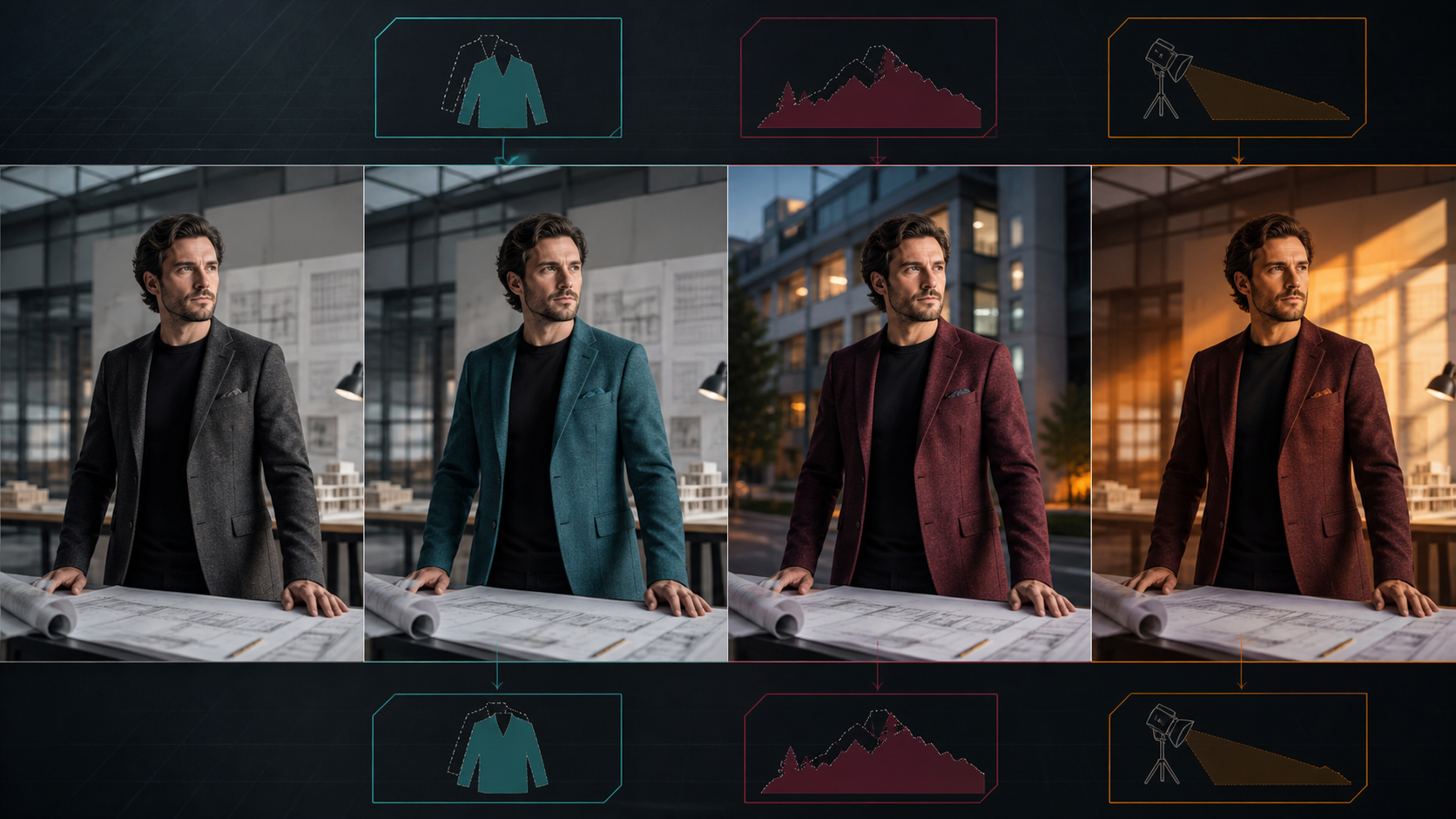
Image-to-Image Is Guided Editing
Image-to-image generation starts with an existing picture and uses it to constrain composition, identity, pose, or style. It is most controllable when one region changes and the rest of the authorized source remains protected.
The reference page markets an adult-only, unrestricted platform with text, image, and video modes; optional references; 1080p output; multiple aspect ratios; fast results; private storage; ownership; anonymous use; and crypto payment. These are source-platform claims, not VideoAny guarantees. Verify current edit controls, file output, costs, privacy, acceptable-use rules, and commercial terms directly.
For mature images, every person must be clearly adult and must have consented to AI editing and distribution. The image must be owned or licensed. Never edit minors or non-consenting real people into intimate contexts, and never assume a public photograph grants permission.
Write an Edit Contract
Separate what must stay from what may change.
Preserve
- adult identity and apparent age;
- face, hair, body proportions, hands, and pose;
- camera angle, crop, and perspective;
- protected clothing and accessories;
- critical props and contact;
- geometry, where the environment is retained;
- source attribution and rights record.
Change
- one garment color or material;
- background environment;
- time of day or lighting direction;
- selected object;
- original descriptive style;
- crop or layout for a defined output.
If several regions need different edits, use separate passes and return to the clean authorized master each time.
Control Transformation Strength
Low strength preserves more source structure; high strength permits larger changes but can rewrite identity, hands, pose, and composition. Generate low, medium, and high tests on a safe representative image.
Choose the lowest strength that completes the requested edit. Do not judge only by attractiveness. Compare face, adult age, hands, garment seams, prop shape, camera, and background lines with the source.
Repeatedly editing an edited output accumulates drift. Save versions and branch from the master.
Use Regional Masks
Masks define where the model may work.
- Keep the mask slightly inside hard boundaries when possible.
- Feather according to focus and edge softness.
- Protect face, eyes, mouth, hands, and identity marks.
- Split hair from background when either changes.
- Use separate masks for clothing, props, sky, and architecture.
- Review semitransparent edges, reflections, shadows, and motion blur.
A garment recolor should not touch skin or hair. A background replacement should include an integration zone for edge light and contact shadow, but not expose the entire person to transformation.
A Source-Inspired Workflow
The source page describes selecting a mode, describing the scene, adding a reference, choosing output settings, then downloading or remixing. Apply it to editing.
- Clear rights and consent. Confirm adult status, image owner, performer permission, intended mature context, and distribution.
- Prepare the source. Use the highest-quality file, correct rotation and color profile, and remove unrelated people or private information.
- Choose one edit. Define preserve and change lists.
- Paint a precise mask. Protect identity and critical contact.
- Test strength. Compare controlled variants without changing other settings.
- Inspect at full resolution. Review anatomy, edges, reflections, shadows, and invented details.
- Branch from the master. Create additional edits as new versions.
- Finish in post. Restore licensed text, match color, and export with correct metadata.
VideoAny’s general image-to-image route may support permitted edits. Text-to-image can explore a new original concept before any real-person reference is involved. Check current models and rules; these links do not imply an unrestricted adult-content service.
Prompt Structure for a Local Edit
Wardrobe color:
Preserve the authorized adult architect’s face, age, hair, body, pose, hands, black shirt, camera, office, blueprints, and lighting exactly; change only the masked blazer from charcoal gray to deep teal wool while preserving fabric weave, seams, lapels, pockets, buttons, folds, shadows, and edge contact; no body, skin, background, text, or logo changes.
Background replacement:
Preserve the same authorized adult identity, pose, hands, blazer, desk, blueprints, crop, and perspective; replace only the masked background with an original modern courtyard at blue hour, matching the existing eye-level camera, depth of field, cool ambience, warm window practicals, edge light, and contact shadows; no new people, text, or logos.
The text and mask should agree. If the mask covers more than the prompt intends, the model may alter it.
Match Light and Perspective
Background replacement fails when the new environment uses a different horizon, lens, depth of field, or light direction. Match:
- eye level and vanishing points;
- apparent focal length;
- subject scale;
- key-light side and softness;
- color temperature and exposure;
- contact shadows and reflections;
- atmospheric depth and grain.
Integration often requires a controlled edge-light or shadow pass after the main edit.
Common Image-to-Image Failures
The face changes during a wardrobe edit
Protect face and hair with the mask, lower strength, and remove appearance language that conflicts with the source.
Hands merge with clothing or props
Create a dedicated hand and contact mask or composite the original authorized hands back when appropriate.
Fabric looks painted on
Describe material thickness, weave, seams, folds, and shadow response. Keep body shape and garment construction stable.
Background edges glow
Refine the matte, match edge color and depth of field, and add subtle light wrap rather than broad blur.
The output looks good but no longer matches consent
Reject it. Consent applies to context and transformation, not merely to a recognizable face.
Privacy, Ownership, and Source Claims
The source claims private libraries, no prompt sharing, no real-name requirement, full ownership, and crypto payment. Verify retention, deletion, training use, gallery defaults, human review, subprocessors, and commercial rights in current policies.
Images can reveal identity, location, health, or private surroundings. Upload only what is needed, remove bystanders and metadata, and delete files according to consent. Payment method does not automatically eliminate logs, and output ownership cannot cure missing image or likeness rights.
Final Checklist
- Every depicted person is clearly adult and consented to the specific edit.
- Source image and distribution rights are documented.
- Preserve and change lists are explicit.
- Mask is precise and protects identity-sensitive areas.
- Lowest effective transformation strength is used.
- Face, age, hands, body, clothing, contact, perspective, light, and edges pass review.
- Every version branches from the authorized master and is labeled.
- Disclosure, age gating, and destination-platform rules are satisfied.
FAQs
Is higher strength better for major edits?
It allows larger changes but raises identity and composition drift. Use masking and multiple controlled passes before increasing strength globally.
Can I edit a public social-media photo?
Not without the necessary photographer, subject, and intended-use permission. Public access is not consent.
Should I make several edits in one prompt?
Usually not. Edit one region or variable at a time so the result is easier to compare and repair.
Does this article claim VideoAny is uncensored?
No. It separates the source platform’s marketing from general VideoAny image routes governed by current policies.
Conclusion
Image-to-image control comes from boundaries. Define what stays, mask what changes, use the lowest effective strength, and compare every result with the authorized adult source. A precise local edit is safer and more reproducible than an unrestricted full-frame rewrite.