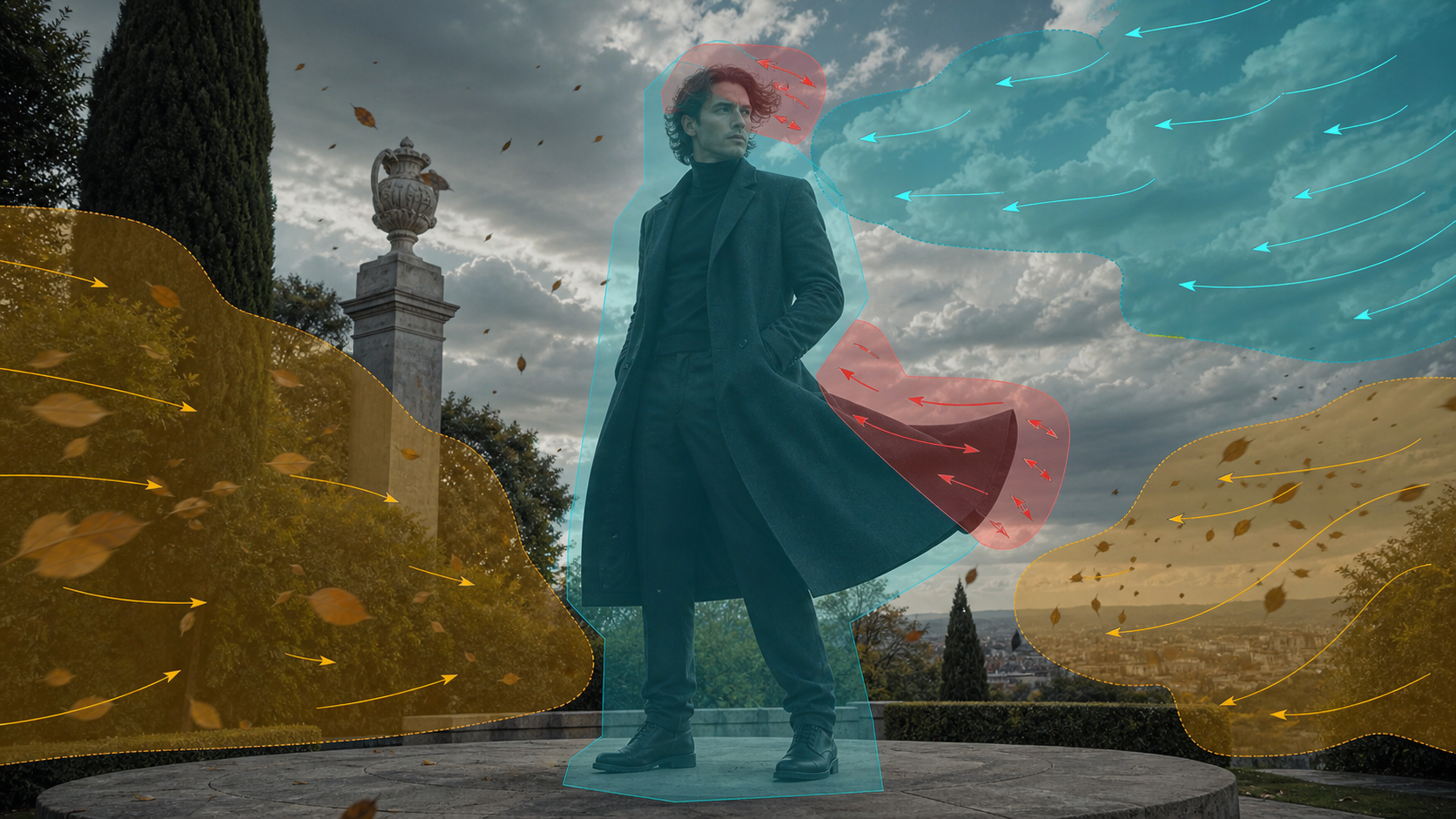
A Motion Brush Is a Regional Direction Tool
A motion brush tells an image-to-video system where movement should occur and often which direction it should follow. It is useful when a still image needs controlled life—hair moving in wind, a coat settling, clouds drifting—without asking the entire frame to transform.
The reference page promotes an adult-only, unrestricted platform with text, image, and video modes; optional references; 1080p output; multiple aspect ratios; quick results; private storage; ownership; anonymous use; and crypto payment. These are source-platform claims, not VideoAny guarantees. Verify current motion-brush controls, export files, prices, privacy, acceptable-use rules, and commercial terms directly.
For mature images, every depicted person must be clearly adult and consenting, and the source still must be owned or licensed for animation. Never animate minors or non-consenting real people, and never use a regional mask to alter intimate areas without explicit authorization.
Separate the Frame Into Motion Zones
Identify zones before painting:
- protected identity: face, eyes, mouth, body proportions, tattoos, and other consent-sensitive details;
- primary motion: the story action, such as a coat hem or one hand;
- secondary motion: hair, fabric, leaves, steam, or reflections;
- background motion: clouds, distant traffic, water, or light;
- static structure: architecture, furniture, horizon, and rigid props.
The protected region is as important as the animated one. A mask should not spill into the adult face or body when only fabric needs movement.
Design Motion as a Vector Field
For each zone, define:
- direction;
- distance or strength;
- speed and acceleration;
- whether motion is linear, curved, rotating, pulsing, or turbulent;
- start and stop timing;
- interaction with neighboring zones;
- whether it should loop.
Wind, for example, should affect clouds, hair, coat, and leaves in related directions and phases. Identical motion everywhere looks mechanical, while contradictory arrows break physical logic.
Masking Principles
Paint inside the object
Keep the mask slightly inside boundaries to reduce background smearing. Feather the edge so motion blends naturally.
Protect overlaps
When hair crosses a face or a coat crosses a hand, isolate them carefully. Motion on one layer can pull pixels from the other.
Use separate passes
Animate the primary subject motion first, approve it, then add environment motion. Multiple masked regions in one pass make failures harder to diagnose.
Keep rigid objects rigid
Do not brush across columns, railings, cameras, or furniture unless their movement is intentional. Straight lines reveal warping immediately.
Reduce brush strength near identity
Face, mouth, eyes, and hands are especially sensitive to temporal distortion. Use a protected mask or a shorter duration.
A Source-Inspired Workflow
The source page describes choosing a mode, describing a scene, adding an optional reference, selecting output settings, then downloading or remixing. Apply that loop with regional control.
- Clear rights and consent. Confirm adult status, likeness permission, source ownership, intended mature context, and distribution.
- Prepare a clean still. Correct anatomy and remove generated text before motion. Do not expect animation to fix the image.
- Mark protected regions. Face, body, rigid set, and critical props should remain stable.
- Paint one motion zone. Begin with a coat hem, hair section, or environmental element.
- Set direction and intensity. Use the smallest movement that communicates the effect.
- Generate a short test. VideoAny’s general image-to-video route may support permitted motion from an authorized still; this article does not claim a dedicated unrestricted motion-brush feature.
- Review and layer. Approve identity and geometry, then add secondary zones in separate passes where practical.
- Finish in post. Stabilize, mask small defects, add licensed sound, and conform delivery settings.
If an authorized motion reference already exists, a permitted video-to-video workflow may be more appropriate than painting vectors. Check current VideoAny models and rules before upload.
Prompt and Brush Direction Together
Text should describe the same physics as the painted vectors:
Same original fictional adult performer in a charcoal long coat, standing on a stone terrace under overcast sky; camera locked; gentle wind travels from right to left; coat hem lifts and settles once, outer hair strands follow with lower intensity, loose leaves cross the foreground, clouds drift slowly in the same direction; preserve adult face, body, hands, coat seams, stone architecture, horizon, and exposure; no text or logos.
If the text says wind travels left while the brush arrows point right, the model receives conflicting directions.
Common Motion-Brush Failures
The face warps when hair moves
Shrink the hair mask, protect the face, feather edges, and reduce strength near the hairline.
The object stretches instead of translating
Use a smaller vector, shorten duration, and mask rigid internal areas. Complex objects may need a motion reference rather than a brush.
Background leaks through the subject
Refine the mask edge and generate from a cleaner separation. Composite the character and background as layers if necessary.
Motion has no weight
Add acceleration, settle, and delayed secondary motion. Fabric should not start and stop like a rigid card.
Every zone moves at once
Offset timing and intensity. Primary action should lead; hair, fabric, leaves, and atmosphere should follow according to their mass.
Review Frame by Frame
Check:
- adult identity and apparent age;
- face, mouth, eyes, hands, and body edges;
- mask boundary smearing;
- straight architecture and horizon;
- fabric attachment points;
- motion direction and acceleration;
- occlusion and contact;
- first and last frames;
- loop seam, if applicable.
Watch at normal speed as well. A technically clean motion can still feel distracting if it competes with the story focus.
Privacy, Ownership, and “No Restrictions”
The source claims private libraries, no prompt sharing, no real-name requirement, full ownership, and crypto payment. Verify retention, deletion, training use, gallery defaults, human review, subprocessors, and transformation rights in current policies.
“No restrictions” is not a substitute for consent, law, or platform rules. Payment method does not guarantee anonymity, and output ownership cannot cure an unlicensed image or likeness.
Final Checklist
- Every depicted person is clearly adult and consented to animation.
- Source image and distribution rights are documented.
- Protected, primary, secondary, background, and static zones are defined.
- Brush direction matches textual physics.
- One region is tested before multiple layers are combined.
- Face, hands, rigid objects, edges, and background geometry pass frame review.
- Export dimensions, frame rate, color, and audio are verified.
- Disclosure, age gating, and destination-platform rules are satisfied.
FAQs
Should I brush the whole subject?
Usually not. Animate only the region that needs motion and protect identity-sensitive or rigid areas.
How strong should the motion be?
Start low. Small controlled movement is easier to keep stable and can be increased after a successful test.
Can a motion brush create complex acting?
It is better for regional movement than detailed performance. Use a motion reference or shot-based generation for complex action.
Does this article claim VideoAny has an unrestricted motion brush?
No. It separates the source platform’s marketing from general VideoAny motion routes governed by current policies.
Conclusion
A motion brush is most powerful when used like a compositor’s mask and an animator’s vector field. Protect identity, isolate one region, align text with direction, and layer secondary motion after the primary pass. Precision creates natural movement; unrestricted painting usually creates drift.