Categories: AI Video Workflow, Creator Strategy, Production Process
Tags: videoany, ai creation studio, ai video workflow, content strategy, creator toolkit
Introduction
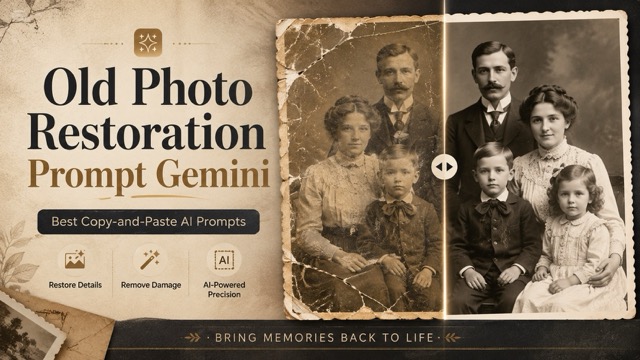
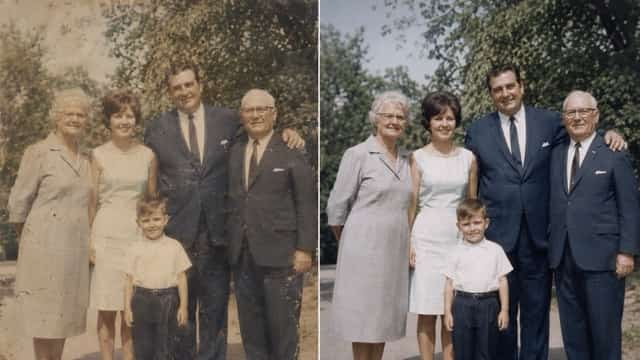
Bringing cherished old photographs back to life no longer requires extensive manual retouching. With the advent of advanced AI image models, restoring faded, damaged, or black-and-white pictures is more accessible than ever. A well-crafted old photo restoration prompt for AI tools like Gemini can effectively remove scratches, reduce blur, repair faded areas, improve facial clarity, colorize monochrome images, and enhance overall image quality. Crucially, these prompts allow for significant improvements while preserving the original person, clothing, background, and the authentic vintage feeling of the photograph.
What Is an Old Photo Restoration Prompt for AI Image Models?
An old photo restoration prompt is a specific written instruction provided to an AI image model, such as Gemini, guiding it on how to repair and enhance a historical photograph. These prompts act as a detailed blueprint, telling the AI precisely what imperfections to address and what original elements to maintain.
Why Prompt Quality Matters for Old Photo Restoration
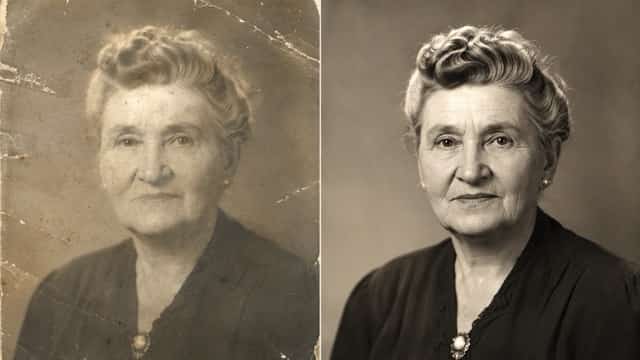
The quality of your prompt is paramount because old photo restoration differs significantly from general image enhancement. When restoring a treasured family photo, the goal is typically to make the image cleaner and clearer without altering the subject's appearance or the historical context. A poorly constructed prompt might lead the AI to "modernize" features, change facial expressions, or introduce elements that detract from the original's authenticity. High-quality prompts ensure the AI understands the delicate balance between repair and preservation.
How to Use These Old Photo Restoration Prompts
Using these prompts is a straightforward process:
- Upload Your Photo: Begin by uploading your old photograph to Gemini or your preferred AI image generation tool.
- Select the Right Prompt: Review the templates below and choose the one that most closely matches the type of photo you have and the restoration you desire.
- Copy and Paste: Copy the entire prompt text.
- Generate: Paste the prompt into the AI's prompt box and initiate the image generation process to receive your restored image.
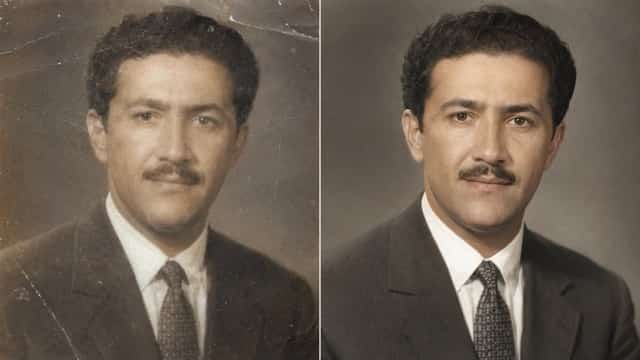
Best Old Photo Restoration Prompt Templates for AI Image Models
Here are a variety of prompt templates tailored for different types of old photos and restoration needs.
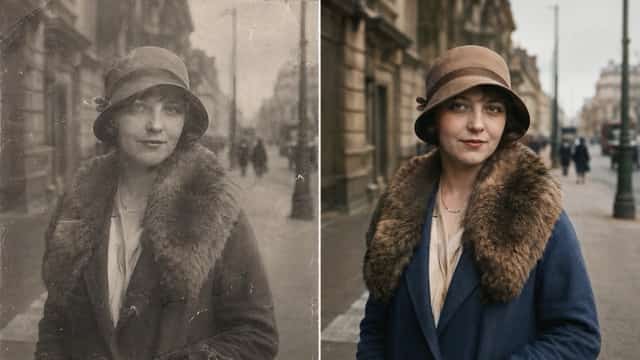
1. High-Fidelity Old Photo Restoration
Use this prompt for a clean, realistic, and balanced restoration that aims for high detail and clarity without over-processing.
2. Natural Family Photo Restoration
Ideal for old family portraits where emotional accuracy and preserving the original likeness are more important than dramatic editing.
3. Vintage Portrait Restoration
Specifically designed for single-person portraits, focusing on enhancing the subject while maintaining the vintage aesthetic.
4. Black-and-White Photo Colorization
This prompt is for restoring and adding natural, realistic color to old black-and-white images.
5. Severely Damaged Old Photo Repair
Employ this prompt for photos with significant damage such as cracks, tears, missing corners, heavy creasing, or severe discoloration.
6. Faded Sepia Photo Restoration
Tailored for antique sepia-toned photos, this prompt helps restore vibrancy and detail to images with brown or yellow hues.
7. Old Wedding Photo Restoration
Use this prompt for vintage wedding portraits and couple photos, focusing on preserving the romantic and historical essence.
8. Group Photo Restoration
Suitable for class photos, family groups, or historical group pictures, ensuring all individuals are naturally restored.
9. Baby & Childhood Photo Restoration
Perfect for baby photos, childhood portraits, and old school pictures, aiming for gentle enhancement that retains youthful innocence.
10. Print-Ready Restoration
Apply this prompt when you need a polished, high-quality result suitable for printing, framing, or professional sharing.
Specific Prompt Examples
Here are some ready-to-use prompts for common restoration scenarios:
Military Photograph Restoration:
Restore this old military photograph with respect and historical accuracy. Remove scratches, dust, stains, fading, blur, cracks, and noise. Preserve the person’s exact face, uniform, medals, posture, expression, and background details.Passport-Style Photo Restoration:
Restore this old passport-style photo naturally. Remove dust, scratches, stains, fading, blur, and discoloration while preserving the exact facial features, expression, hairstyle, clothing, and background.School Photo Restoration:
Restore this old school photo with natural detail. Remove scratches, dust, stains, fading, blur, and grain. Preserve the student’s original face, age, hairstyle, clothing, expression, pose, and background. Improve facial clarity, lighting, and overall quality gently.Couple Photo Restoration:
Restore this old couple photo in a warm and natural style. Remove scratches, dust, stains, fading, blur, cracks, and noise. Preserve both people’s exact faces, expressions, clothing, hairstyles, pose, and relationship feeling.
Old Photo Restoration Prompt Formula
A highly effective old photo restoration prompt generally follows a structured formula to guide the AI precisely:
- Action Verb: Start with a clear instruction like "Restore," "Repair," or "Enhance."
- Photo Type/Subject: Specify the type of photo (e.g., "old family portrait," "vintage wedding photo," "military photograph").
- Desired Style/Tone: Indicate the desired aesthetic (e.g., "naturally," "with historical accuracy," "in a warm style," "high-fidelity").
- Damage to Remove: List specific imperfections to be corrected (e.g., "Remove scratches, dust, stains, fading, blur, cracks, noise, discoloration, grain, tears, missing corners").
- Elements to Preserve: Crucially, detail what aspects of the original image must remain unchanged (e.g., "Preserve the person’s exact face, facial features, expression, uniform, medals, posture, hairstyle, clothing, background details, vintage feeling, original person, age, pose, relationship feeling").
- Optional Enhancements: Add gentle improvements if desired (e.g., "Improve facial clarity, lighting, and overall quality gently," "Colorize").
Best Prompt Words for Old Photo Restoration
Leveraging specific keywords can significantly improve your restoration results:
- For Restoration Quality & Style:
natural,realistic,balanced,high-fidelity,polished,respect,historical accuracy,gently,authentic,vintage feeling. - For Damage Types:
scratches,dust,stains,fading,blur,cracks,noise,discoloration,grain,tears,missing corners,creases. - For Preservation Details:
exact face,facial features,expression,uniform,medals,posture,hairstyle,clothing,background details,original person,age,pose,relationship feeling. - For Enhancements:
improve facial clarity,lighting,overall quality,colorize,sharpen details.
Common Mistakes to Avoid in AI Photo Restoration
To achieve optimal results and avoid common pitfalls, consider these points:
- Over-editing or Identity Alteration: The most significant mistake is failing to specify the preservation of original features. Without clear instructions, AI might "beautify" or alter faces, changing the identity of the person in the photo. Always include phrases like "Preserve the exact face" or "do not alter facial features."
- Losing the Vintage Aesthetic: Over-processing can strip an old photo of its historical charm. Avoid prompts that push for a hyper-modern, pristine look if a natural, vintage feel is desired.
- Lack of Specificity for Damage: Vague instructions like "fix damage" are less effective than listing specific issues like "remove scratches, dust, and tears." The more precise you are, the better the AI can target repairs.
- Ignoring Context: For historical photos (e.g., military, wedding), neglecting to mention "historical accuracy" or "respect" can lead to inappropriate alterations.
Best Use Cases for Old Photo Restoration Prompts
AI-powered old photo restoration is incredibly versatile, offering solutions for a wide range of needs:
- Family History: Restoring faded or damaged family portraits, baby photos, and childhood pictures to preserve memories across generations.
- Archival & Historical Preservation: Repairing old military photographs, historical group pictures, and vintage documents for museums, archives, or personal collections.
- Special Occasions: Breathing new life into old wedding photos or other significant event pictures.
- Artistic & Decorative Purposes: Enhancing vintage portraits or sepia-toned photos for display, framing, or sharing.
- Digitalization Projects: Preparing old physical photos for digital archiving, sharing on social media, or inclusion in digital scrapbooks.
- Professional Use: For photographers or genealogists who need to restore client images or research materials.
Conclusion
Leveraging specific, well-structured prompts with AI image models like Gemini offers an unparalleled opportunity to restore and preserve precious old photographs. By understanding the nuances of prompt crafting—from specifying damage to emphasizing preservation of identity and vintage feel—you can achieve natural, high-quality results. This approach transforms the complex task of photo restoration into an accessible, efficient process, ensuring that cherished memories can be enjoyed for years to come.
Next Step
Explore VideoAny workflow templates: https://videoany.io