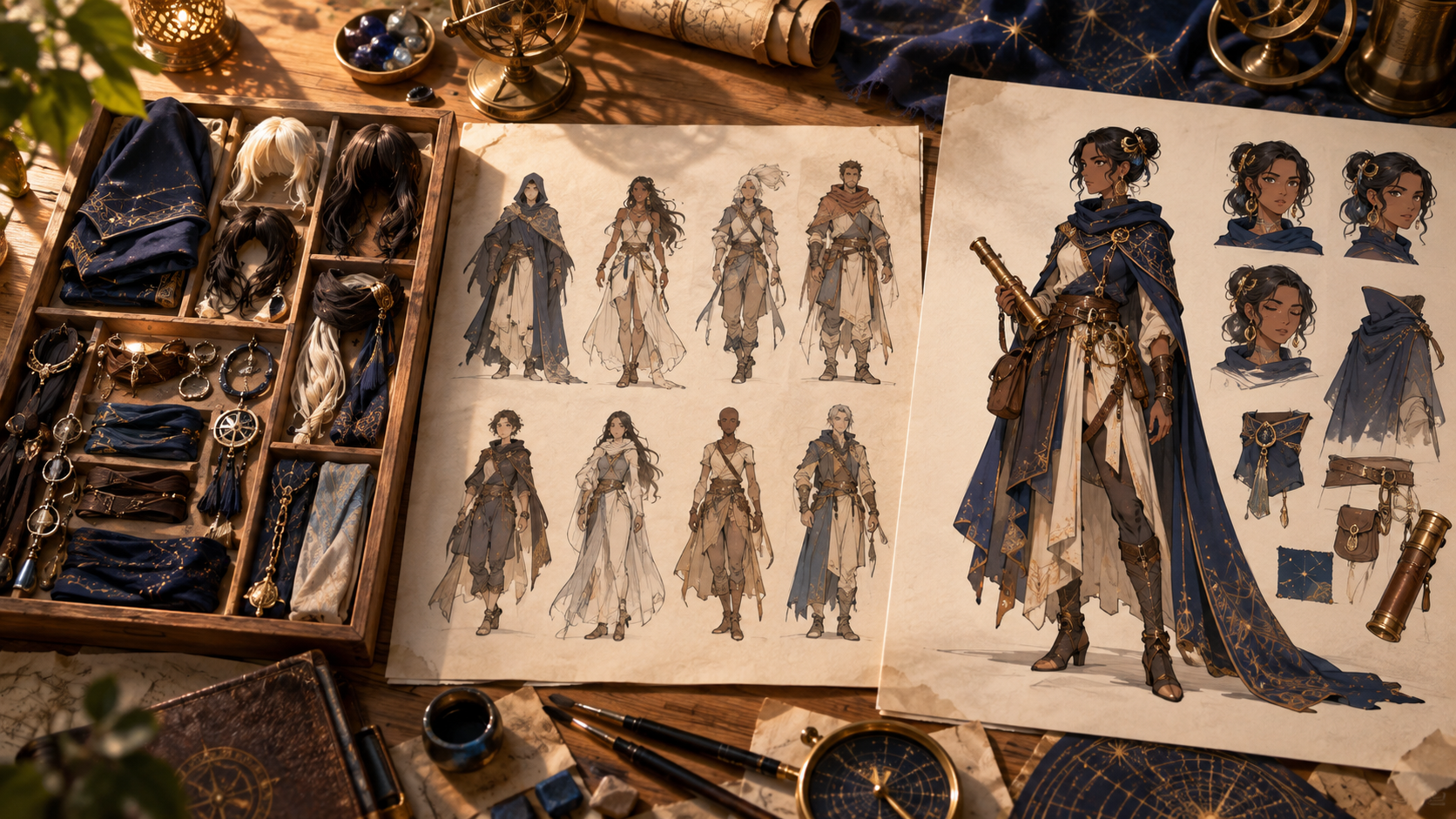
When you set out to design an original character, you'll encounter three overlapping labels: OC maker, OC generator, and character creator. These terms describe different workflows rather than standardized feature sets, and choosing the right approach depends on whether you need a quick visual sketch, a surprising creative prompt, or precise control over every trait. Understanding the distinctions helps you match the tool to your current stage—whether you're exploring ideas for a roleplay avatar, refining a comic protagonist, or building a reusable reference package for animation.
This guide explains what each workflow emphasizes, presents a compact comparison table, walks through a five-stage design process using a single hypothetical character, and addresses common questions about originality, rights, and production continuity.
What Each Workflow Emphasizes
OC maker platforms offer approachable starting points through guided prompts, preset templates, or step-by-step questionnaires. You might select a fantasy archetype, answer questions about personality traits, or choose from curated color palettes and accessory sets. The result is often a single illustration or avatar suitable for early roleplay profiles, social-media headers, or visual brainstorming. These tools prioritize accessibility and speed over granular control, making them ideal when you want to see a character concept quickly without wrestling with technical parameters.
OC generator workflows emphasize automated or randomized proposals. You provide a seed phrase, select a few high-level attributes—species, mood, era—and the system returns a combination of appearance details and sometimes written backstory snippets. Because the output mixes unexpected elements, generators can break creative blocks by suggesting directions you hadn't considered. However, every randomized detail still needs a coherent narrative reason; a character wearing mismatched armor and carrying a flute becomes interesting only when you explain why those choices reflect their history or goals.
Character creator tools prioritize direct revision and control. This category ranges from game-style sliders for body proportions and facial features to modular clothing libraries, reference-image uploads, and layer-based editing canvases. The key advantage is deliberate choice: you decide whether the scar crosses the left eyebrow or the right, whether the coat is navy or charcoal, and whether the expression reads as skeptical or merely tired. Evaluate these tools by asking whether your intentional decisions survive successive edits, not by counting the number of decorative options in a dropdown menu.
A production character system extends any of the above by organizing an approved identity alongside records for multiple angles, expressions, outfits, voice notes, props, relationships, and emotional states. This organized reference makes visual drift diagnosable across a comic series or animation project, though it does not guarantee that every generation will match the approved design perfectly. Some platforms offer integrated world-building or canvas-editing features, but those capabilities are publisher-specific and not universal.
Quick Comparison Table
| Workflow | Primary Strength | Typical Output | Best For |
|---|---|---|---|
| OC Maker | Guided presets, approachable prompts | Single avatar or concept illustration | Early exploration, roleplay profiles |
| OC Generator | Randomized combinations, creative seeds | Appearance details plus optional lore | Breaking creative blocks, discovering directions |
| Character Creator | Direct control, modular revision | Editable design with deliberate traits | Refining specific features, intentional choices |
| Production System | Organized multi-angle reference library | Approved identity plus expression/outfit records | Comics, animation, repeated storytelling shots |
These categories overlap: a maker might include randomization toggles, a generator might let you lock certain traits, and a creator might offer preset starting templates. Treat the labels as workflow descriptions rather than rigid product specifications.
A Five-Stage Design Process
To illustrate how these workflows can work together, consider designing Mira, a fictional astronomer who catalogs forgotten constellations in a nomadic society. Each stage addresses a different design question.
Stage One: Define a Role That Causes Story Decisions
Before touching any tool, ask what narrative problem Mira solves. She preserves knowledge that her community considers obsolete, creating tension between tradition and curiosity. This role immediately suggests design choices: she carries portable star charts, wears practical travel clothing that doubles as a makeshift observatory cloak, and her accessories include a worn brass sextant passed down through three generations. An OC maker with archetype prompts—"scholar," "wanderer," "keeper of secrets"—can produce an initial sketch that captures this duality.
Stage Two: Select a Recognizable Silhouette and Meaningful Object
Mira's silhouette should read clearly at a distance. A long, asymmetrical coat with one short sleeve (for instrument handling) and a distinctive hood shape differentiate her from other travelers. Her color palette pairs deep indigo (night sky) with warm amber accents (candlelight used for chart annotation). The brass sextant becomes her signature object, large enough to recognize in a thumbnail but practical enough to justify in the story. At this stage, an OC generator can propose unexpected combinations—perhaps suggesting that the hood incorporates a collapsible brim that doubles as a sunshade—that you then evaluate for narrative fit.
Stage Three: Add a Behavioral Contradiction
Mira is methodical in her observations but impulsive in her travel decisions, often departing a village the morning after discovering a new constellation rather than waiting for safer weather. This contradiction shows in her design: meticulous chart organization (rolled scrolls in labeled cases) versus hastily patched travel gear (mismatched buttons, a frayed hem she hasn't repaired). A character creator with layered editing lets you place the patch on the left knee rather than the right, ensuring the detail supports the story beat where she kneels on rough ground to sketch a star pattern.
Stage Four: Explore Families, Then Refine Variables
Generate multiple variations of Mira's coat length, hood shape, and accessory placement before committing to one. Does a knee-length coat or an ankle-length cloak better convey "nomadic scholar"? Does the sextant hang from a belt hook or a shoulder strap? Explore these families broadly, then refine one variable at a time: adjust the indigo shade without changing the coat length, test three amber accent placements without altering the hood. This iterative process benefits from a character creator that saves incremental versions, letting you compare side-by-side rather than relying on memory.
Stage Five: Build a Production Reference Package
Once you approve Mira's core design, create a neutral reference sheet showing her from front, three-quarter, and profile angles. Add expression studies (focused concentration, surprised delight, weary frustration) and scale references (standing beside a standard doorway, sitting at a camp table). Document her two primary outfits—travel gear and a slightly cleaner version for village lectures—and note that her sextant must appear in every scene where she's working. If you plan to animate Mira, include movement notes (she walks with a slight limp from an old injury, favoring her right leg) and voice direction (calm, measured cadence with occasional bursts of enthusiasm). This organized package makes drift diagnosable but does not guarantee that every generated image will match perfectly; you'll still need to review and sometimes manually correct outputs.
Decision Mapping Across Stages
Use a maker when you need a first visualization and want guided prompts to translate a vague idea into a concrete image. Switch to a generator when you're stuck on a design decision and need randomized proposals to suggest new directions. Move to a creator when you know what you want and need precise control to refine specific details. Finally, organize an approved design into a production system when you're ready to produce a series of comics, animations, or narrative illustrations that require visual consistency.
These stages often happen sequentially, but you can also loop back: generate a new outfit variation for an established character, or use a maker to explore a secondary character who will eventually join your production library.
Rights, Provenance, and Originality
Creating an original character means more than swapping decorative traits on a template. Originality resides in the authored combination of visual qualities, narrative choices, personality contradictions, and story role. Avoid requesting replicas of copyrighted characters or real individuals without permission. When you use reference images—whether from stock libraries, your own photography, or other artists' work—document the provenance and ensure you have the right to use that material as input.
If you borrow a character concept from a friend's campaign, a published setting, or collaborative fiction, clarify ownership and usage terms before producing commercial work. Real likenesses and voice recordings require consent from the individual or their rightsholder. Output licenses vary by provider; some platforms grant broad commercial rights, others restrict usage, and many require you to verify that your inputs were legally sourced. Check the actual terms and permissions for every tool and asset you use, rather than assuming a universal rule or relying on informal "fan-use" exceptions that may not hold in your jurisdiction.
Frequently Asked Questions
What's the difference between an avatar and an OC?
An avatar typically represents you—the user—in a game, forum, or virtual space, reflecting your preferences or online persona. An original character has an independent fictional identity, backstory, and motivations separate from your own. You might use an OC maker to design an avatar, but the character becomes "original" when you develop their narrative role and relationships within a story world.
Can I use these tools for commercial projects?
Commercial viability depends on three factors: the provider's terms of service, the rights status of any input material (reference images, style samples, character concepts), and applicable copyright or trademark rules in your jurisdiction. Some platforms explicitly permit commercial use of outputs, others restrict it, and many require you to warrant that your inputs were legally sourced. Review the specific terms for each tool and consult a legal professional if you plan to monetize the work.
Is changing a character's hair color or outfit enough to make them original?
Build characters from the ground up with intentional design choices: unique visual silhouettes, distinct motivations, specific relationships, and memorable behaviors. Document your creative decisions and reference sources as you develop them. Surface-level changes to existing designs rarely create meaningful distinction. If you're adapting someone else's character concept, review their terms of use and seek permission when appropriate. Focus on what makes your character genuinely different in appearance, personality, and story role rather than simply changing accessories or colors.
How do I prepare a character for animation or video?
Animation and video production require more than a single approved illustration. Build a reference package that includes multiple angles (front, three-quarter, profile, back), a range of expressions (neutral, happy, angry, surprised, sad), scale references (standing, sitting, interacting with objects), outfit variations, and movement notes (gait, posture, signature gestures). If the character will speak, include voice direction or sample recordings. Organize these assets so that anyone on your production team can generate or draw a consistent character across scenes. Keep in mind that automated generation tools may still produce variations; manual review and correction are part of the workflow.
Experiment With Text-Driven Image Workflows
If you're ready to explore prompt-based character visualization, text-to-image workflows let you describe Mira's indigo coat, brass sextant, and nomadic silhouette in natural language and receive an initial concept illustration. This approach works well for Stage One exploration, though you'll still need to refine details, build multi-angle references, and organize a production package manually as your project matures.
Choosing between an OC maker, generator, and creator isn't about finding the "best" tool—it's about matching the workflow to your current stage. Start with guided prompts when you need a visual anchor, use randomization to discover unexpected directions, apply direct control when you know what you want, and organize approved assets into a production system when consistency across a series matters. Every stage contributes to a character who feels both visually distinctive and narratively coherent.