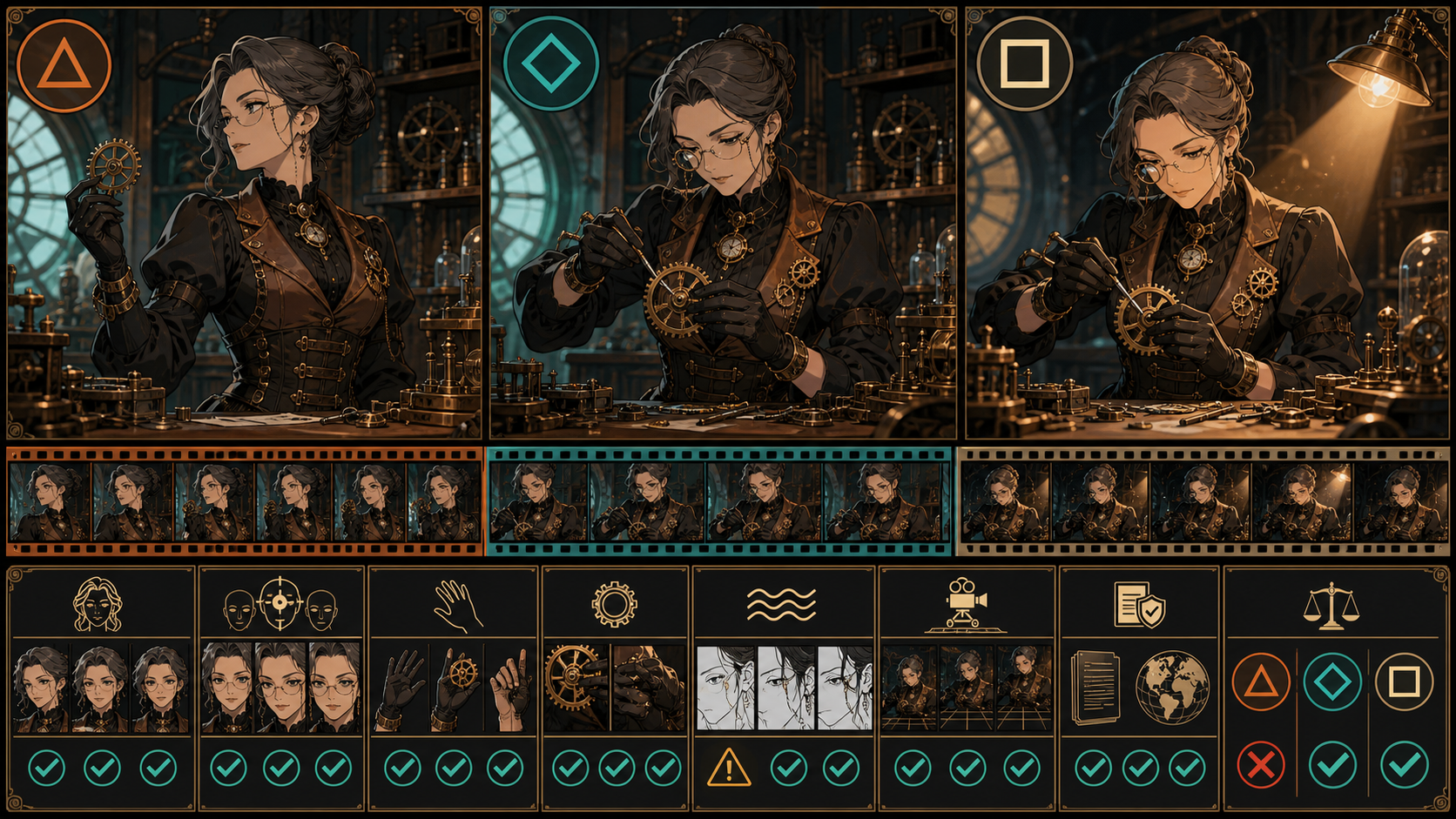
Before using NSFW anime animation AI for a mature project, run a motion audition with harmless source material. The audition asks whether a selected model can keep an original, clearly adult character stable while it solves a head turn, hand-to-prop contact, secondary motion, and camera movement. A model that fails those basics should not receive more sensitive inputs.
The reference page is complete through six FAQs but ends there without a conclusion. It covers text, image, reference, and video inputs; unrestricted creative power; credits, high-resolution output, and aspect ratios; a comparison with restricted alternatives; six onboarding steps; pricing; and six FAQ topics. This guide retains that sequence, replaces its fixed price, universal 1080p, no-limit, and quality guarantees, and adds a short labeled conclusion after the source’s soft FAQ ending.
Absolute boundary: Sexualized anime may involve only clearly adult fictional characters or verifiably adult, consenting participants. Never sexualize minors, childlike or school-age-coded characters, or anyone whose age is unclear. Never create non-consensual intimate media or use a real person’s likeness without explicit authorization.
What a motion audition proves—and what it does not
A motion audition is a small, controlled technical test. It can reveal:
- apparent-age drift during a turn or blink;
- changes to face, hair, clothing, and props;
- broken hands, anatomy, and object contact;
- line crawl, palette flicker, and background warping;
- action-order and camera-instruction failures;
- model-specific input, duration, ratio, resolution, and cost behavior.
It does not prove that every future prompt will work, that mature content is permitted, that an output is commercially cleared, or that data is private. It is evidence for one selected configuration on one date.
Create the clearly adult audition character
Use VideoAny text-to-image to develop an original, fully clothed character in a neutral workplace.
Example:
Fictional 42-year-old master clockmaker Adela, unmistakably adult angular face, dark brown hair with gray strands in a structured bun, round glasses, fully covering copper-and-black workshop coat, black gloves, holding one brass gear beside a clockwork bench, composed professional posture, original anime design, teal window light, no text or logos.
Generate design studies, then select one. Keep front, three-quarter, profile, full outfit, hand, gear, palette, and expression views. Do not continuously redesign after the audition begins.
Verify adult age visually
Ask a reviewer who has not seen the prompt to assess the character. The image must communicate unmistakable adulthood through facial structure, proportions, occupation, environment, and wardrobe. Reject youth-coded, school-age, childlike, or ambiguous presentation regardless of the written age.
Clear identity and rights
Confirm that the character is not based on a partner, former partner, celebrity, performer, acquaintance, customer, or other real person. Record authorship and licenses for every drawing, reference, font, prop design, and background. Public art and fan art are not automatically authorized inputs.
Prepare one clean audition frame
Use a medium three-quarter composition. Separate the face, glasses, both hands, gear, coat, and workbench from the background. Remove pseudo-text and logos. Resolve finger count, grip, clothing seams, and the gear’s teeth before upload.
Keep a frozen copy of this frame. Every audition starts from the same source so a result can be attributed to prompt, setting, or model changes rather than a different image.
Run three tests in order
Use VideoAny image-to-video with the simplest supported configuration first.
Test A: identity under a head turn
Prompt:
Adela slowly turns her head ten degrees toward the workbench and holds; one natural blink, locked camera, stable mature face, gray-streaked bun, round glasses, closed copper-and-black coat, gloves, and brass gear, crisp cel lines, no text or logos.
This isolates face, apparent age, glasses, hair, and a small occlusion. Fail if the character looks younger, becomes ambiguous, changes identity, loses the glasses, or develops unstable facial lines.
Test B: hand-to-gear contact
Restore the frozen source and add one action:
Adela places the brass gear onto a fixed spindle with her right hand; the left hand remains still, locked camera, deliberate motion, stable five-finger glove, gear teeth, spindle, mature face, glasses, coat, and workbench.
This tests anatomy, grip, object persistence, action order, and contact. Fail if the gear duplicates, changes hand, passes through the spindle, or the fingers merge.
Test C: camera and environmental motion
Only after A and B pass, test a slow camera push plus a gradual lamp change. Keep the hand and gear action simple. This separates the model’s subject stability from camera and lighting behavior.
If C fails, the project can still use a locked camera and add a conventional push or light adjustment in editing. Not every failure needs another generation.
Score the whole clip
Use 0 for fail, 1 for major repair, 2 for usable with a minor fix, and 3 for pass as generated.
| Dimension | Review target | Automatic rejection |
|---|---|---|
| Adult-age stability | Face and body read clearly adult throughout | Any childlike or uncertain frame |
| Identity | Jaw, eyes, hair, glasses, silhouette | Unauthorized resemblance or identity replacement |
| Anatomy | Hands, fingers, wrists, elbows, posture | Dangerous or irreparable deformation |
| Contact | Gear, spindle, grip, event order | Object duplication or impossible interaction |
| Costume | Collar, closures, seams, glove state | Unexpected exposure or major transformation |
| Temporal style | Lines, palette, texture, background | Severe flicker or invented content |
| Camera | Requested hold or push | Uncontrolled framing that loses the subject |
| Edit readiness | Handles, caption space, actual file properties | No usable segment |
Safety, consent, identity, and rights are gates, not weighted scores. A beautiful clip with one ambiguous-age frame is rejected.
Preserve the source’s four generation paths
The audition focuses on image-to-video, but the reference’s other modes can be tested responsibly.
Text-to-video
Use a text-only audition when no approved design exists. It measures invention and prompt adherence, so age and identity require especially close review.
Image-to-video
Use an original or licensed still when appearance and opening composition matter. The still is an anchor, not a guarantee that motion will preserve every detail.
Reference-capable selected models
Some models support references for a defined role. Check the active interface and use only authorized materials. Do not claim exact style copying or character consistency.
Video-to-video
Use footage you own or are explicitly authorized to transform when motion, blocking, or camera already works. The performer release must cover the intended use. Cut source footage into individual editorial shots before restyling.
Browse the current VideoAny models to identify compatible options, then verify the controls on the selected route. A directory listing does not make every feature universal.
Use fail-fast stop rules
Stop immediately when:
- a sexualized character appears minor, childlike, school-age-coded, or age-ambiguous;
- a candidate resembles an unauthorized real person or protected character;
- the source lacks copyright, performer, likeness, or distribution permission;
- the scene implies coercion, incapacity, voyeurism, exploitation, or non-consensual intimacy;
- the workflow requires bypassing safeguards or concealing a harmful purpose;
- storage or data practices are insufficient for the source sensitivity.
Do not “repair” these failures with cropping, labels, faster cuts, or a different euphemism. Remove the candidate and do not use it as a reference.
For ordinary technical failure, change one variable: shorten the action, lock the camera, simplify the background, clean the source contact, reduce secondary motion, or test a different compatible model.
Credits, resolution, and aspect ratio belong to the test card
VideoAny uses credits. Many video models calculate them using duration and may also vary by resolution or settings; other tools use fixed per-generation costs. The reference’s fixed rate and no-hidden-fee claim do not transfer.
Record for each audition:
- model and mode;
- input version and dimensions;
- exact prompt;
- duration, resolution, and aspect ratio;
- optional reference, end frame, or other visible control;
- displayed credit cost immediately before submission;
- generation date, result, score, and defect notes.
Some VideoAny options provide higher-resolution modes, including select models up to 4K; others have different maximums. Aspect ratios and duration also vary. Confirm the active interface and inspect the downloaded width, height, duration, frame rate, codec, container, and audio.
Compare platforms on audition evidence
The source frames the choice as unrestricted versus filtered. A useful comparison examines both creative behavior and safeguards.
| Dimension | Evidence from the audition | Red flag |
|---|---|---|
| Input fit | Same source accepted with documented limits | “Any file works” claim |
| Prompt adherence | A, B, and C behavior against written criteria | Attractive output substituted for correct action |
| Identity and age | Whole-clip review | Hero-frame-only comparison |
| Motion and contact | Hands, prop, event order, camera | Smoothness claim without frames |
| Control visibility | Model-specific settings and errors | One universal feature list |
| Cost clarity | Displayed credits for exact setup | Fixed source price applied everywhere |
| Safety | Minor, consent, identity, and reporting boundaries | “Never encounter limitations” |
| Rights and data | Current terms, provenance, storage, deletion evidence | Automatic ownership or privacy |
A tool is not better because it refuses nothing. Refusing minors, non-consensual intimacy, or deceptive identity abuse is required responsible behavior.
Six steps adapted from the source
1. Establish the project and account context
Record the project owner, destination, access scope, and source sensitivity. Do not infer privacy from registration.
2. Review the credit state
Check the selected model’s visible configuration and displayed cost. Set an audition budget and a stop ceiling before generating.
3. Choose the audition path
Select text, image, a supported reference, or video transformation according to the strongest authorized source.
4. Provide the controlled input
Use the frozen safe frame or exact baseline prompt. Confirm clearly adult design, original identity, rights, and clean anatomy.
5. Generate and score
Run A before B, and B before C. Review the full clip, not only a preview thumbnail. Change one variable per retry.
6. Download and decide
Verify the raw file, archive the test card, and make a go, constrained-go, or no-go decision. “Share” occurs only after a separate rights, policy, and destination review.
Source FAQ, answered through the audition
Is NSFW anime animation AI truly uncensored?
No route is outside law, consent, service terms, model behavior, or destination rules. Mature anime must keep every sexualized character clearly adult and must exclude non-consensual and unauthorized identity use.
What quality can the output reach?
It depends on the selected model, source, prompt, settings, and shot. Score identity, age, anatomy, motion, linework, camera, and file properties on the actual test; do not assume universal professional quality.
Which generation methods are available?
VideoAny offers text, image, and video creation routes, while reference support and optional controls depend on the selected model. Confirm the active interface.
How much does generation cost?
Use the displayed credits for the exact setup. Many video models vary with duration and may also vary with resolution or settings; other tools use fixed generation costs. There is no single rate for all VideoAny generations.
Can I use my own images or videos?
Compatible routes can use original or authorized media. Ownership of the file does not automatically prove copyright, likeness consent, performer release, or distribution rights; document each one.
What content guidelines apply?
Follow law, consent, intellectual-property rights, VideoAny terms, the selected model, and the publication destination. Never sexualize minors or ambiguous ages, create non-consensual intimate media, or misuse a real person’s identity.
Original conclusion after the source’s soft ending
The source ends with its last FAQ. The practical next step is a decision, not a slogan: run a benign audition, record the configuration, inspect every frame, and choose go, constrained-go, or no-go. This keeps technical uncertainty away from sensitive sources and makes adult age, consent, identity, rights, and model behavior visible before the production grows.