The Gutter Is Your Edit
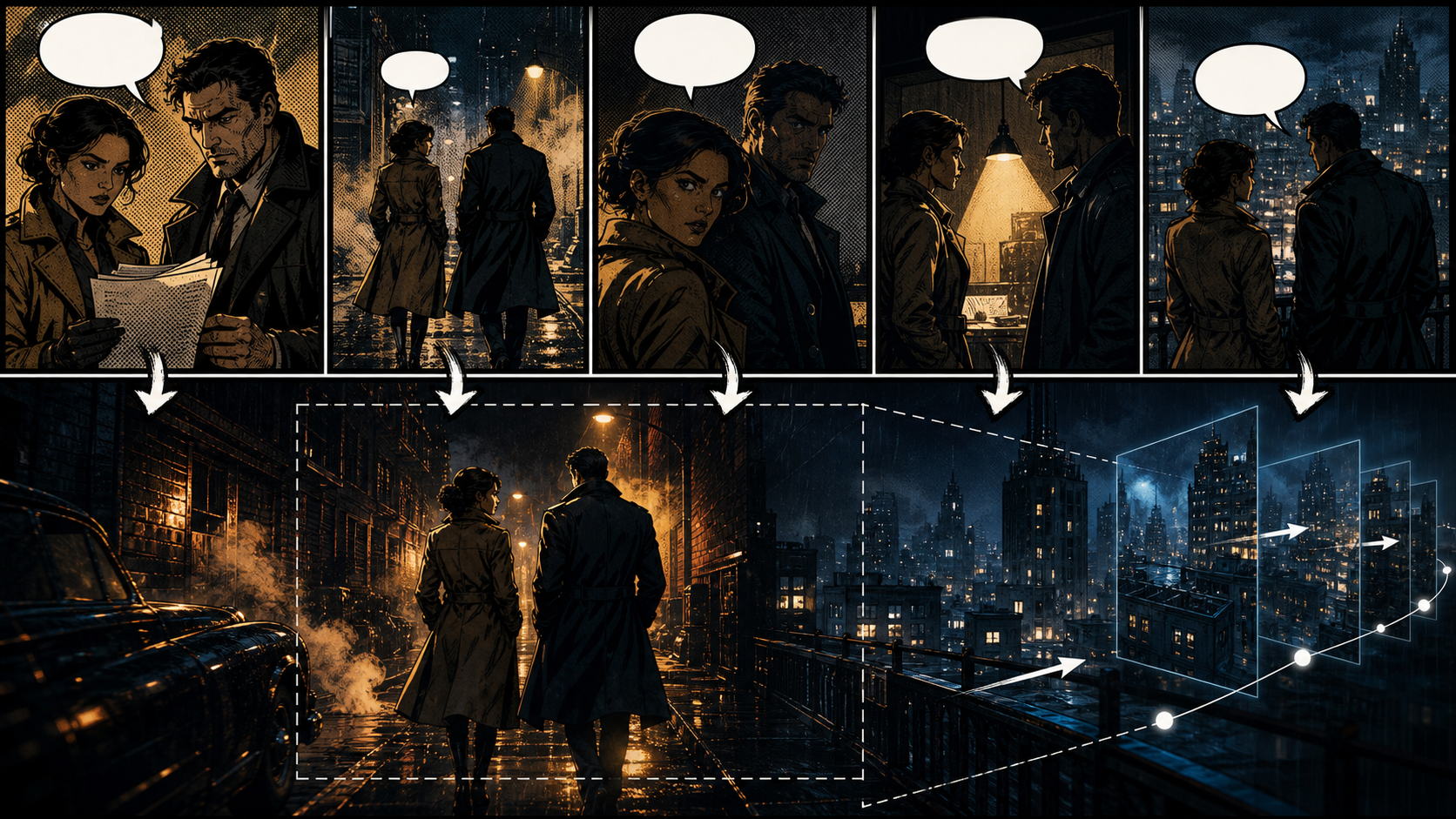
In comics, the blank space between panels asks the reader to imagine elapsed time and missing action. In video, that same transition must become a cut, camera move, sound cue, or animated bridge. A comic-to-video generator is therefore not just moving a picture; it is interpreting what happens in the gutter.
The reference page presents an adult-only, unrestricted tool that combines text, image, and video generation. It advertises optional identity references, 1080p downloads, several aspect ratios, rapid rendering, private storage, ownership, anonymous use, crypto payment, and few content filters. These are claims from the source platform, not VideoAny guarantees. Check the actual product, file exports, pricing, terms, and privacy controls at the time of use.
Only adapt comics you own or are licensed to animate. Mature characters must be clearly adults, and real-person likenesses require explicit consent for generation and distribution. Never create intimate media involving minors or non-consenting people.
Read the Page as a Sequence
Before touching a generator, annotate the comic page:
- Panel purpose: establish, reveal, react, act, or resolve.
- Elapsed time: instantaneous, seconds, or a larger jump.
- Screen direction: where each character enters, looks, and exits.
- Visual priority: the face, prop, action, or environment the viewer must notice.
- Dialogue duration: how long spoken lines will take.
- Layer depth: foreground, characters, props, and background.
- Continuity anchors: adult character face, costume, handedness, light, and location.
This analysis becomes a shot list. A five-panel page does not always need five clips; two reaction panels might form one shot, while a dense action panel may require three beats.
Clear Rights Before Animation
Possessing a comic file does not grant adaptation rights. Confirm rights for the drawings, characters, script, lettering, logos, and any referenced franchise. If the comic depicts a real adult, consent should cover AI processing, animation, the intended audience, and distribution channels.
Remove speech balloons, captions, and sound-effect lettering from generation inputs when possible. Save them as separate design references. Generated video rarely keeps text stable, and the original font license may not cover motion use.
Turn Panels Into a Motion Plan
Establishing panels
Use a layered parallax move, light shift, or environmental loop. Keep character motion minimal so the world remains readable.
Dialogue panels
Hold the composition, add a subtle breath or eyeline change, and record timing from the final voice track. Do not generate lip movement until dialogue is locked.
Action panels
Define the pose immediately before and after the illustrated impact. Split complex choreography into setup, contact, and recovery shots instead of asking for one long transformation.
Reaction panels
A blink, head turn, focus pull, or slow push-in may be enough. Over-animation weakens the clarity of the drawn expression.
Transitions across gutters
Choose a cut for a decisive time jump, a match cut for visual continuity, or a generated bridge only when the missing action matters. Sound can carry a transition without showing every movement.
A Source-Inspired Workflow
The source proposes selecting a mode, describing the scene, adding an optional reference, setting format and duration, then downloading or remixing. Apply that structure with production controls.
- Prepare the panel. Clean printing artifacts, remove text, and separate layers when possible.
- Create a continuity card. Record the original adult character’s face, costume, palette, and left-right details.
- Choose one motion. Define a character action or a camera move, not both during the first test.
- Generate short. Use an authorized image-to-video workflow for supported material and review the entire clip frame by frame.
- Repair the still when needed. Correct an owned image with image-to-image before asking motion to hide a drawing problem.
- Use transformation carefully. A low-strength video-to-video pass may restore style on supported content, but repeated passes can soften ink and alter faces.
- Finish in an editor. Rebuild balloons and captions, add licensed voices and sound, and match adjacent shots.
These VideoAny links point to general routes subject to current rules; they do not represent a dedicated unrestricted adult-comic generator.
Prompt Structure for Comic Motion
The source recommends subject, wardrobe, environment, lighting, camera, and motion. Add the comic’s ink and continuity anchors:
Two original fictional adult investigators in dark trench coats, preserve both faces, costume details, and height difference, bold noir comic ink with restrained amber halftone, rain-slick city alley at night, fixed medium-wide camera, they walk three steps away from camera while coats react naturally to wind, stable architecture and screen direction, no dialogue balloons, no text, no logos.
Write separate prompts for separate shots. If two characters must interact, stabilize each one alone first and keep their contact simple.
Aspect Ratio Is a Story Decision
The source advertises 9:16, 1:1, and 16:9, but a comic panel’s composition may not survive automatic cropping. A vertical export can separate characters who share a wide panel; a widescreen version can remove a tall building or full-body pose.
Create a re-layout for each delivery format. Protect faces, hands, props, and caption-safe zones. Verify whether a service generates each ratio natively or crops from a base frame, and inspect the downloaded pixel dimensions rather than relying on “Full HD” labels.
Dialogue, Lip Sync, and Sound
Lock the script and voice track before lip animation. Time each line, preserve pauses, and avoid a single unbroken close-up for long dialogue. Use reaction shots and environmental cutaways to reduce visual strain.
Rebuild speech balloons only if the final format intentionally retains comic grammar. Otherwise use subtitles or spoken dialogue, with licensed voices and accessible captions. Add sound effects to support transitions the reader once imagined in the gutter.
Common Failures
- Faces drift: reuse the same approved reference, shorten shots, and keep light direction stable.
- Halftone crawls: reduce motion or apply texture after generation.
- Hands merge with props: isolate the interaction in a short insert shot.
- Backgrounds bend: separate the background and use 2.5D parallax instead of full generation.
- Dialogue text mutates: remove it from inputs and rebuild it in post.
- Characters cross sides: preserve screen direction and check for mirrored frames.
- The edit feels slow: cut to the story beat rather than animating every panel for equal time.
Privacy and Ownership Questions
The source says its library is private, prompts are not shared, a real name is unnecessary, users own outputs, and crypto checkout improves anonymity. Verify retention, deletion, training use, gallery defaults, subprocessors, human review, and commercial rights in the current policy. A payment method alone does not remove account or network data.
Output rights also cannot cure missing rights in an underlying comic, character, logo, voice, or music track.
Final Checklist
- Comic and character adaptation rights are documented.
- All mature characters are clearly adults; likeness consent is explicit.
- Each gutter has become a deliberate cut, sound cue, or motion bridge.
- Character face, costume, handedness, and screen direction remain consistent.
- Text is stable because it was rebuilt after generation.
- Aspect-ratio versions are recomposed, not blindly cropped.
- Voices, music, fonts, logos, and sound effects are licensed.
- Age gating, disclosure, and destination-platform rules are satisfied.
FAQs
Should every panel become an animated shot?
No. Combine panels that express one beat and split dense action panels when needed. Story timing matters more than one-to-one conversion.
Can I animate a fan comic?
Only if you hold the relevant rights. Original drawing effort does not automatically authorize use of protected characters or settings.
Why remove speech balloons?
AI video tends to deform lettering over time. Rebuilding text afterward preserves readability, translation, and accessibility.
Is this a claim that VideoAny is uncensored?
No. The source platform’s claims are identified as such. VideoAny routes are general tools governed by current product policies.
Conclusion
The strongest comic-to-video adaptations respect what happens inside the panels and what readers imagine between them. Clear the rights, translate gutters into edits, limit motion, preserve character continuity, and rebuild typography and sound with intention. That is how sequential art becomes coherent video instead of a moving page.