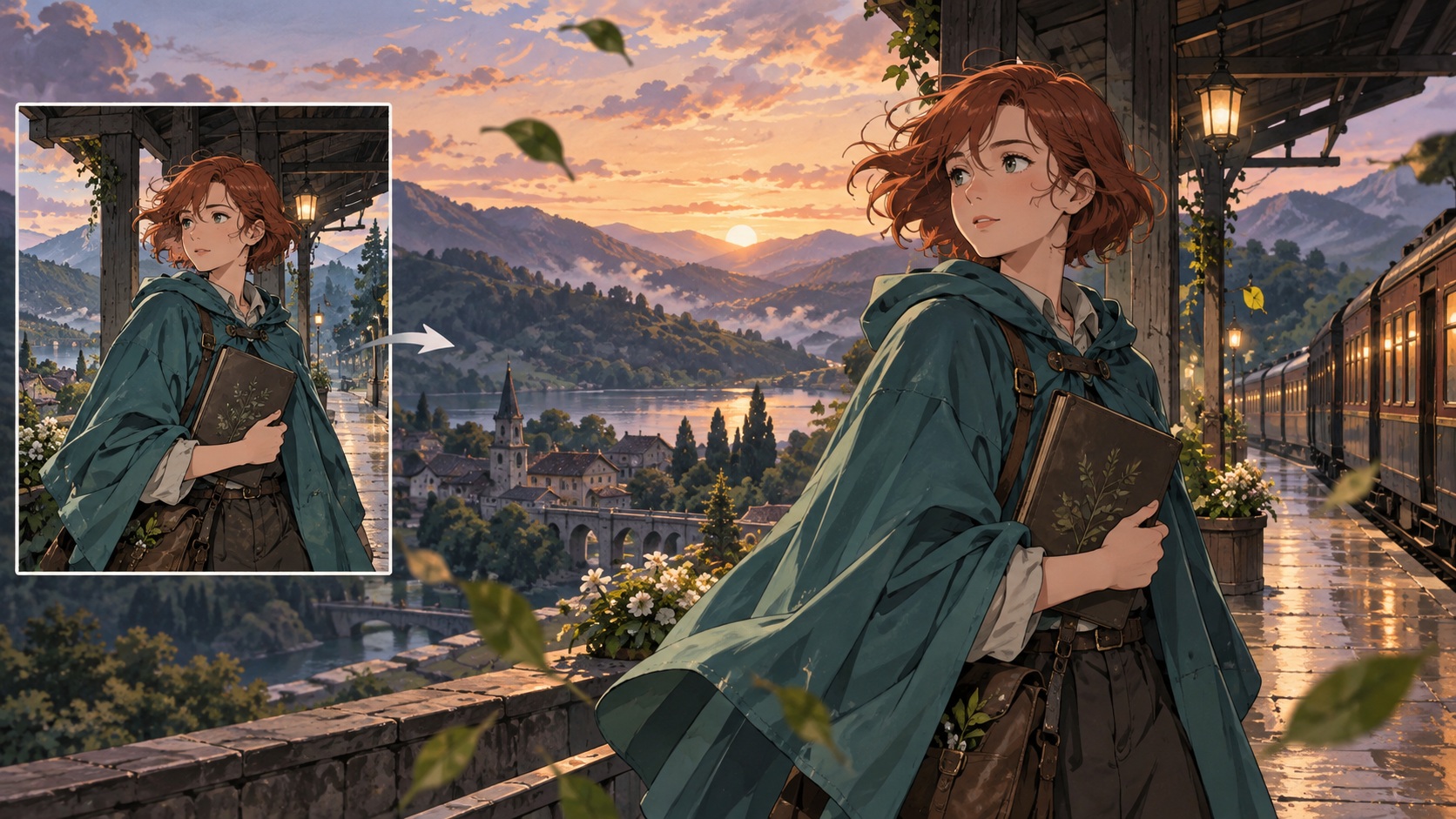
To create an anime video from a single image, begin by treating your image as a foundational keyframe. The process involves defining a clear, concise action or reaction, then articulating specific movements for the character, camera, and environment. This initial image serves as the visual anchor, guiding the animation tool to generate a short, editable sequence that brings the scene to life.
Preparing Your Source Image for Animation
The quality and composition of your initial image significantly impact the animation's outcome. Think of this image as the first frame of your video; it needs to contain all the essential visual information for the animation to build upon.
Image Readiness Checklist
Before you begin, evaluate your source image against these criteria:
- Readable Anatomy and Props: Ensure the character's body parts are clearly visible and distinct. If the character holds props, they should be well-defined and not obscured. Ambiguous shapes can lead to unpredictable deformations during animation.
- Motion Space: The image should ideally have some negative space around the character or objects that will move. This provides room for motion without immediately hitting the frame edges or causing elements to clip unnaturally.
- Stable Lighting: Consistent and natural lighting helps maintain visual coherence throughout the animation. Avoid images with harsh, rapidly changing, or overly complex lighting that might confuse the AI model.
- Correct Defects: Address any visual imperfections in the source image, such as artifacts, blurriness, or inconsistent art style. A clean input image yields a cleaner animation.
- Aspect Ratio Selection: Choose an aspect ratio (e.g., 16:9 for widescreen, 9:16 for vertical video) that suits your intended output and the composition of your image. This decision affects how the scene is framed and how motion is perceived.
Canonical Artwork and Inspection
Consider your source image as a piece of canonical artwork for your character or scene. It establishes the visual identity. Before animating, inspect it closely for any details you wish to preserve. If your character has specific markings, clothing details, or unique facial features, ensure they are prominent and clear. These details will serve as visual anchors that the animation tool can attempt to maintain.
Crafting Your Narrative Beat
A single image typically supports a concise, singular narrative beat rather than a complex story arc. The goal is to animate a moment, a reaction, or a simple action.
The Cause-and-Response Principle
Focus on a clear cause-and-response dynamic. What happens, and how does the character react? This simplicity helps the AI model generate a coherent short sequence. For instance, a character hears a sound and turns, or an object falls and the character reaches for it.
Example Scenario: The Traveling Botanist
Let's imagine our single image depicts an adult traveling botanist standing on a quiet station platform, holding a closed sketchbook. She wears a practical cape, and her expression is contemplative.
- Cause: The distant rumble of an arriving tram grows louder.
- Response: She subtly shifts her weight, her gaze turns towards the sound, and she steadies her sketchbook as her cape gently settles from the slight breeze.
This scenario provides a clear, contained action that can be animated from a single starting image. Avoid trying to tell an entire story in one go; instead, focus on a single, impactful moment.
Avoiding Overloaded Storylines
Resist the temptation to pack too much narrative into a single animation sequence derived from one image. Overly complex instructions or multiple simultaneous actions can lead to confusing or disjointed results. Stick to one primary action or reaction to maximize clarity and coherence.
Defining Motion: The Animation Blueprint
Once your image is ready and your narrative beat is clear, the next step is to translate that beat into specific motion instructions. This is where you guide the AI on how elements within the scene should move.
Deconstructing Motion: The Motion Map
A motion map helps you break down the desired movement into distinct components. Consider:
- Body Movement: How does the character's torso, limbs, or head move? (e.g., "turns head slowly," "shifts weight to the left").
- Expression: Does the character's facial expression change? (e.g., "eyes widen slightly," "a subtle smile forms").
- Camera Movement: Does the camera pan, zoom, or track? (e.g., "camera slowly zooms in," "slight camera pan to the right").
- Surroundings/Environment: Do elements in the background or foreground move? (e.g., "leaves rustle gently," "distant tram approaches").
- Ending State: How does the motion conclude? (e.g., "holds gaze," "returns to original posture").
Motion-First Prompting
When writing your prompt, prioritize motion descriptions. Start with what is happening, then describe the character and scene. This helps the AI understand the dynamic elements first.
Example Prompt for the Botanist:
"A woman on a station platform, hearing an approaching tram, slowly turns her head towards the sound. Her eyes shift, and her cape gently billows and settles around her. She steadies the closed sketchbook in her hands. The camera subtly tracks her head turn. Anime style, detailed, soft lighting."
Intensity and Camera Movement
- Deliberate Intensity: Specify the intensity of movements (low, medium, high). Subtle shifts are often more effective for short animations from a single image. For our botanist, her movements are low to medium intensity.
- Compatible Camera Movement: Ensure any camera movement complements the character's action. A slight pan or zoom can enhance the feeling of movement without being distracting. Avoid aggressive camera movements that might disorient the viewer or detach from the character's focus.
Avoiding Common Motion Pitfalls
- Moving Everything: Do not instruct every element in the scene to move simultaneously. This can lead to a chaotic and unnatural animation. Focus on the key elements that drive your narrative beat.
- Missing End Holds: Ensure your animation has a clear end state, even if it's just a brief hold on the final pose. Abrupt cuts can feel jarring.
- Premature Final Resolution: Approve the character's action and identity at practical draft settings before rendering the final, high-resolution output.
Maintaining Character Consistency
One of the biggest challenges when animating from a single image is maintaining the character's appearance and identity throughout the sequence.
Character Identity Anchors
Identify key visual elements that define your character. For our botanist, these might include:
- Her distinctive wide-brimmed hat.
- The specific design of her cape.
- Her facial features (e.g., eye shape, nose, mouth).
- The style of her sketchbook.
Explicitly mention these in your prompt to help the AI preserve them.
Creating a Reference Pack (for multi-shot projects)
While a single image is your starting point, if you plan to extend this into multiple shots or a longer sequence, consider creating a small "reference pack" of images. This pack would include different angles or expressions of your character, all in the same style. This helps maintain consistency across different generated clips.
Protecting Distinctive Visual Anchors
When generating, pay close attention to how the AI interprets and renders these anchors. If a specific detail is crucial, you might need to iterate on your prompt or adjust settings to ensure it remains consistent. Be aware that some tools might struggle with intricate details or extreme changes in perspective from a single reference.
Refining the Animation: Iteration and Detail
Animation is an iterative process. Your first generation might not be perfect, and refinement is key.
Testing Subtle Acting Before Fast Action
Start with subtle movements. It's easier to achieve believable subtle acting than complex, fast-paced action from a single image. Once you have a stable base with subtle movements, you can gradually introduce more dynamic elements if desired. For the botanist, her head turn and cape settling are subtle actions.
Approving Movement Before Adding Audio
Focus on the visual animation first. Once you are satisfied with the character's movements, camera work, and overall visual flow, then consider adding audio elements.
Sound Layers (Conditional on Tool Capabilities)
If your chosen tool allows for audio integration or if you're editing externally, think about layering sounds:
- Ambience: The general background noise (e.g., distant city hum, platform sounds).
- Event Cues: Specific sounds that trigger actions (e.g., the tram's approaching rumble).
- Object Sounds: Sounds related to objects (e.g., the rustle of the cape, the slight creak of the sketchbook cover if it were to open).
- Dialogue/Music: If applicable, though less common for single-image animations.
When generating audio, if your tool offers it, always check the generated audio separately for unintended speech, timing issues, or irrelevant sounds.
Editing and Post-Production Considerations
Even short animations benefit from thoughtful editing.
Editing Separate Shots
If your narrative requires more than one distinct action or perspective, you'll likely generate multiple short clips from different starting images or prompts. These clips will then need to be edited together.
Example Shot Sequence for the Botanist:
- Shot 1 (from initial image): Medium shot of the botanist on the platform. She hears the tram, turns her head, steadies her sketchbook, and her cape settles. (Generated from our single image).
- Shot 2 (new image/prompt): A slightly wider shot, perhaps from a different angle, showing the tram approaching in the background as she watches. (Requires a new starting image or a different prompt focusing on the tram's arrival).
Maintaining Screen Direction
When cutting between shots, pay attention to screen direction. If the botanist turns to the right in Shot 1 to look at the tram, ensure that in Shot 2, the tram appears to be coming from the right, maintaining visual continuity. Breaking the 180-degree rule can disorient the viewer.
Logging Prompts, Settings, and Takes
Keep a detailed log of the prompts you use, the settings (e.g., duration, motion strength, aspect ratio), and which generated takes you found most successful. This is invaluable for iteration, troubleshooting, and maintaining consistency across projects.
Common Pitfalls to Avoid
Being aware of common mistakes can save time and improve your results.
- Decorative Poster Inputs: Avoid using images that are overly stylized like posters, with text overlays or highly abstract compositions. These often lack the clear anatomical and environmental data needed for coherent animation.
- Appearance-Only Prompts: While describing your character's appearance is important, don't make it the sole focus of your prompt. Remember to prioritize motion and action. A prompt like "A beautiful botanist with a cape" is less effective than "A botanist with a cape turns her head slowly."
- Reveal Only Geometry the Input Supports: The AI can only animate what it "sees" or infers from your input image. If a character's arm is hidden, don't expect it to suddenly perform a complex gesture unless you provide explicit instructions and the model has the capacity to infer it, which is often limited from a single frame.
Frequently Asked Questions
Can I create a full narrative with just one image?
While you can create a compelling short scene or a single narrative beat, generating a full, complex narrative with multiple scenes, character interactions, and plot developments typically requires more than one starting image. Each new angle, character interaction, or significant scene change usually benefits from a new reference image or a series of carefully crafted prompts and edits.
How much appearance repetition should I include in my prompt for my character?
When using an image to supply your character's appearance, you generally don't need to repeat extensive descriptions. Instead, focus on a few key identity anchors (e.g., 'red hat,' 'blue eyes') if they are crucial to maintain, and prioritize describing the desired motion or action. The image provides the primary visual reference.
What is "face drift" and how can I minimize it?
Face drift refers to subtle (or sometimes significant) changes in a character's facial features, expression, or overall appearance over the course of an animation. It happens when the AI struggles to maintain perfect consistency from frame to frame. To minimize it, keep movements subtle, ensure your initial image has a clear and well-defined face, and use precise descriptive terms for facial features in your prompt. Some advanced tools may offer "character lock" features.
Does camera motion help or hinder the animation?
Camera motion can both help and hinder. A subtle, well-integrated camera movement (like a slow zoom or a gentle pan that follows the character's gaze) can enhance the sense of dynamism and immersion. However, excessive, jerky, or illogical camera movements can detract from the animation, make it feel unstable, and potentially exacerbate issues like character drift. Use camera motion sparingly and purposefully.
Are there specialized requirements for lip-sync animation?
Creating believable lip-sync animation from a single image, especially with supplied audio, often involves specialized workflows. While a single static image can support talking portraits, the quality and accuracy depend on factors such as the face angle in the image, the supplied speech or audio, the language, the AI model used, and precise timing. These workflows typically involve:
- Audio Analysis: Analyzing phonemes in spoken dialogue.
- Mouth Shapes: Generating specific mouth shapes (visemes) corresponding to those phonemes.
Always ensure you have the necessary permissions for using any voice or likeness in your creations.
How do I select the best aspect ratio (vertical/horizontal)?
The best aspect ratio depends on your intended platform and content.
- Horizontal (16:9 or 21:9): Ideal for traditional video platforms like YouTube, cinematic presentations, and desktop viewing. It offers a wider field of view, suitable for landscapes or scenes with multiple elements.
- Vertical (9:16): Perfect for mobile-first platforms like TikTok, Instagram Reels, and YouTube Shorts. It fills the screen on smartphones, making it engaging for quick, on-the-go consumption. Choose the ratio that best frames your subject and suits where your video will be viewed.
Conclusion
Transforming a single image into an engaging anime video is an art that blends careful preparation with creative prompting. By focusing on a clear narrative beat, precise motion descriptions, and maintaining character consistency, you can bring static visuals to life. Remember to iterate, refine, and pay attention to the details that make your animation compelling. For those interested in exploring various AI video creation tools, you can browse available models and features on platforms like VideoAny.