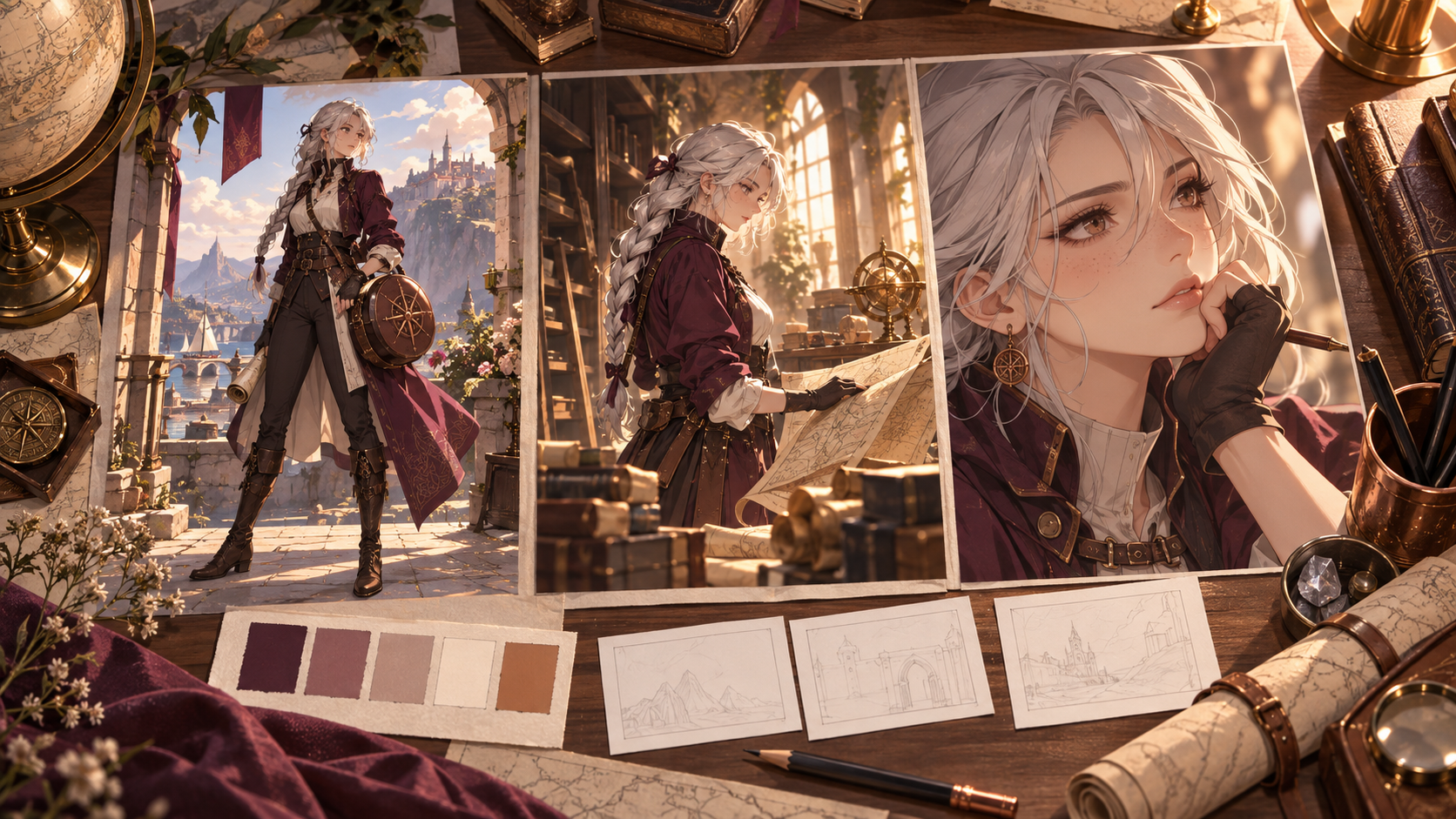
To generate high-quality anime art with AI, focus on detailed, structured prompts that define character identity, scene specifics, camera angles, and desired artistic style. Iterative refinement, starting with core elements and gradually adding complexity, is key to achieving precise visual outcomes.
Understanding Your Anime Production Goals
Before crafting any prompt, consider the ultimate purpose of your AI-generated anime image or sequence. Different production goals require varying levels of detail and focus in your prompts.
From Concept to Animation-Ready Input
- Concept Exploration: For initial brainstorming, prompts can be broader, focusing on general themes, character archetypes, or mood. The goal is to generate diverse ideas quickly.
- Canonical Character Sheet: This requires highly specific and consistent prompts to define a character's appearance from multiple angles, expressions, and poses. The aim is to establish a stable visual identity that can be reused.
- Pose/Expression Study: Prompts here focus on a character's body language or facial nuances, often in isolation, to capture specific emotions or actions.
- Storyboard Panel: These prompts combine character, scene, and camera information to depict a specific moment in a narrative sequence. Consistency with established character designs is crucial.
- Promotional Key Visual: For a single, impactful image, prompts emphasize dramatic composition, lighting, and a polished artistic style to create a compelling standalone piece.
- Animation-Ready Input: When preparing for motion, prompts must define not only the visual elements but also potential actions, camera movements, and environmental changes, ensuring elements are distinct and controllable for subsequent animation steps.
Understanding these distinctions helps prioritize which aspects of your prompt need the most attention, guiding you from abstract ideas to concrete visual assets.
Deconstructing the Anime Prompt: Layers of Control
Effective AI anime generation relies on breaking down complex visual ideas into manageable, descriptive layers. This structured approach allows for greater control and consistency in the output.
Defining Character Identity and Consistency
A strong character identity is the foundation of any compelling anime. Your prompts should clearly articulate visual traits that make your character unique and recognizable. Begin with core descriptors and build outwards.
- Silhouette: Describe the overall shape and distinguishing features. For our mapmaker, this might include her braids and the distinct outline of her coat and map case.
- Face Structure and Features: Detail eye shape, nose, mouth, and any unique facial marks. For instance, "sharp intelligent eyes" or "a faint scar near her left eyebrow."
- Layered Clothing and Materials: Go beyond basic attire. Specify fabric types, textures, and how garments are worn. "Plum-colored wool coat with brass buttons" is more effective than just "plum coat." The "worn round leather map case" adds character.
- Controlled Palette: Suggest primary and accent colors for clothing, hair, and accessories to maintain visual harmony.
To achieve a specific look, you might use a reference image for a particular style of "silver braids" or the cut of a "plum-colored wool coat," translating visual details into descriptive text. Similarly, a reference for a specific facial expression can inform the prompt's description of "thoughtful, a slight smile playing on her lips."
Crafting Dynamic Scenes and Environments
Scenes provide context and atmosphere. Describe the setting, objects, and overall mood.
- Assembling Scene Prompts: Combine elements like location, time of day, weather, and key objects. For a "sunlit archive," specify "towering wooden shelves filled with countless scrolls and ancient tomes" and "dust motes dance in the golden shafts of light."
- Motivated Lighting: Lighting is crucial for mood and depth. Identify the light source, its direction, hardness (soft or harsh), and color hierarchy. "Golden shafts of light streaming through tall, arched windows" clearly defines the light in the archive. For a "coastal lookout," consider "dramatic lighting from a setting sun" or "overcast, diffused light."
If a specific architectural style for the "sunlit archive" is desired, a reference image of an old library or study can guide the description of "towering wooden shelves" and "arched ceilings." For the "coastal lookout," a reference photo of a rugged cliffside can help articulate the "turbulent sea" and "rugged cliff."
Mastering Camera Angles and Composition
The "camera" in AI generation dictates how the viewer perceives the scene. Use cinematic language to guide the AI.
- Framing: Specify shot types like "close-up," "medium shot," "full body," or "establishing shot."
- Angle: Describe the camera's vertical position: "low angle" (looking up), "high angle" (looking down), "eye-level."
- Perspective: Indicate depth and viewpoint, such as "over-the-shoulder," "wide-angle," or "dramatic foreground element."
- Serving Storytelling: Ensure camera choices enhance the narrative. A close-up emphasizes emotion, while an establishing shot sets the scene. Avoid contradictory shot sizes within a single still-image or single-shot prompt; changing shot sizes is normal and useful across an edited sequence.
Specifying Artistic Style and Aesthetic
The "anime" aspect itself needs definition. Be specific about the visual characteristics you want.
- Linework: Describe the quality of lines: "clean linework," "sketchy," "bold outlines," "delicate."
- Shading: Specify how light and shadow are rendered: "soft cell shading," "gradient shading," "cross-hatching," "painterly."
- Color: Detail the color palette: "warm color palette," "muted tones," "vibrant hues," "monochromatic with a single accent color."
- Medium: Suggest traditional or digital art styles: "digital painting," "watercolor," "ink wash," "pencil sketch."
To achieve a specific "anime style," you might reference a particular artist's linework, shading techniques, or color palette, translating these visual characteristics into terms like 'clean linework,' 'soft cell shading,' or 'warm color palette.'
Practical Prompt Templates for Anime Generation
These templates provide a structured starting point for various common anime generation needs, using our silver-braided mapmaker character. Remember that references can guide specific aspects like identity, pose, costume, composition, or style separately.
Template 1: The Character Sheet
This template focuses on defining a character's core appearance for consistency.
"An adult mapmaker, female, with silver braids tied back, sharp intelligent eyes, a faint scar near her left eyebrow, wearing a plum-colored wool coat with brass buttons, sturdy leather boots, and a worn round leather map case slung over her shoulder. Her expression is thoughtful, a slight smile playing on her lips. Full body shot, neutral pose, white background. Anime style, detailed character design, clean linework, soft cell shading, warm color palette, digital painting."
Template 2: Emotional Close-Up
For conveying specific feelings or reactions.
"Close-up of the mapmaker's face, her silver braids framing her intense, focused eyes. A single tear traces a path down her cheek, reflecting the soft glow of a flickering candle. Her expression is one of profound sorrow mixed with determination. Anime style, dramatic lighting, high detail, painterly, shallow depth of field."
Template 3: Two-Character Interaction
To depict dialogue or interaction between two entities, ensuring clear focus and eyelines.
"The silver-braided mapmaker, plum coat slightly askew, leans over a large, ancient map spread across a rustic wooden table. Her right hand points to a specific location, her brow furrowed in concentration. Opposite her, a small, glowing, ethereal sprite hovers, its translucent form casting a soft light on the map. The sprite's 'eyes' are fixed on the mapmaker's finger. Eye-level shot, 3/4 view, clear eyelines between mapmaker and sprite. Anime style, warm, inviting light from an unseen window, intricate map details, dynamic composition."
Template 4: Action Preparation
Capturing a moment leading up to an event, emphasizing movement and anticipation.
"The mapmaker, clad in her plum coat, stands at the edge of a rugged cliff overlooking a turbulent sea. Her silver braids whip in the wind. She unlatches her round leather map case, her gaze fixed on the horizon, a determined glint in her eyes. The wind tugs at her coat. Medium shot, dynamic pose, dramatic lighting from a setting sun, atmospheric perspective, strong sense of movement. Anime style, detailed textures, vibrant colors."
Template 5: Establishing Environment
To set the scene and convey atmosphere, often with the character as a secondary element.
"A vast, sunlit archive. Towering wooden shelves filled with countless scrolls and ancient tomes stretch towards a high, arched ceiling. Dust motes dance in the golden shafts of light streaming through tall, stained-glass windows. In the foreground, the silver-braided mapmaker, her plum coat a splash of color, is perched on a rolling ladder, reaching for a particularly old, leather-bound atlas. Wide shot, high angle, intricate architectural details, warm and inviting atmosphere, soft volumetric lighting. Anime style, rich detail, historical fantasy aesthetic."
From Still Images to Animated Sequences
While AI image generators primarily produce static visuals, the principles of prompting extend to preparing for animation. The key is to define elements that can be consistently maintained or purposefully altered over time.
Guiding Action and Camera Movement
Converting still prompts to motion involves adding temporal instructions.
- Action Order: Clearly describe the sequence of events. Instead of "mapmaker stands," consider "mapmaker walks towards the cliff, then stops, then unlatches her map case."
- Camera Movement: Specify how the camera moves relative to the scene or character. "Camera slowly zooms in on her face," or "pan across the archive shelves."
- Physical Response: Detail how characters react to their environment or actions. "Her braids whip in the wind," "she shivers slightly from the cold."
- Ending State: Define the final pose, expression, or camera position for a sequence.
- Invariants: Identify elements that must remain consistent throughout the animation, such as character design, specific props, or background details. Stable identity anchors, like the mapmaker's silver braids and plum coat, should remain unchanged while her actions or location shift.
For example, to animate the mapmaker at the coastal lookout: > "The silver-braided mapmaker walks slowly towards the cliff edge, her plum coat billowing gently in the wind. She stops at the precipice, gazing out at the turbulent sea. Her hand slowly reaches for her round leather map case, unlatching it with a deliberate motion. Camera tracks her as she walks, then slowly zooms in on her determined expression as she unlatches the case. Anime style, dramatic lighting from a setting sun, continuous motion, atmospheric perspective."
Iterative Workflow and Troubleshooting Common Issues
Generating high-quality anime art with AI is rarely a one-shot process. It requires a systematic approach of generation, evaluation, and refinement.
A Structured Approach to AI Anime Creation
- Explore Design: Start with broad concept prompts to generate a variety of initial ideas. Focus on overall mood, character archetypes, and general settings.
- Approve Canonical Reference: Once a concept is chosen, refine prompts to create a stable, consistent visual reference for your character (e.g., a character sheet). This "canonical" image serves as a benchmark.
- Record Full Body/Expressions: Generate variations of your canonical character in different poses and with various expressions. This builds a library of consistent assets.
- Storyboard Key Moments: Use specific prompts to depict crucial scenes, integrating your consistent character with defined environments and camera angles.
- Animate Approved Images (if applicable): If moving to video, use the refined still images as a basis, adding motion and temporal instructions.
- Compare and Revise One Layer: Critically evaluate the output. If the character's face is off, revise only the face descriptors. If the lighting is wrong, adjust only the lighting parameters. Avoid making too many changes at once, as this can obscure which adjustments had a positive or negative effect.
Diagnosing and Overcoming Prompting Challenges
Even with a structured approach, you may encounter issues. Recognizing common failures helps in targeted troubleshooting.
- Competing Priorities: If your prompt is too long and tries to define too many disparate elements (e.g., "a cheerful mapmaker in a dark, stormy cave with bright sunlight"), the AI may struggle to reconcile them, leading to incoherent results. Prioritize the most important elements.
- Abstract Personality: Describing a character as merely "brave" or "wise" is often insufficient. Translate personality traits into visual cues: "a brave mapmaker, standing tall with a resolute gaze," or "a wise mapmaker, with a knowing smile and eyes that hold ancient secrets."
- Shifting Identity: If your character's appearance changes significantly between generations, ensure your core identity descriptors are strong and consistently placed at the beginning of your prompt. Using negative prompts to exclude unwanted variations can also help.
- Vague Style Labels: "Cool anime style" is less effective than "anime style, clean linework, soft cell shading, vibrant colors, inspired by Studio Ghibli." Be specific about linework, shading, color, and medium.
- Poster-like Motion Prompts: Simply adding "walking" to a still image prompt may not yield true animation. Motion prompts require detailed action sequences, camera movements, and physical responses, as discussed in the previous section.
When using AI tools to generate images, particularly those involving recognizable styles or characters, it's important to consider intellectual property rights. Ensure you have the necessary permissions for any reference images or concepts you use, and be mindful of the output's intended use, especially for commercial applications. Always respect privacy and consent when generating images that might resemble real individuals.
Frequently Asked Questions (FAQ)
What is a useful prompt length for anime generation?
There's no fixed "ideal" prompt length. The most useful length is one that contains enough detail to convey your vision without becoming overly verbose or contradictory. For complex scenes or characters, longer, more descriptive prompts are often necessary. However, excessively long prompts can sometimes dilute the impact of key descriptors or introduce conflicting instructions. Focus on clarity, specificity, and structure rather than arbitrary word count.
When should I explicitly specify "anime style" in my prompt?
Include an "anime style" cue, or a more specific sub-genre (e.g., "shonen anime style," "slice-of-life anime"), when your selected model or style preset does not already establish an anime aesthetic. Without such a cue, the AI might default to a more realistic, illustrative, or general cartoon aesthetic. Describing concrete visual properties like linework, cel shading, color palette, and medium can be more effective for refining the outcome than simply repeating a generic style label.
How can I maintain consistent character identity across multiple images?
Consistency is achieved by anchoring core identity descriptors at the beginning of your prompts and keeping them unchanged. This includes unique physical traits (e.g., "silver braids," "faint scar"), specific clothing items ("plum-colored wool coat," "round leather map case"), and a consistent color palette. When generating variations, only change the pose, expression, scene, or camera angle, while keeping the character's fundamental description identical. Using a canonical reference image and iterating from it is also highly effective.
How do negative prompts help refine anime outputs?
Negative prompts instruct the AI on what not to include or what characteristics to avoid. Their availability and effectiveness depend on the selected model and interface. They are powerful for removing unwanted elements or refining style. When aiming for a specific positive composition, such as "a dynamic anime battle scene," you might use targeted negative prompts like "blurry, low quality, watermark" to ensure visual clarity, or "realistic, photorealistic" to maintain the anime aesthetic. Remember that exclusions do not guarantee perfect anatomy or identity corrections and should not overwhelm the primary motion or image goal of your positive prompt.
What are the considerations for rights and using reference images?
When using reference images to guide your prompts, be mindful of intellectual property rights. If you are directly copying or heavily deriving from copyrighted material, especially for commercial use, you may face legal issues. It's generally safer to draw inspiration from multiple sources, abstract concepts, or use references that are in the public domain or for which you have explicit permission. Always prioritize ethical creation and respect for original artists' work.
How do I adapt prompts for video generation?
Adapting prompts for video involves adding temporal and sequential information. Instead of describing a single moment, you describe a series of moments, actions, and camera movements. This includes specifying the order of events, character movements, environmental changes over time, and how the camera should pan, zoom, or track. Maintaining character and environmental consistency across frames is paramount, often by keeping core identity and scene descriptors constant while varying action and camera instructions.
To begin exploring the possibilities of AI image generation, you can browse tools available at VideoAny's text-to-image page.