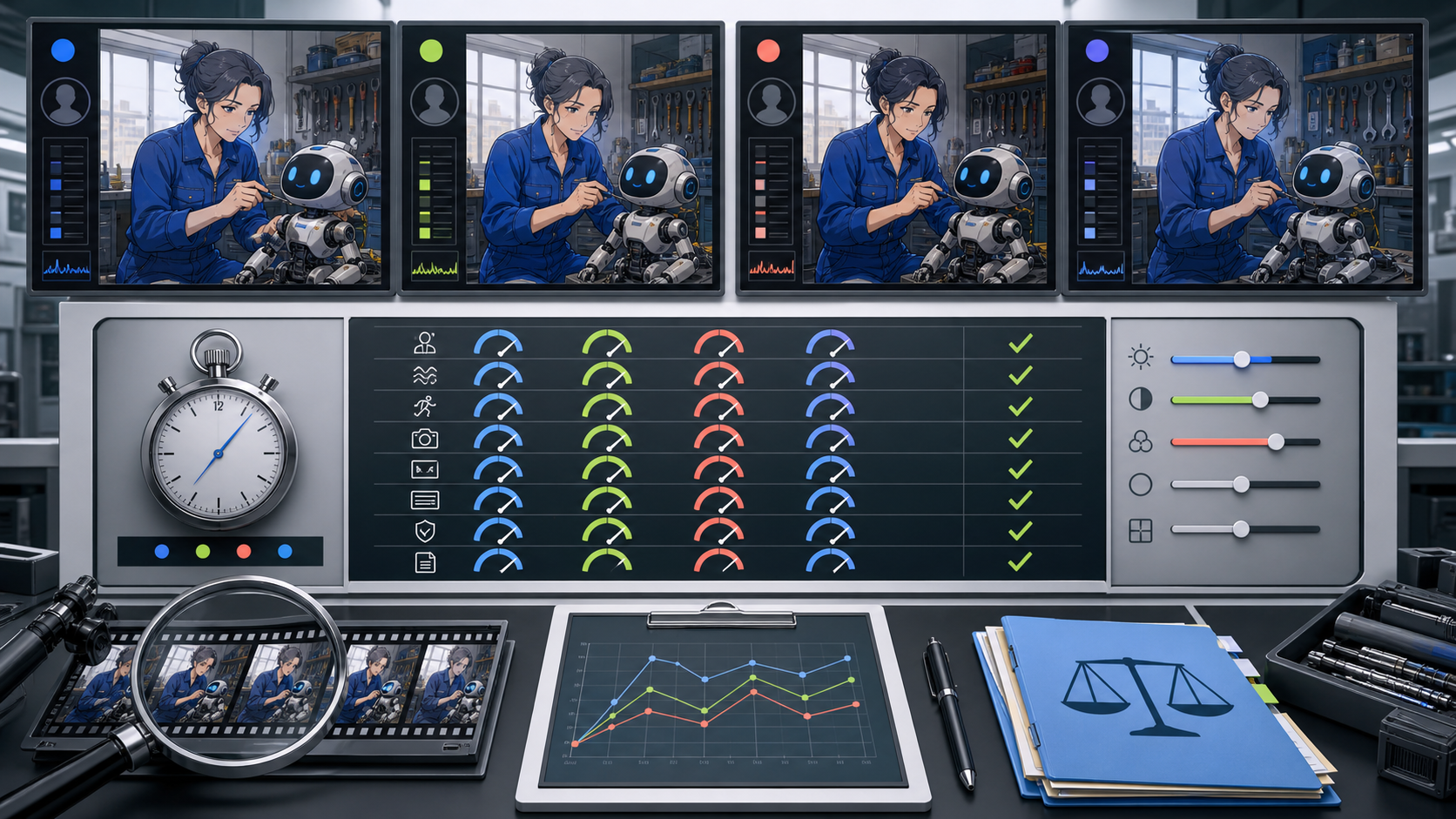
“AI anime video no filter” is not a testable specification. It does not tell a creator which inputs a model accepts, whether a character remains consistent, how much a configuration costs, where a file is stored, or which requests a service will refuse. Creative control can be tested. A slogan cannot.
The reference page introduces a tool suite through text-to-video, image-to-video, reference-guided generation, and video-to-video. It begins to explain why creative freedom matters, then stops mid-sentence after roughly 365 words. It contains no completed process, comparison, price section, or FAQ. The controlled lab below is therefore an original extension of its input-method and creative-freedom themes, not a reconstruction of missing source content.
Adult-only boundary: Any mature anime project must involve clearly adult fictional characters or verifiably adult, consenting participants. Never sexualize a minor, childlike or school-age-coded character, or anyone whose age is unclear. Do not create non-consensual intimate media or use a real person’s likeness without explicit authorization.
Turn “creative freedom” into measurable questions
A creator needs enough freedom to choose a story, look, camera, motion, and format. Those choices can be translated into questions:
- Does the selected model accept the source asset the project already owns?
- Can the prompt separate subject, action, setting, camera, and anime treatment?
- Does identity remain stable through motion and occlusion?
- Do lines, colors, costume details, and props remain temporally coherent?
- Are ratio, duration, resolution, reference, or end-frame controls visible for this model?
- Is the displayed credit cost clear before submission?
- Do policies set meaningful boundaries around age, consent, and identity?
- Can storage, history, retention, and deletion behavior be verified?
This definition is broader than output quality. A beautiful clip can still fail because its character becomes younger-looking, its source rights are unclear, or its settings cannot be reproduced.
Design one harmless benchmark scene
Use the same scene across models so differences can be attributed to the tool rather than the idea. The benchmark should reveal common anime failures without using explicit or sensitive material.
Character and source
Create an original fictional 42-year-old robotics mechanic named Imani. She wears a fully covering cobalt work jumpsuit, has a strong adult facial structure, silver-threaded dark hair in a high bun, and a hexagonal copper tool badge. Her companion is a small round repair robot with two blue display eyes. Keep the approved character sheet and proof of authorship with the test.
Action
Imani tightens one panel screw with her right hand. The robot tilts its head once. She smiles subtly after the indicator light turns green. This gives the model hand-object contact, two subjects, ordered motion, and an emotional beat without crowding the shot.
Camera and look
Use a medium three-quarter view with a locked camera. Specify clean outer contours, fine facial lines, two-value cel shading, cobalt and copper palette, soft daylight, and a readable workshop background. A fixed camera makes line and identity drift easier to see.
Acceptance criteria
Before generating, define pass conditions:
- Imani remains unmistakably adult in every frame;
- face, hair, jumpsuit, badge, hand count, and tool stay stable;
- the right hand keeps plausible contact with the screw;
- the robot tilts only after the tightening motion;
- no invented text, logo, extra person, or sexualization appears;
- the camera remains locked and the shot has usable head and tail frames.
If a criterion is written after seeing the output, it is not a fair benchmark.
Preserve the source’s four input paths
Run only the paths that the selected model actually supports. A route name does not imply identical controls across models.
Text-to-video test
Use VideoAny text-to-video with the benchmark description and no image input. This measures how much the model invents, how well it follows ordered motion, and whether the prompt alone maintains adult identity.
Keep the prompt identical for the first run. If a model needs repair, log the changed words as a second test rather than quietly replacing the baseline.
Image-to-video test
Use the approved, rights-cleared workshop frame as the opening image. This measures how well motion preserves composition, face, costume, badge, robot design, and linework. Ask for the same three beats: tighten, tilt, smile.
Some selected models accept end frames or additional images; others do not. A baseline should use only controls shared by the compared configurations. Optional-control tests can follow separately.
Reference-guided test
Where a selected model visibly supports reference inputs, provide the compact original character sheet. Record what kind of reference the interface describes—character, style, subject, or another role. Do not assume a reference has the same effect across providers or modes.
Reference material must be original, licensed, or explicitly authorized. Do not benchmark with a living artist’s work, copyrighted character, public figure, partner, acquaintance, or private image.
Video-to-video test
Use an authorized, fully clothed motion plate that performs the same ordered actions. Video-to-video measures whether the model preserves blocking and camera while applying the anime treatment. Use VideoAny video-to-video only with footage and performer rights that cover the transformation and intended use.
Cut the source into one editorial shot. Multiple cuts inside a test introduce a separate source of flashes and identity resets.
Freeze the configuration before comparing
Start from the current VideoAny models directory, then record the active interface for every test. Models may differ in supported input, duration, ratio, resolution, reference behavior, end frames, and credit formula.
Create one configuration card per run:
| Field | Record exactly |
|---|---|
| Model and mode | Displayed name plus text, image, reference, or video path |
| Inputs | File count, type, dimensions, duration, and ownership record |
| Prompt | Exact version, including negative constraints if supported |
| Output | Selected duration, resolution, aspect ratio, and optional controls |
| Credits | Displayed cost immediately before submission |
| Timing | Start time, completion time, retry or error |
| Result | Candidate ID or filename and archive location |
VideoAny uses credits. Many video models calculate them using duration and may also vary by resolution or settings; other tools use a fixed generation cost. The current displayed configuration is evidence. A site-wide fixed rate is not.
Run the lab in ten steps
- Clear the benchmark assets. Confirm original authorship, licenses, adult-age design, and absence of a real person’s likeness.
- Select comparable models. Compare only configurations that support the same route and enough shared settings to make the result meaningful.
- Freeze the prompt. Store the exact baseline before any generation.
- Normalize the output target. Choose the closest shared duration, ratio, and resolution; document unavoidable differences.
- Capture the pre-submit state. Record model, controls, and displayed credits.
- Generate one baseline candidate. Do not cherry-pick multiple runs for one model while giving another only one attempt.
- Archive the raw file. Keep metadata and do not recompress before review.
- Score blind where possible. Hide the model name from the visual reviewer.
- Run a separate policy and data review. Do not let attractive imagery inflate non-visual scores.
- Repeat only under a written rule. For example, permit one repair prompt per model, document it, and report baseline and repair separately.
This protocol does not produce a universal winner. It identifies which selected configuration best fits one production requirement.
Score visual and temporal behavior
Use a 0–3 scale: 0 fails, 1 poor, 2 usable with repair, 3 passes as generated. Define each score before review.
Prompt adherence
Check subject count, order of actions, camera lock, setting, and specified visual treatment. A clip that looks attractive but changes the action sequence does not pass adherence.
Adult identity stability
Inspect the opening, quarter, midpoint, three-quarter, and final frames, then scrub turns and occlusions. Score zero and reject the candidate if Imani becomes underage-looking, childlike, or ambiguous at any point. A written age does not rescue the visual result.
Line and color stability
Watch outer contours, facial marks, hair strands, jumpsuit seams, badge shape, robot eyes, and background tools. Fine details that oscillate can become more distracting than a larger, stable simplification.
Anatomy and contact
Check finger count, tool orientation, hand-to-screw contact, wrist motion, and whether the robot occupies a consistent surface. Review slow motion as well as individual frames; a plausible still can hide impossible transitions.
Motion adherence
The expected order is tighten, robot tilt, smile. Note merged actions, repeated gestures, premature reactions, frozen subjects, or camera movement that was not requested.
Edit readiness
Measure usable frames before and after the action, caption space, composition, actual file dimensions, duration, container, codec, frame rate, and audio state. Output labels should be checked against the downloaded file.
Score control and reproducibility
Visual results vary from run to run, so control quality matters.
Give points for:
- visible, model-specific input requirements;
- explicit ratio, duration, and resolution selectors where supported;
- clear reference or end-frame roles rather than vague upload fields;
- displayed credits before submission;
- errors that identify the failed requirement;
- downloadable output with inspectable properties;
- enough generation history to associate an output with its configuration.
Do not award points for a marketing phrase such as “unparalleled control.” Award them when a creator can repeat the setup and explain why a result changed.
Review policy without harmful media
A “no filter” evaluation must never become a safeguard-bypass exercise. Do not upload a minor, a real person, private intimate media, or illegal material as a test.
Instead, inspect current terms and use text-only boundary descriptions where necessary to confirm that the service refuses clear harms. Healthy signals include explicit prohibitions on minors, non-consensual intimate imagery, deceptive identity use, and illegal content; a reporting path; and no evasion instructions.
Reject services that encourage:
- sexualizing minors or age-ambiguous characters;
- using scraped, stolen, or private photographs;
- creating intimate deepfakes of public or private people;
- bypassing age, consent, or identity safeguards;
- harassment, blackmail, impersonation, or deceptive evidence;
- assuming anime or cartoon style makes harmful content acceptable.
Content boundaries and creative controls answer different questions. A service can support broad fictional styles while still refusing abuse.
Review rights and data handling separately
For each test asset, record creator, license, permitted transformations, commercial scope, attribution, and participant authorization. “Any image” is never an acceptable source rule. Publicly visible art remains protected, and fan art is not automatically licensed for transformation.
Before sensitive work, verify:
- where uploads, outputs, and account history appear;
- whether third-party model processors are involved;
- documented retention and deletion behavior;
- who can access an output URL;
- how abuse or privacy concerns can be reported;
- what happens after account or generation deletion.
Do not infer automatic deletion, local-only processing, absolute confidentiality, or ownership from a clean interface. If data practices are too uncertain for the material, keep the workflow to non-sensitive original assets.
Separate findings from recommendations
A lab report should show the evidence before naming a preferred configuration.
Findings table
| Dimension | Model A | Model B | Model C | Model D |
|---|---|---|---|---|
| Prompt adherence | ||||
| Adult identity stability | ||||
| Line and color stability | ||||
| Anatomy and contact | ||||
| Motion order | ||||
| Edit readiness | ||||
| Control visibility | ||||
| Credit visibility | ||||
| Policy evidence | ||||
| Rights and data fit |
Attach representative hard frames and defect notes. Report failures, not only the selected output.
Recommendation statement
Use bounded language:
For this fully clothed, two-subject, locked-camera image-to-video benchmark at the tested settings and date, Model B produced the strongest line stability after one documented repair prompt. This does not establish performance for other routes, explicit material, ratios, durations, or models.
That statement is useful because another creator can understand its scope.
Common testing mistakes
Comparing different prompts
If every model receives a rewritten prompt, the lab measures prompt tuning as well as the model. Freeze the baseline and report repair rounds separately.
Cherry-picking generations
One model should not receive ten candidates while another receives one. Use the same run budget and disclose errors and retries.
Scoring only the hero frame
Anime video quality is temporal. A sharp opening image says nothing about line flicker, anatomy during contact, or identity after occlusion.
Treating one model as the platform
Resolution, ratios, duration, controls, credit formulas, and reference support vary. Name the selected model and test date.
Letting policy become a binary label
“Filtered” and “no filter” conceal the important questions: which harms are refused, how clearly, with what reporting path, and whether benign creative requests remain workable.
Original lab questions prompted by the truncated reference
The reference does not provide an FAQ. These questions belong to this test protocol.
Is the most permissive model always the most creative?
No. Creativity also depends on adherence, motion, consistency, controls, source flexibility, and edit readiness. Safety boundaries do not prevent a model from supporting unusual lawful fictional work.
Can I compare models using a real person’s photo?
Only with explicit authorization for that exact transformation and test use. An original fictional character is a safer benchmark and makes identity risk easier to control.
Does a successful benign test approve a mature project?
No. It establishes technical behavior for one scene. Mature work still requires clearly adult presentation, consent, rights, current policy fit, and an appropriate publication destination.
How often should I rerun the lab?
Repeat it after a material model, interface, policy, pricing, or workflow change. Record the date because results and options can change.
Measure the controls, not the slogan
The reference page’s strongest idea is that anime creation can begin from several kinds of input. Its incomplete “creative freedom” argument becomes more useful when translated into a reproducible lab. Use one harmless original scene, freeze the configuration, score the whole clip, inspect policy and data evidence, and report a narrow recommendation. That process reveals actual creative control while keeping adult age, consent, identity, and rights outside the experiment’s tradeoffs.