Categories: AI Video, AI Image, Creator Guides
Tags: videoany, ai video, ai video generator, ai content creation, creator guide
Introduction
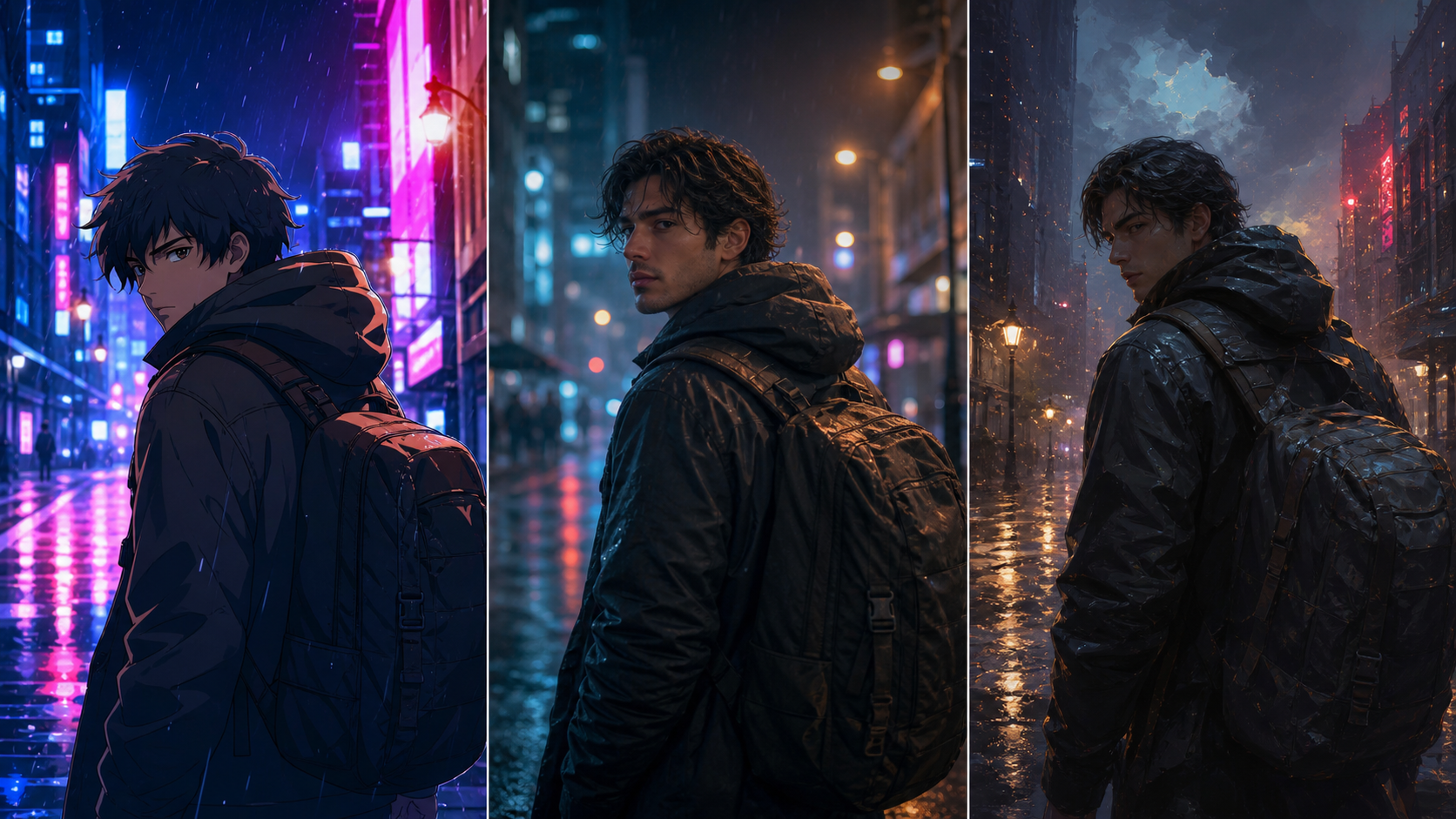
In the evolving landscape of AI-assisted media, success depends on more than just generation speed—it requires a clear creative strategy. By understanding the three dominant aesthetic categories currently shaping the industry—Anime, Photoreal, and Cinematic—creators can better align their production pipelines with their intended visual outcomes. This guide breaks down these styles to help you plan, generate, and refine your projects using VideoAny.
The Three Pillars of AI Animation
1. Anime Style
The anime aesthetic is defined by its reliance on hand-drawn linework, flat shading, and highly expressive, stylized facial features.
- Technical Approach: This style typically utilizes specialized checkpoints designed for illustrative output.
- Prompting Strategy: Effective prompts are generally short, stylized, and rely on specific tags to capture the desired artistic flair.
- Best Use Cases: Ideal for character-driven shorts, manga-to-motion projects, and stylized content involving consenting adult themes.
2. Photoreal Style
Photorealism aims for high-fidelity results, focusing on believable skin textures, natural light responses, and subtle micro-expressions.
- Technical Approach: This style pairs advanced image-to-video models with high-quality base models to ensure realistic motion and lighting.
- Prompting Strategy: Prompts should be grounded in photographic terminology, such as lens type, aperture settings, and specific lighting conditions.
- Best Use Cases: Best suited for persistent AI companions, portrait-focused work, and lifelike depictions of characters in realistic settings.
3. Cinematic Style
Cinematic animation prioritizes the "director's eye," focusing on deliberate framing, motivated lighting, and controlled, purposeful motion.
- Technical Approach: This style combines a photorealistic base with camera-aware video models to simulate professional cinematography.
- Prompting Strategy: Focus on direction-style language, including camera angles, lens choice, and overall mood.
- Best Use Cases: Perfect for hero shots, music video segments, and narrative beats where composition is the primary driver of the story.
Strategic Considerations for Creators
When building your project, consider the following production logic:
- Identity Locking: If your project involves a recurring character, both Photoreal and Anime styles offer the best results for maintaining visual consistency.
- Composition vs. Continuity: Cinematic style excels in one-off shots where composition and mood take precedence over long-term character continuity.
- Mixing Styles: Avoid mixing these styles within a single clip, as it often disrupts the viewer's immersion. Instead, reserve style changes for distinct clips within your edit.
Practical Workflow for Success
- Define the Goal: Determine if you are creating a short ad, a narrative scene, or a social post.
- Prepare Inputs: Gather your reference images, character designs, and scripts before you begin generating.
- Iterative Generation: Work in small, manageable passes rather than attempting to finalize an entire video in one go.
- Review and Refine: Evaluate each clip for pacing, motion quality, and visual clarity.
- Standardize: Save your successful prompts and export settings to ensure a repeatable, high-quality workflow.
Note: When creating content involving AI-generated faces or personas, always ensure you have the necessary rights and permissions. Responsible use of AI media is essential for building professional, ethical creative projects.
FAQs
Can this workflow work for a solo creator? Yes. By focusing on one repeatable format and keeping your asset list organized, you can significantly improve your output quality and speed with each published project.
Should I generate first or write the edit plan first? Always write a plan first. Even a simple storyboard or outline helps you determine if the AI output will effectively serve your final video's narrative.
What should I check before publishing an AI video? Review your work for continuity, motion quality, pacing, and whether the visual content clearly communicates your intended message without requiring extra explanation.
How does VideoAny fit into this workflow? VideoAny serves as your primary engine for visual generation and variation. Use it to create the foundational clips, then combine them with your preferred editing, audio, and captioning tools to finalize your project.
Explore More
- Start your creation process
- Explore our model library
- View our pricing