“Long Clip” Can Mean Two Different Things
One interpretation is a single continuous generated shot. The other is a sequence of short clips edited to feel continuous. The second is usually more controllable because identity, camera, motion, and environment can be approved at each boundary.
The reference page markets an adult-only, unrestricted platform with text, image, and video modes; reference uploads; 1080p output; multiple aspect ratios; fast rendering; private storage; ownership; anonymous use; and crypto payment. Those are source-platform claims, not VideoAny guarantees. Verify current duration limits, export files, pricing, privacy, acceptable-use rules, and commercial terms directly.
For mature work, every depicted person must be clearly adult and consenting. Use original fictional identities or authorized likenesses, and only transform media you own or are licensed to use. Never involve minors or create non-consensual intimate content.
Why Longer Generations Drift
Every additional second asks the model to preserve more relationships:
- face, apparent age, hair, and body proportions;
- clothing seams, accessories, and props;
- hands and physical contact;
- environment layout and reflections;
- camera height, focal length, path, and speed;
- lighting direction, exposure, and color;
- action order and endpoint;
- motion physics for fabric, hair, water, and particles.
A short clip can hide a small inconsistency. In a long shot, errors accumulate until the person, space, or action is no longer the same.
Design a Long Shot as Segments
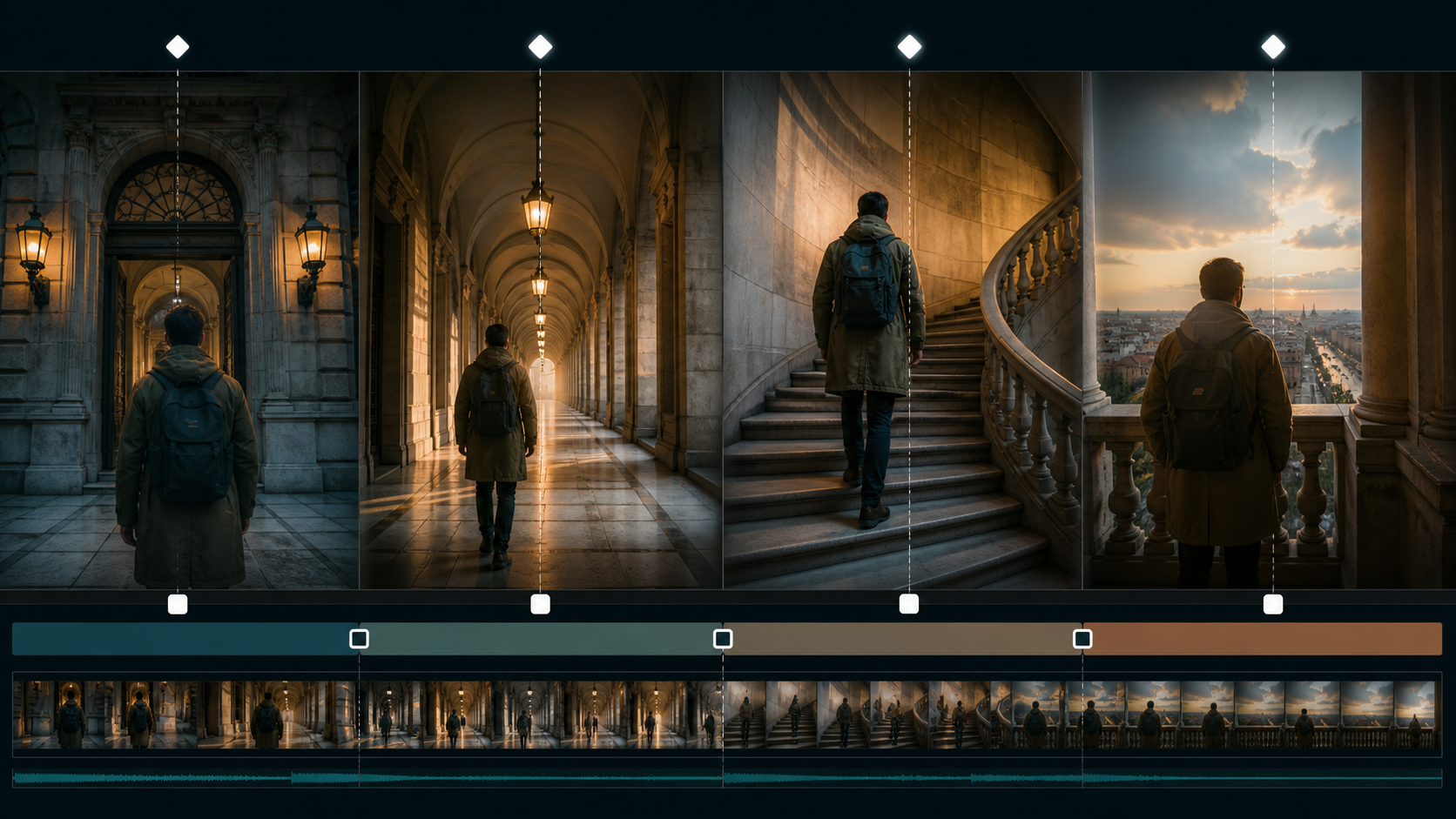
Break the intended action into beats with stable edit points. A traveler moving from entrance to observation deck might become:
- enter through the arch and stop;
- walk down the corridor;
- climb the staircase;
- reach the balcony and look outward.
Each segment has one action and one endpoint. Transitions occur on a stable pose, foreground wipe, doorway, turn, or cutaway. This structure preserves the feeling of continuous progress without demanding one uninterrupted generation.
Create Continuity Anchors
Character anchors
Adult age, face, hair, build, costume silhouette, materials, accessory placement, and prop.
Environment anchors
Floor plan, doors, windows, columns, staircase direction, practical lights, and time of day.
Camera anchors
Shot height, lens feel, framing, movement direction, and speed.
Motion anchors
Screen direction, gait, lead foot, body orientation, prop hand, and the exact endpoint of each beat.
Technical anchors
Aspect ratio, frame rate, color space, resolution, sharpening, grain, and audio format.
Keep these in a shot bible and compare every segment before extending or editing.
A Source-Inspired Workflow
The source page’s loop is: choose a mode, describe the scene, add an optional reference, select format and duration, then download or remix. Expand it for long clips.
- Approve a master still. Use a permitted general text-to-image workflow for an original adult character and location.
- Generate the first beat. Use image-to-video on the authorized master and request one action with a stable end pose.
- Extract the clean boundary. Trim corrupted tail frames and save the last approved frame plus several preceding frames.
- Continue immediately. Describe only the next beat. Preserve identity, environment, camera, light, and motion direction.
- Repair style carefully. A permitted video-to-video pass may match texture or color, but repeated transformations can amplify drift.
- Assemble continuously. Place segments in the edit as soon as they pass review and match picture and sound across each seam.
These VideoAny links are general routes governed by current policies. They do not imply unrestricted adult generation or inherit the source’s claims about duration, speed, resolution, privacy, or ownership.
Prompt Structure for a Continuation Segment
Use the source’s subject, wardrobe, environment, lighting, camera, and motion categories, but state what must remain unchanged:
Continue from the approved boundary: same original fictional adult traveler, 35 years old, same face, dark hair, olive knee-length coat, black backpack, body scale, and screen direction; same stone corridor, repeating arches, amber wall lamps, and late-afternoon light from the right; natural 40 mm perspective, slow forward tracking camera at the same height and speed; traveler walks four steps to the staircase and stops with right hand on the rail; preserve identity, coat, backpack, architecture, horizon, reflections, and exposure; no new people, cut, zoom, text, or logos.
The next segment should begin from the stated endpoint, not from a rewritten summary of the whole scene.
Build Edit Handles
Ask for a brief stable hold before and after each action. Editors need several usable frames for trims, dissolves, speed changes, or cut-on-motion decisions.
Good seam opportunities include:
- passing behind a column or doorway;
- a close-up of a prop or hand;
- a reaction shot;
- a foreground object filling the frame;
- a matched body turn;
- a deliberate cut to a new shot size.
Do not force an invisible join when an intentional cut improves story rhythm.
Audio Makes Duration Feel Continuous
Build a scene-level audio bed across all segments:
- room tone or exterior ambience;
- footsteps with consistent cadence and surface;
- fabric and prop movement;
- licensed music spanning the edit;
- dialogue recorded and timed before lip sync;
- reverb matched to corridor, stairwell, and balcony.
Visual segments can cut cleanly while continuous sound preserves space and time.
Common Long-Clip Failures
Identity drifts after each extension
Return to the approved master and character pack rather than using a corrupted boundary. Shorten segments and reduce rotations.
The location changes layout
Use a floor plan, stable background plates, and intentional cuts between zones. Do not ask one generation to invent an entire journey.
Motion resets at boundaries
Record gait phase, screen direction, camera velocity, and prop position. Cut on motion or insert coverage when exact continuation fails.
The shot becomes monotonous
Long duration does not require one camera angle. Use coverage, reaction shots, inserts, and changes in shot size to maintain attention.
File specifications vary
Conform frame rate, resolution, color, sharpening, and audio before final assembly. Verify downloaded properties instead of trusting labels.
Verifying Product Claims
If a service advertises long clips or 1080p, measure maximum duration, actual pixel dimensions, frame rate, bitrate, compression, and temporal consistency. Record how credits and failures work for extensions.
For privacy and ownership, review retention, deletion, training use, gallery defaults, human review, subprocessors, and transformation rights. Crypto payment does not guarantee anonymity, and ownership cannot cure an unlicensed source clip or likeness.
Final Checklist
- Every depicted person is clearly adult and consented to all intended uses.
- Source media, identities, music, and designs are owned or licensed.
- The long action is divided into short beats with stable endpoints.
- Character, environment, camera, motion, and technical anchors are documented.
- Each boundary frame is clean before it becomes a new reference.
- Picture and sound remain continuous across seams.
- Final frame rate, resolution, color, and bitrate are consistent.
- Disclosure, age gating, and destination-platform rules are satisfied.
FAQs
Is one long generation better than several short clips?
Not necessarily. Short controlled segments are easier to approve, replace, and edit while often preserving identity better.
How should I hide extension seams?
Use stable poses, cut on motion, foreground wipes, inserts, or intentional changes in shot size. Continuous audio helps.
What should stay constant across segments?
Adult identity, costume, props, screen direction, environment geography, camera language, light, and technical export settings.
Does this article claim VideoAny is uncensored?
No. It separates source-platform marketing from general VideoAny routes governed by current policies.
Conclusion
Long AI clips are built through continuity discipline. Break the journey into beats, approve every boundary, preserve the shot bible, and let editing and sound carry time across segments. Duration becomes useful when the character and world remain intact.