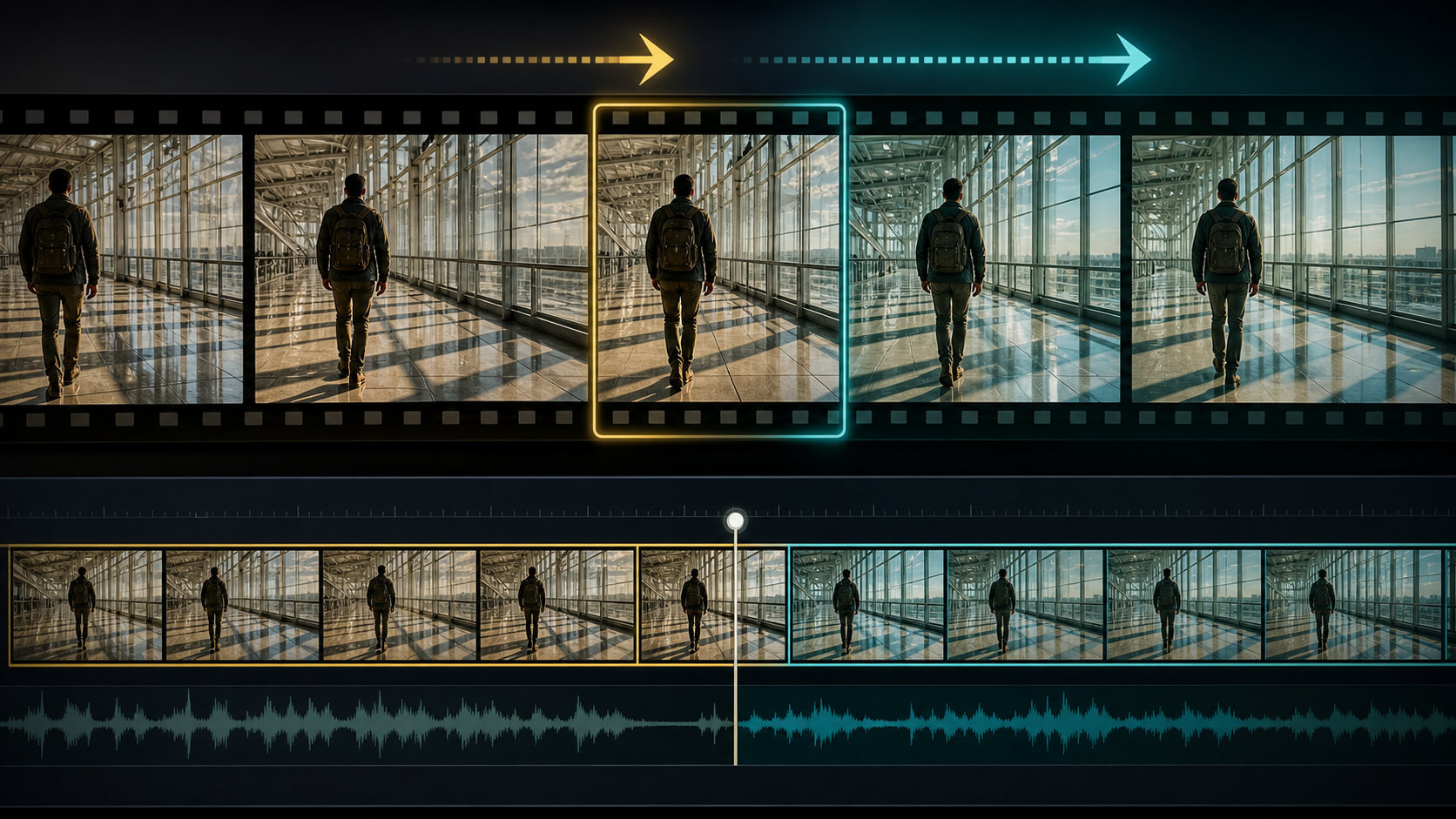
Extension Is a Continuity Problem
An AI video extender begins from the end of an existing clip and predicts what happens next. The difficult part is not creating more frames; it is preserving identity, pose, direction, camera velocity, light, reflections, and environment across the boundary.
The reference page markets an adult-only, unrestricted platform with text, image, and video modes; optional references; 1080p output; multiple aspect ratios; fast results; private storage; ownership; anonymous use; and crypto payment. Those are source-platform claims, not VideoAny guarantees. Verify current features, file output, price, privacy, acceptable-use rules, and commercial terms directly.
For mature footage, every depicted person must be clearly adult and consenting, and the input video must be owned or licensed for transformation. Never extend content involving minors or non-consenting people, and never assume a downloaded clip grants modification rights.
Pick the Right Boundary
The final frame of a source clip becomes the first reference for the extension. Choose a boundary with:
- a clear adult face or a deliberate non-face angle;
- stable anatomy and hands;
- readable body pose and motion direction;
- minimal occlusion or motion blur;
- consistent costume and props;
- straight background geometry;
- predictable lighting and reflections;
- no half-completed cut, flash, or transition.
If the last frames are corrupted, trim backward to the most stable moment. Extending from a bad frame preserves and amplifies the defect.
Measure Motion Before You Continue It
Describe what is happening at the boundary:
- subject velocity and screen direction;
- camera pan, tilt, dolly, zoom, or handheld drift;
- gait phase or gesture phase;
- prop trajectory;
- fabric, hair, water, smoke, or particle movement;
- light flicker and shadow direction;
- background parallax.
A person mid-step needs the next gait phase, not a reset to a neutral pose. A rightward pan should not become a leftward dolly. Motion continuity is often more important than visual detail in hiding the seam.
A Source-Inspired Extension Workflow
The source page describes selecting a mode, describing the scene, adding a reference, setting duration and aspect ratio, then downloading or remixing. Apply that loop specifically to extension.
1. Prepare the source
Confirm rights, consent, adult age clarity, frame rate, resolution, aspect ratio, and color space. Remove damaged tail frames and export a clean mezzanine file.
2. Extract a boundary packet
Save the final stable frame, several preceding frames, the original prompt if available, and notes for character, costume, environment, light, camera, and motion.
3. Write only the next beat
Describe what happens immediately after the boundary. Do not recap the whole clip or introduce a location change, new wardrobe, and complex action at once.
4. Generate a short extension
For supported material, VideoAny’s general image-to-video route can test continuation from an approved boundary frame. A permitted video-to-video workflow may support style or motion transformation, while text-to-video is better for replacement coverage than strict continuation.
5. Compare across the seam
Watch at full speed, half speed, and frame by frame. Check identity, gait, camera velocity, background lines, exposure, color, grain, and sound.
6. Hide the join honestly
Use a cut on motion, foreground wipe, brief insert, sound bridge, or matched dissolve when a mathematically seamless continuation is not possible. Editing is part of the workflow, not a failure.
These VideoAny links are general routes subject to current rules. They do not imply unrestricted adult extension or inherit the source’s claims about resolution, speed, privacy, or ownership.
Extension Prompt Anatomy
The source recommends subject, wardrobe, environment, lighting, camera, and motion. For continuation, explicitly preserve the boundary state:
Continue directly from the approved final frame: same original fictional adult traveler, same olive jacket, black backpack, walking phase, body scale, and screen position; same sunlit glass corridor, window grid, long floor reflections, and warm-left/cool-right color balance; camera continues a slow forward tracking move at the existing speed; traveler completes two more steps and stops beside the next pillar; preserve face, gait, backpack straps, architecture, horizon, and exposure; no cut, zoom, new people, text, or logos.
Avoid poetic restatement. Continuation prompts should read like continuity notes.
Audio and the Extension Boundary
Video extenders may not preserve production sound. Build a separate audio bridge:
- continue room tone across the join;
- carry footsteps at the same cadence;
- match reverberation to the space;
- avoid an abrupt music or ambience reset;
- use licensed effects and dialogue;
- crossfade only where it does not smear a transient.
A stable sound bed can make a small visual seam less noticeable, while an audio discontinuity can expose an otherwise good extension.
Common Extension Failures
The subject takes a duplicate step
Identify gait phase and trim to a different boundary. Specify the next foot and endpoint only if the model can follow that detail reliably.
Camera motion resets
Measure direction and approximate speed. Use a fixed camera if continuation control is insufficient, then cut to the new angle.
Face or costume changes
Use the approved identity packet, shorten the extension, and avoid rotation or occlusion near the seam.
The background bends
Choose a boundary with stable geometry, reduce camera movement, or generate the character separately from a clean background plate.
Color shifts at the join
Match exposure and white balance before generation, then perform a shot-level color match in post. Do not hide a large identity change with grading.
Verifying Product Claims
If a service promises 1080p, several ratios, or fast output, inspect dimensions, frame rate, bitrate, compression, actual time, and whether failures consume credits. Confirm whether audio is preserved and whether “extension” maintains the original frame rate.
For privacy and ownership, review retention, deletion, training use, gallery defaults, human review, subprocessors, and transformation rights. Crypto payment does not guarantee anonymity, and output ownership cannot cure an unlicensed source video or likeness.
Final Checklist
- Source video and every depicted adult are authorized for transformation.
- Boundary frame has stable identity, anatomy, geometry, and light.
- Motion, camera, fabric, props, and effects are documented.
- Extension contains one immediate beat and a clear endpoint.
- Identity, costume, environment, exposure, and horizon match across the seam.
- Audio cadence, room tone, and reverberation continue naturally.
- Downloaded technical properties match the edit timeline.
- Disclosure, age gating, and destination-platform rules are satisfied.
FAQs
How long should the first extension be?
Use the shortest duration that completes one beat. Short extensions are easier to match and replace.
Can I extend any online clip?
No. You need the necessary video, performance, likeness, and transformation rights.
What if the seam cannot be hidden?
Use an intentional cut, insert, foreground wipe, or sound bridge. Continuity editing is often more reliable than repeated generation.
Does this article claim VideoAny is uncensored?
No. The source platform’s marketing is separated from general VideoAny routes governed by current policies.
Conclusion
Successful video extension starts before the new frames are generated. Choose a clean boundary, measure the motion, preserve the approved adult identity and environment, request one next beat, and finish the seam in an editor. More duration is valuable only when continuity survives it.