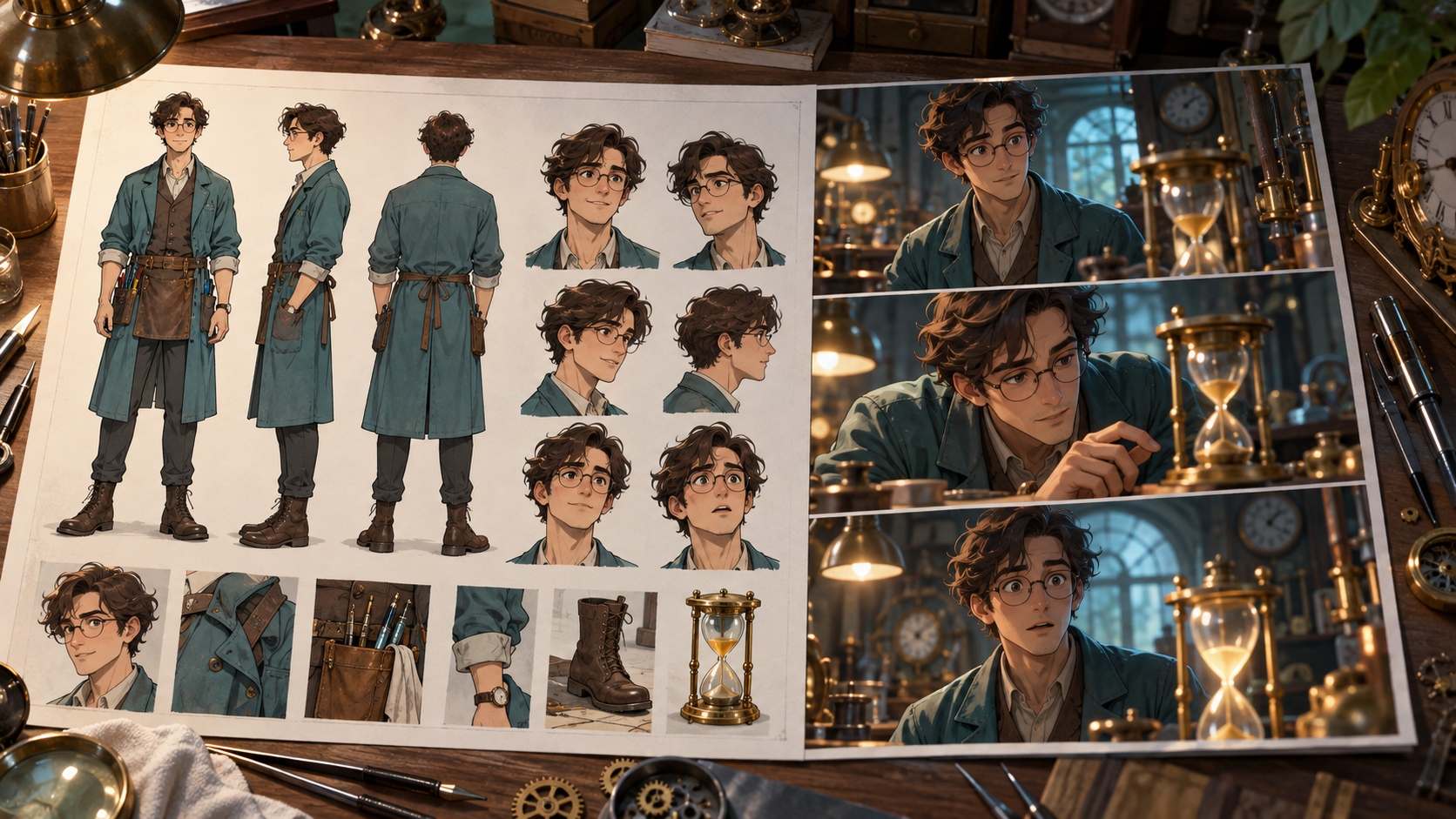
A polished character sheet looks finished, but when you try to animate a scene, the model returns a stranger's face or warps the costume mid-action. The problem isn't the collage—it's that the drawings don't agree on construction. A production-ready sheet requires consistent geometry across views, clean reference crops, actionable movement notes, and early calibration tests that reveal fragile identity moments before you commit to complex choreography.
Check Construction Agreement Before Exporting References
A sheet functions as visual evidence only when face structure, eye spacing, hair volume, accessory placement, clothing seams, and body proportions match across every drawing. Inspect the front view against the three-quarter and profile: does the jawline curve the same way? Do the eyes sit at the same height? Does the hairstyle occupy the same skull volume? If one sketch shows narrow shoulders and another shows broad ones, the model will interpolate unpredictably.
Check accessories and costume details with equal rigor. A necklace that sits at the collarbone in one view and mid-chest in another will flicker or vanish. Fabric folds, button placement, and hem length should follow the same garment logic in every pose. When construction conflicts, redraw the inconsistent view or mark it as unusable rather than hoping the model will choose the correct interpretation.
Separate Usable Views and Remove Layout Artifacts
Once construction agrees, isolate face closeups, three-quarter portraits, profile silhouettes, front and back full-body poses, expression studies, detail callouts, palette swatches, and outfit variants into individual clean crops. Remove human-readable labels, grid lines, comparison arrows, extra figures, and decorative borders unless your chosen workflow explicitly accepts structured multi-panel sheets. Many image-to-motion models treat layout elements as part of the scene and will animate text or replicate background figures.
A clean crop shows only the character against a neutral or contextually appropriate background. If the original sheet uses a white canvas with pencil construction lines, erase the lines or export the finished ink layer. If expression studies share a single artboard, separate each face into its own file. The goal is to give the model unambiguous visual input: this specific character, in this specific pose, wearing this specific costume, with no competing information.
Add a Movement and Performance Brief
Personality adjectives like "confident" or "anxious" mean nothing to a motion model. Translate them into visible actions: does the character stand with weight evenly distributed or shift from foot to foot? What is their default stride length and pace? Do they gesture broadly or keep their hands close to their body? What is their baseline facial energy—neutral and watchful, or quick to smile?
Document stress behavior and moving materials. Does the character freeze when startled, or do they step back? How does their hair move—stiff and short, or long and flowing? Does their coat hang heavy, or does it billow? These physical constraints guide prompt writing and help you recognize when a generated clip contradicts the design. A character brief that says "brave knight" is useless; a brief that says "stands square, slow deliberate steps, keeps sword hand near hilt, cloak drapes without fluttering" gives you something to check.
Pick One Small Dramatic Change for a First Scene
Avoid empty repeated gestures—a character waving at the camera or walking in place teaches you nothing about identity stability under narrative pressure. Instead, choose a single small moment where the character learns or decides something. A test scene might show them noticing a sound, reading a message and reacting, or making a choice between two objects.
Consider a new character, Mira, a courier in a weathered jacket. Her sheet shows a lean build, short dark hair, a scar across her left eyebrow, and a satchel strap crossing her chest. A useful first scene: Mira stands in a dim hallway, glances down at a data tablet in her hand, her expression shifts from neutral to concerned, and she looks up toward an unseen doorway. This twenty-second sequence tests face stability during an expression change, accessory coherence when the satchel strap moves with her torso, and whether the model maintains her scar and hair shape across three distinct actions.
Plan Context, Action, and Reaction Coverage
Break the scene into shots, each with its own reference image and motion prompt. Gaze direction, lighting quality, wardrobe state, and prop position must pass coherently from one shot to the next. A simple three-shot structure for Mira's hallway scene:
| Shot | Context | Action | Reaction |
|---|---|---|---|
| 1 | Medium shot, Mira centered, dim hallway, tablet in hand | Looks down at tablet, face illuminated by screen glow | Eyebrows draw together, lips press into a line |
| 2 | Close-up, Mira's face, screen glow from below | Eyes widen slightly, scar visible above left brow | Gaze shifts from tablet toward off-screen doorway |
| 3 | Medium shot, Mira from side, hallway extends behind her | Lowers tablet, turns head and shoulders toward doorway | Weight shifts onto back foot, hand moves toward satchel strap |
Each shot uses a reference crop from Mira's sheet—front three-quarter for shot one, face closeup for shot two, side profile for shot three—and the motion prompt describes only the action, camera behavior, and timing, not every visible costume detail already present in the reference image.
Write Focused Motion Prompts
For image-conditioned generation, the reference picture already shows the character, costume, and environment. Concentrate the text prompt on what changes: the specific action, camera movement if any, timing cues, and physical constraints. Avoid overlong negative-instruction lists.
A motion prompt for Mira's first shot might read: "Character looks down at the tablet in her hands, face lit by screen glow. Eyebrows draw together, expression shifts to concern. Subtle weight shift, shoulders remain square. Camera static, medium framing. Three seconds, slow deliberate motion."
This prompt does not relist "weathered jacket," "satchel strap," or "scar above eyebrow"—those details are visible in the reference image. It focuses on the action (looking down, expression change), physical constraint (shoulders square, subtle weight shift), camera behavior (static), and timing (three seconds, slow). The model may or may not preserve every detail perfectly; the prompt simply requests the intended motion without making guarantees.
Calibrate the Most Fragile Identity Moment Early
Generate the shot that tests the hardest identity challenge first. For Mira, that's shot two—the face closeup during an expression change. Inspect face geometry: does the jawline match the reference? Hair shape: does the short cut maintain its volume and silhouette? Accessories: is the scar still visible above the left eyebrow, or did it migrate or vanish? Fingers and objects: if her hand enters the frame, are the fingers plausible? Costume geometry: does the jacket collar sit at the same height? Background stability: do supposedly stationary walls warp or drift?
If the closeup fails—the scar disappears, the face structure shifts, or the hair becomes a different length—improve the reference image or try a different crop before adding camera complexity or longer duration. A weak reference will not improve with a more detailed prompt. Some models may accept a full character sheet as input, others may require clean single-pose crops, and some may benefit from pinned start or end frames; these capabilities vary by model and are not universal.
Organize References and Settings for Reuse
Keep permanent character designs separate from episode-specific conditions. Mira's core reference folder contains her face, profile, full-body, and expression crops, plus her movement brief and costume notes. A scene-specific folder for the hallway sequence holds the tablet prop reference, lighting setup notes, the three-shot table, and the motion prompts with any model-specific settings—resolution, duration, motion strength, or seed values that produced acceptable results.
Version each approved clip with a meaningful name: mira_hallway_01_tablet_look_v3.mp4 tells you which scene, which action, and which iteration. When you return to the character for a new scene, you'll know which references and settings worked. This is a manual file-and-folder task; organize it in whatever system you prefer.
Edit Accepted Clips Early and Diagnose Failures
Place approved clips on a timeline as soon as you have them. Evaluate actual screen direction: does Mira's gaze in shot two connect logically to her head turn in shot three? Action timing: does the expression change feel too slow or too abrupt? Remove empty frames at the head or tail of each clip. Listen across audio cuts if you've added sound.
When a clip fails, categorize the problem: identity failure (face changed), action failure (wrong motion or no motion), camera failure (unintended zoom or pan), continuity failure (costume or prop inconsistency), or timing failure (too fast, too slow, or stuttering). Some failures require a new reference image, others need a rewritten prompt, and some can be fixed with local editing—a freeze frame, a speed ramp, or a mask to stabilize a warping background. Diagnose before generating again.
Frequently Asked Questions
Can I start with just one character image?
A single approved image can be useful for a supported limited-angle, modest-motion experiment. Views or details absent from it need careful output review, and extra consistent references can help where the selected workflow supports them. The reference provides visual information the system uses during generation.
Do text labels on the sheet help the model?
Text labels serve human collaborators. Clean crops without labels guide models more reliably, though some workflows may handle annotated sheets differently. Test your specific toolchain.
How much motion should I request in a first test?
Limited medium framing and a single readable action—a head turn, a glance, a hand gesture—reveal identity stability better than a long action sequence. Calibrate before choreographing.
Do I need storyboards for a single test clip?
A single test needs little planning. A multi-shot scene benefits from rough coverage panels or a shot list so you know which references and prompts to prepare.
What if the generated clip changes the character's face?
Check reference image quality first: does the face construction agree across your sheet views? Try a cleaner crop, a closer framing, or a different pose. Some models preserve identity better with certain angles or lighting. If the reference is sound and the model still fails, that specific shot may exceed the model's current capability.
Rights and Permissions Reminder
Verify your actual rights and agreed usage terms for character designs, reference artwork, and voices in your project. Keep source and permission records, and obtain consent when using real identities or voice references. Check applicable terms and authorizations before proceeding with your workflow.
Conclusion
A character sheet becomes production-ready when its views agree on construction, references are clean and separated, movement is described in physical terms, and early tests reveal which identity details are fragile. Plan coverage as context/action/reaction, write focused motion prompts, calibrate the hardest shot first, organize references and settings for reuse, and edit accepted clips early to diagnose failures. This workflow applies regardless of which image-to-motion tool you choose.
If you're ready to test your character references with image-conditioned motion generation, explore image-to-video workflows and experiment with model-specific controls. Results will vary; use early tests to learn what your references and prompts can reliably produce.