
External visual reference from Textideo. Not a VideoAny-generated result.
The celebration has two easy-to-read gestures: both hands move behind the ears, then the arms open wide. The face supplies the playful attitude while a stadium crowd gives the gesture its context. You can use your own appearance rather than dressing as a footballer.
AI Enzo Celebration on VideoAny creates a 5-second, 720p video with Seedance 2.5 for 568 credits. It starts from one uploaded person photo, follows that photo’s aspect ratio and develops a stadium celebration. The output is silent and the movements come from a fixed preset.
1. Choose a photo that leaves room for both arms
Use one sharp upper-body or full-body photo with the face visible. An upright posture with arms relaxed and separated from the torso provides a useful starting point. Leave space beside the shoulders for the final open-arm gesture.
Avoid a tight face crop, hands already covering the ears or another person overlapping the arms. Hair can remain part of the look, but a clear view of the sides of the head helps when reviewing whether the hands land plausibly.
You do not need a football shirt or pitch in the source image. The preset uses the person’s own clothing as a reference and creates the stadium setting. Fine details, likeness and anatomy can still vary in the result.
Crop before uploading for the intended post. A landscape image gives the outstretched arms more side room. A vertical composition can work, but it is worth leaving a wider margin around the body rather than choosing a close portrait. The output follows your photo’s shape.
2. Upload and check the generation panel
Open the effect, sign in and select Click to upload. Choose a JPG or PNG up to 20 MB, then inspect the preview for a clear face and readable shoulders. Wait for uploading to finish.
Confirm the displayed Seedance 2.5 · 720p, 5-second clip, photo-based aspect ratio and 568-credit cost. This effect does not need a custom celebration prompt or a second pose image. The intended sequence is already part of the preset.
Select Generate once when your image and balance are ready. Processing may take several minutes. If progress checking fails or the task takes longer than expected, review generation history before starting a second request.
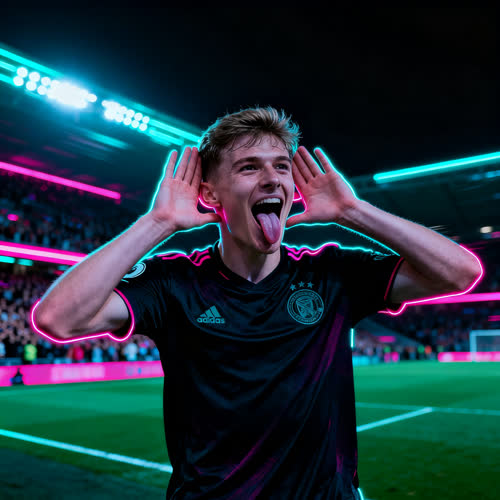
External visual reference from Textideo. Not a VideoAny-generated result.
3. Inspect the hands at the ears and during the release
Watch the complete clip at normal speed first. The viewer should understand the ear gesture and the final arms-wide pose as two parts of the same short celebration.
Pause at the gesture’s peak and check:
- Both hands: they should sit behind or beside the ears, with wrists and elbows connected naturally.
- Face: the expression should remain recognizable and playful while the hands are close to it.
- Release: the hands should move away without dragging or distorting the face or hair.
- Frame edges: the final open arms should have enough room to read, even if the hands approach the sides.
The background crowd should support the celebration without taking over the lead role. A vivid stadium is less useful if the main person’s hands merge with their head.
4. Choose a clearer input for the failed detail
If fingers or wrists distort, use a photo with simpler arm placement and visible shoulders. If the face changes, choose a sharper, less filtered front-facing image. If the final gesture is clipped, loosen the source crop before trying again.
The effect is designed around this compact celebration, so it does not offer exact control over the hand trajectory, expression or stadium arrangement. Review the generated movement rather than expecting a copy of a particular match recording.
5. Download and finish the celebration edit
Use Download video when the result is ready. Add music or crowd sound separately, since the generated file contains no stadium audio. Place captions below the face or above the outstretched arms and keep the ear gesture visible. Preview the final crop on a phone before posting, and identify the scene as AI-generated. The preset uses your subject’s appearance and is independent of Enzo Fernández and any club.