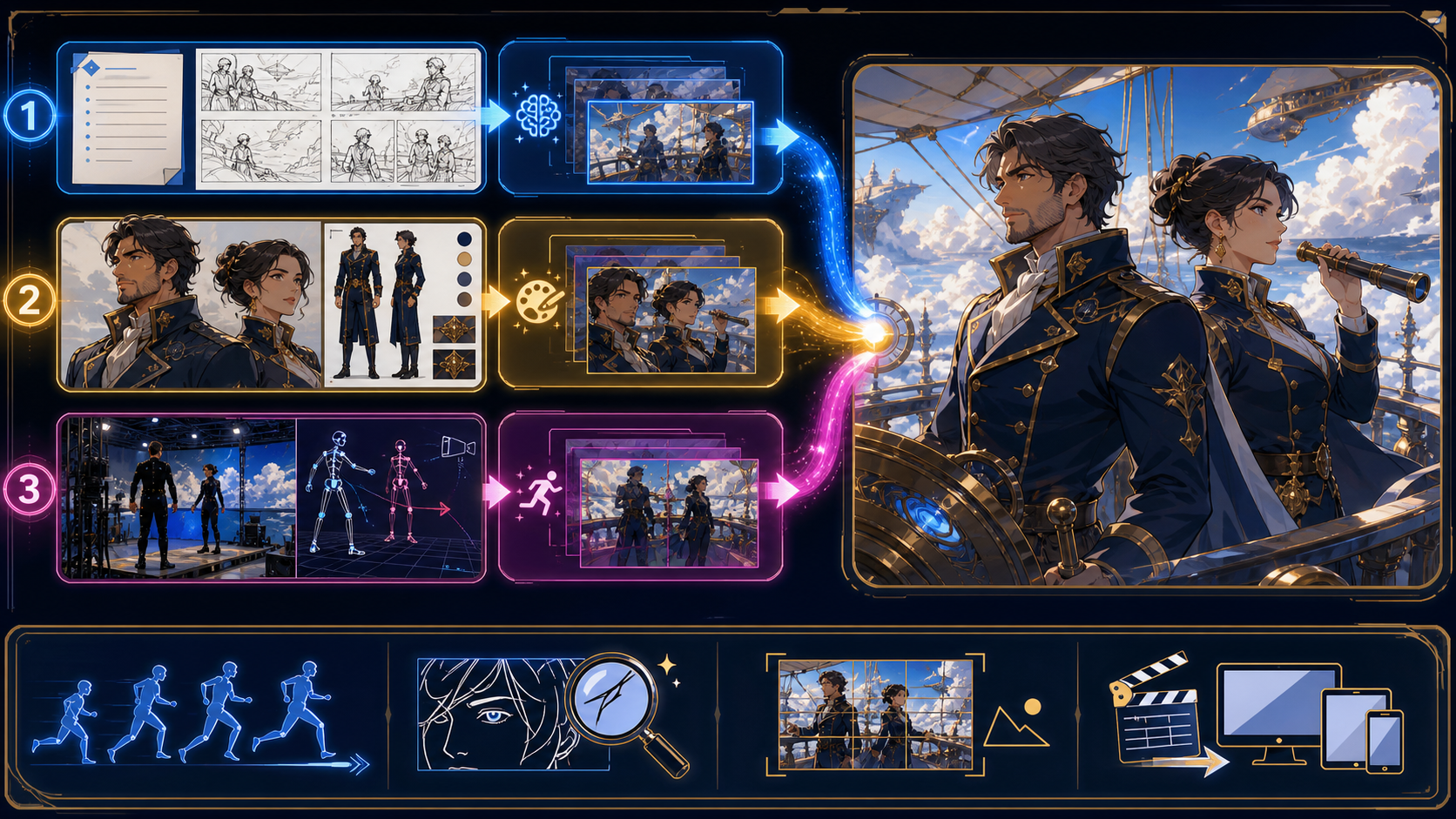
To generate NSFW anime videos with AI, start with a storyboard rather than a long prompt. A storyboard decides what changes from shot to shot; the generation method decides which existing asset anchors each shot. Text is useful when the composition is open, an illustration anchors character design, a compatible reference can guide selected models, and owned footage can preserve motion.
The reference page organizes its argument around unrestricted creative expression, four generation methods, credits and output formats, a comparison with restricted alternatives, seven getting-started steps, and seven FAQs. That structure is valuable. Its fixed per-second price, blanket 1080p claim, and “no filters” promises are not transferable to VideoAny, where capabilities and credit behavior depend on the selected model.
Adult-only boundary: Sexualized or intimate animation must involve clearly adult fictional characters or verifiably adult, consenting participants. Never depict minors, childlike or school-age-coded characters, or anyone whose age is uncertain. Never create non-consensual intimate media or use a real person’s likeness without explicit authorization.
Why creative freedom needs a storyboard
Creative freedom is often presented as the absence of moderation. For a filmmaker, it is more useful to define it as the ability to make purposeful choices: subject, staging, camera, palette, motion, pacing, and edit. A storyboard records those choices before a model begins inventing details.
This matters for three kinds of work the reference emphasizes:
- Original narratives: short action, romance, fantasy, or dramatic sequences built around fictional adults;
- Existing visual concepts: original or licensed illustrations that already establish a character and world;
- Motion experiments: authorized footage transformed into an anime treatment while retaining useful blocking.
None of these use cases requires “anything goes.” They require enough control to explore a niche idea, plus consent, rights, age clarity, and a destination that permits the final work.
Write the beat before the frame
Reduce the short to one change:
Two fictional skyship navigators in their mid-30s disagree about a storm route, notice a hidden passage, and choose it together.
Now split that change into beats: establish the deck, reveal the storm, exchange a look, find the passage, commit to the turn. A beat prevents the generator from producing motion that is attractive but narratively empty.
Board for handoffs
Every thumbnail should show subject position, eye line, screen direction, camera size, and the object or pose that continues into the next shot. Leave space for captions when the destination needs them. Use arrows for movement and note whether the camera holds, pans, pushes, or tracks.
For mature work, add an adult-age and consent marker to every character board. Reject a board that depends on ambiguous youth cues, coercion, incapacity, voyeurism, or an unauthorized identity.
Choose the method from the strongest starting asset
The source’s four-method spectrum becomes practical when each method answers one question: what must this shot preserve?
| What you already trust | First method to test | What it can anchor | What still needs review |
|---|---|---|---|
| A written beat | Text-to-video | Story intent, setting, action, camera language | Identity and composition may vary |
| An approved storyboard frame | Image-to-video | Face, costume, palette, opening composition | Motion can deform lines and anatomy |
| An authorized reference sheet | A selected model with reference support | Model-dependent identity or style cues | No guarantee of frame-level consistency |
| An owned performance or motion plate | Video-to-video | Timing, blocking, camera movement | Restyling can flicker or alter age and identity |
Text-to-video for open shots
Use VideoAny text-to-video for an establishing shot or action whose exact pose is not locked. Write the prompt as subject, action, setting, camera, and anime treatment:
Two clearly adult fictional skyship navigators, both in their mid-30s and fully clothed in navy flight uniforms, brace against wind on a luminous cloud deck; wide static camera, one deliberate glance toward a storm gap, crisp cel shading, cobalt and gold palette, stable adult faces, no text or logos.
Generate a short test. If the subjects exchange positions or become younger-looking, simplify to one subject or lock the composition with an image-led route.
Image-to-video for a trusted frame
Use VideoAny image-to-video when the board frame already establishes the visual identity. Prepare the still: separate silhouettes, resolve hands and props, remove unreadable marks, and make adult age visually unmistakable. Ask for one principal movement and one restrained secondary response.
Selected models may accept an end frame or other image inputs. These controls are not universal. If an end frame is available, align costume, light, screen direction, and camera axis so the model is not asked to bridge contradictory scenes.
Reference-capable models for recurring visual anchors
Some models support references. Use original, licensed, or explicitly authorized materials and confirm what the active model treats as reference input. A character sheet with a neutral front view, three-quarter view, limited expression set, palette, and costume details is more useful than a crowded collage.
A reference is guidance, not a lock. Inspect facial proportions, apparent age, hair, costume, prop, and linework across the whole clip. Never use an artist, copyrighted character, celebrity, partner, acquaintance, or private photograph without the rights and consent required for the exact use.
Video-to-video for solved motion
Use VideoAny video-to-video when footage you own or are authorized to transform already solves performance or camera movement. Cut the source into editorial shots before restyling. A source clip containing multiple cuts can cause flashes and identity resets.
For a two-person scene, verify who stands on each side, which hand holds a prop, and where eye lines point. Restyling can preserve broad motion while changing critical identity details.
Prepare an asset packet for every shot
Each storyboard frame becomes a small production packet:
- Shot purpose: the story information or emotional change;
- Approved source: prompt brief, illustration, reference, or motion plate;
- Rights record: creator, license, participant authorization, and intended use;
- Character anchors: explicit adult age, face, hair, wardrobe, and prop;
- Motion: one primary action, direction, tempo, and camera behavior;
- Look: line weight, shading, palette, background density, and light;
- Handoff: the frame state needed by the next edit;
- Reject rules: age ambiguity, identity drift, broken anatomy, coercive implication, or unsafe source use.
Name the packet by sequence and shot, such as S01_SH03. Keep candidate and setting notes under that identifier. This makes it possible to regenerate one weak shot without losing the continuity decisions around it.
Credits and output are model decisions
VideoAny uses a credit system, but there is no single platform-wide price formula that should replace the reference’s fixed rate. Many video models calculate credits from duration and may vary by resolution or settings. Other tools use a fixed generation cost. Check the selected configuration before submitting.
Record:
- model and mode;
- input count and type;
- displayed duration and resolution;
- selected aspect ratio;
- reference, end-frame, or other optional controls;
- displayed credit cost;
- generation date and candidate result.
This record turns budget planning into evidence. If the model or settings change, price the test again rather than extrapolating from an earlier shot.
Plan the ratio before generation
The reference calls out 16:9, 9:16, and 1:1. Those are common destinations, but available ratios depend on the selected model.
- 16:9 suits widescreen narrative staging and two-character blocking.
- 9:16 requires vertical movement, close framing, and deliberate caption zones.
- 1:1 favors centered subjects and compact spatial relationships.
Do not compose a wide two-person shot and crop it blindly into vertical delivery. Create ratio-specific boards and verify that the active model supports the chosen setting.
Verify resolution, do not promise it
Some VideoAny models offer higher-resolution modes, including select options up to 4K, while others provide different maximums. The selected model and configuration define the output. Review the actual exported dimensions and do not describe all generations as 1080p, 4K, or professional quality.
Compare tools on production evidence
The reference compares an unrestricted product with alternatives using content filters, control, expression, and community. A safer comparison keeps the same questions but replaces absolute claims with tests.
| Dimension | What to inspect | Useful evidence |
|---|---|---|
| Permitted creative range | Published policies and actual refusals | A benign test plus a clearly unsafe text-only boundary test |
| Input flexibility | Text, image, reference, and video support | Active model interface and accepted formats |
| Creative control | Ratio, duration, resolution, camera, end frame, references | Model-specific control list, not site-wide assumptions |
| Output reliability | Age, identity, linework, motion, continuity | Hard-frame and full-speed review across repeated tests |
| Cost transparency | Credits for the chosen configuration | Recorded pre-submit display |
| Data handling | Upload, output, history, retention, deletion | Current terms and account behavior |
| Publishing fit | Destination rules and disclosure needs | Release checklist for the intended channel |
No-filter marketing is not evidence of control. A useful platform makes its limits inspectable, lets creators choose compatible routes, and gives them enough information to review the result responsibly.
Seven steps from storyboard to finished short
The source’s seven-step onboarding sequence can be translated into a production sequence.
1. Define the audience and destination
Decide whether the short is widescreen, vertical, or square; how long it needs to be; where it will be published; and whether that destination permits mature animation. Plan disclosures, captions, and audio requirements now.
2. Clear the concept and sources
Confirm that all mature characters are clearly adult and that participants, illustrations, footage, music, and references are original or authorized. Record licenses and consent scope. Stop on any minor, ambiguous age, coercion, incapacity, voyeurism, or unauthorized real person.
3. Board the beats
Draw the shortest sequence that communicates the change. Mark screen direction, eye lines, camera, action, caption space, and shot handoffs. A six-shot short often needs six generation units, not one long render.
4. Assign a generation method
Choose text, image, a reference-capable selected model, or video transformation according to the asset that must remain stable. Confirm supported controls and source limits in the active interface.
5. Generate a low-complexity test
Test the main action with minimal effects. Record the configuration and displayed credits. Keep candidates short enough that a failure can be isolated and regenerated.
6. Review and repair
Watch at normal speed, scrub frame by frame, and compare adjacent shots. Inspect apparent age, identity, anatomy, hand-object contact, line flicker, costume state, palette, screen direction, and edit handles. Simplify or regenerate the smallest failing unit.
7. Edit, label, and archive
Assemble approved clips in a conventional editor. Add licensed sound, captions, transitions, and any required synthetic-media disclosure. Verify delivery dimensions, then archive prompts, sources, consent and license records, model settings, approved outputs, and edit notes.
Anime motion QA before sharing
Run three viewing passes.
Story pass
Mute the clip. Can a viewer understand the beginning, decision, and ending? Does each shot add information, or is it only decorative motion?
Continuity pass
Compare the last frame of one shot with the first frame of the next. Check character side, eye line, costume closure, prop hand, background geography, time of day, and emotional progression.
Safety and rights pass
Confirm clearly adult presentation in every mature frame, consensual context, authorized identities, cleared sources, lawful content, and destination fit. Remove any candidate that becomes childlike, ambiguous, non-consensual, or deceptively resembles an unauthorized person.
Frequently asked questions
Can AI anime tools generate without any restrictions?
No tool is exempt from law, consent, service terms, model behavior, or publishing rules. Treat “unrestricted” as a search phrase and evaluate actual controls and policies.
How much does it cost to generate an NSFW anime video?
There is no single VideoAny rate to quote for every model. Cost may depend on duration, resolution, and settings, while some tools use fixed per-generation credits. Check the active configuration before submitting.
What resolution can I generate?
It depends on the selected model. Some options support higher-resolution modes, including select models up to 4K; others have different maximums. Verify the model and exported file.
Which aspect ratios are available?
Support varies by model. Common destinations include 16:9, 9:16, and 1:1, but the actual selector defines what is available. Board for the destination rather than cropping after generation.
Do I need animation experience?
Traditional animation skill is not required to run a model, but storyboarding, shot design, editing, rights clearance, and frame-level review materially improve the result. AI generation does not remove production judgment.
Can I animate my own image or video?
Yes, compatible image and video workflows can use your material. “Your own” must mean created by you or authorized for the intended transformation and distribution. Check the active route’s file limits.
How should I compare content policies?
Read current terms, examine boundary language, test with harmless original assets, and verify that clearly unsafe requests are refused. Do not attempt to bypass safeguards or use real sensitive media as a test.
The shortest path is the best-anchored path
Generating an adult anime short is not a contest to write the longest prompt. Board the change, choose each route from the asset you trust most, record model-specific cost and controls, and repair one shot at a time. The result keeps the reference page’s useful multi-input and seven-step structure while replacing fixed-price, universal-output, and no-filter promises with evidence. Most importantly, it makes clearly adult presentation, consent, rights, and frame-level review part of the production—not a disclaimer added after export.