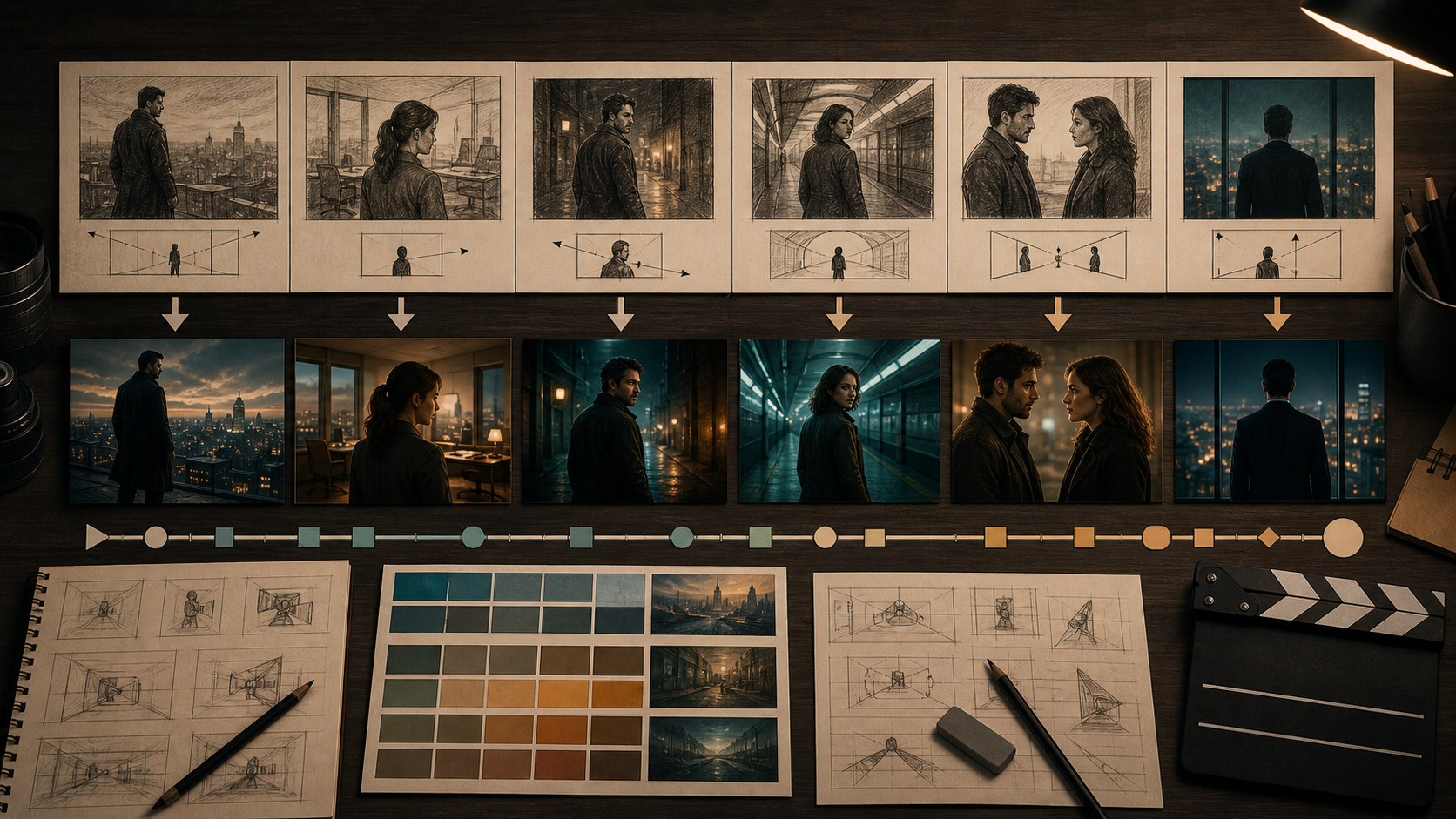
A Storyboard Is a Contract for the Shot
A storyboard tells the team what the audience must see, from where, and in what order. AI generation becomes more controllable when each board is treated as a shot contract rather than a loose inspiration image.
The reference page promotes an adult-only, unrestricted platform with text, image, and video modes; optional references; 1080p output; multiple aspect ratios; fast rendering; private storage; ownership; anonymous use; and crypto payment. These are source-platform claims, not VideoAny guarantees. Check the current interface, export files, pricing, privacy, content rules, and commercial terms yourself.
For mature work, every depicted person must be clearly adult and consenting. Use original fictional characters or authorized likenesses. Never depict minors, never fabricate non-consensual intimate media, and never upload a storyboard containing protected characters or unlicensed photography.
Make the Board Generation-Ready
Each panel should communicate:
- shot number and story purpose;
- adult characters present and their screen positions;
- camera size, angle, height, and movement;
- start pose, main action, and end pose;
- eyelines and screen direction;
- set geography and important props;
- intended duration;
- dialogue or sound cue timing;
- continuity details that cannot change.
Keep notes outside the image when sending it to a video model. Generated lettering often mutates, and text inside the panel can become unwanted scenery.
Build an Animatic First
Place the boards on a timeline using approximate shot lengths, temp dialogue, and rough sound. The animatic reveals pacing and coverage problems before generation.
Ask practical questions:
- Can the action fit within the planned duration?
- Does the editor have a wide, medium, close-up, and insert where needed?
- Do characters enter and exit on consistent sides?
- Are long dialogue sections covered by reaction shots?
- Is a difficult transition essential, or can a cut solve it?
- Does the aspect ratio preserve the composition?
Lock the board sequence before polishing every frame. A beautiful generated shot is wasted if the story no longer needs it.
Create a Shot Packet
For each approved panel, assemble one compact packet:
- clean storyboard image without text;
- character references with documented rights;
- environment reference or simple layout;
- prop references and left-right placement;
- lighting and color swatches;
- start and end frames, when available;
- one-sentence action description;
- camera and duration note;
- negative constraints for known defects;
- approval checklist.
Do not overload the packet with conflicting images. References should agree on character age, costume, lens, time of day, and style.
A Source-Inspired Workflow
The source page describes choosing a mode, describing the scene, adding an optional reference, selecting output settings, then downloading or remixing. Convert that into a shot pipeline.
1. Establish the keyframe
Use a permitted text-to-image workflow for original concepts or image-to-image on authorized boards to produce a clean start frame. Confirm adult age, character identity, composition, set, and rights.
2. Generate one motion beat
Use image-to-video for a single visible action. Begin with a fixed camera; add camera motion only after the performance is stable.
3. Review against the contract
Compare the clip with the storyboard, not with how impressive it looks. Check start pose, direction, eyeline, action, end pose, duration, and editability.
4. Generate alternatives strategically
Create variations for difficult beats, but change only one factor at a time. Label takes and keep the input packet attached to each result.
5. Edit continuously
Place approved clips into the animatic immediately. Adjacent shots expose continuity drift that may not be obvious in isolation.
These links are general VideoAny routes governed by current rules. They do not imply an unrestricted adult-video product or inherit the source’s claims about speed, resolution, privacy, or ownership.
Prompt Anatomy From a Board
The source recommends subject, wardrobe, environment, lighting, camera, and motion. Tie each item to something visible in the panel:
Same two original fictional adults from the approved references, both in dark coats, empty elevated train platform at night, cool overhead fluorescents with warm city light through windows, medium two-shot from chest height on a natural 50 mm lens, fixed camera, the woman turns from the window and takes one step toward the man while he remains still, preserve faces, costume, height difference, eyelines, platform geometry, and screen positions, no text or logos.
One character should drive the action. For complex interaction, split the board into setup, contact, and reaction shots.
Continuity Between Shots
Create a continuity row for every scene:
- costume and hair state;
- character handedness and prop location;
- time of day and key-light direction;
- weather and environment state;
- camera side of the action axis;
- emotional state at the cut;
- first and last frame of the approved take.
Use the end frame of one shot only when it is stable enough to guide the next. A corrupted hand or face will propagate if treated as a new reference.
Common Storyboard-to-Video Failures
The output ignores composition
Simplify the panel, remove notes, and state camera size and character placement. Use a clean keyframe rather than a busy board page.
Too much happens in one shot
Break the action at a clear pose or edit point. A storyboard panel can imply more time than one generation can sustain.
Characters cross the axis
Record screen direction and camera side in the shot packet. Reject mirrored takes unless the whole sequence is adjusted.
The clip has no usable ending
Specify an end pose and a brief settle. Editors need stable handles before and after the main action.
Dialogue and mouth motion do not align
Lock voice timing first and plan coverage. Generate lip sync as a separate step only after the performance and edit are approved.
Verifying Product Claims
If a service advertises 1080p and several aspect ratios, inspect downloaded dimensions, compression, and whether each composition is native or cropped. Record rendering time, credit use, and failure handling rather than relying on a speed claim.
For private or identity-sensitive boards, review retention, deletion, gallery defaults, training use, human review, subprocessors, and commercial rights. Crypto payment alone does not guarantee anonymity, and output ownership cannot grant rights in unlicensed boards, faces, scripts, logos, or music.
Final Checklist
- Every mature character is clearly adult; consent and likeness rights are documented.
- Storyboard, script, photos, characters, and designs are original or licensed.
- Animatic timing and coverage are approved before final generation.
- Each shot packet has one action, clear start and end poses, and consistent references.
- Screen direction, eyeline, props, costume, geography, and light match adjacent shots.
- Clips have stable editing handles and pass frame review.
- Dialogue, voices, music, fonts, and logos are licensed.
- Disclosure, age gating, and destination-platform rules are satisfied.
FAQs
Does one panel equal one generated clip?
Not always. A simple reaction panel may be one clip, while a complex action panel may need several shots.
Should notes remain visible in the storyboard image?
Keep notes in the shot packet, but send a clean visual reference to the model. Rebuild captions later.
What should be approved first?
Approve story timing and coverage in the animatic, then the keyframe, then performance, and finally camera and style.
Does this article claim VideoAny is uncensored?
No. The reference platform’s claims are separated from general VideoAny routes subject to current policies.
Conclusion
Storyboard-to-video work succeeds when the board remains the standard of truth. Lock the animatic, build a concise shot packet, generate one beat at a time, and compare every take with its contract. That process converts AI output into editable coverage rather than a collection of disconnected clips.