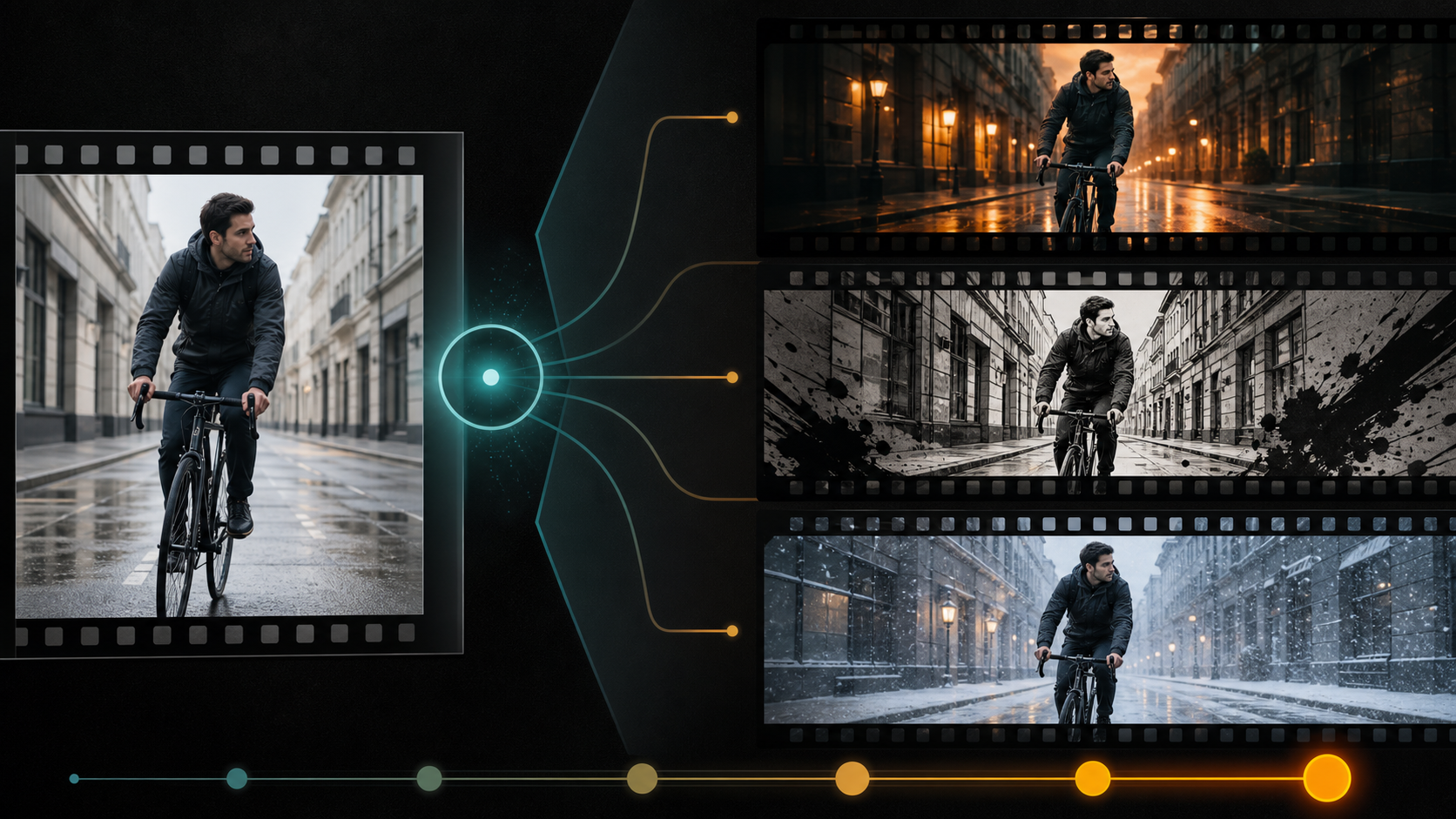
Video-to-Video Uses Motion as a Constraint
Video-to-video generation starts with existing footage and changes its appearance, environment, or selected content while trying to preserve timing and movement. It can be more controllable than text-to-video because the source already defines pose, camera path, action, and edit duration.
The reference page markets an adult-only, unrestricted platform with text, image, and video modes; optional references; 1080p output; multiple aspect ratios; fast results; private storage; ownership; anonymous use; and crypto payment. These are source-platform claims, not VideoAny guarantees. Verify current transformation controls, file specifications, costs, privacy, acceptable-use rules, and commercial terms directly.
For mature footage, every depicted person must be clearly adult and have explicitly consented to AI transformation and distribution. The source must be owned or licensed. Never transform minors or non-consenting people into intimate contexts.
Decide What May Change
Create two lists before processing.
Content lock
- adult identity and apparent age;
- body proportions, action, and timing;
- costume silhouette and key accessories;
- prop contact and screen direction;
- camera height, lens feel, movement, and framing;
- environment geometry and edit points;
- duration, frame rate, and audio timing.
Transformation target
- color and lighting mood;
- weather or time of day;
- surface style or medium;
- environment dressing;
- costume color within authorized boundaries;
- selected effects or atmosphere.
If the target conflicts with the content lock—such as changing a side-lit face to a light source on the opposite side—expect drift or redesign the shot.
Transformation Strength Is the Main Tradeoff
Low strength usually preserves motion and identity but may make only subtle visual changes. High strength can deliver a dramatic restyle while rewriting faces, hands, props, background geometry, and camera information.
Test three levels on a short representative segment. Compare the same frames and motion at each level. Choose the lowest strength that achieves the creative objective.
Do not repeatedly transform an already transformed output. Each pass compounds invented detail. Return to the authorized master and adjust settings from there.
Prepare the Source
- Use the highest-quality authorized file.
- Conform variable frame rate if necessary.
- Correct severe exposure, stabilization, or compression first.
- Split at scene cuts, flashes, and major occlusions.
- Remove text and logos that should be rebuilt later.
- Keep handles before and after each shot.
- Preserve an untouched source and rights record.
Short, clean shots are easier to transform and compare than an entire edited film.
A Source-Inspired Workflow
The source page describes selecting a mode, describing the scene, adding a reference, choosing output settings, then downloading or remixing. Apply it to transformation.
- Confirm adult consent and source rights. Include permitted transformation types and distribution.
- Select one representative shot. Include face, hands, motion, prop, and background detail.
- Write content lock and target. Keep them separate.
- Test low, medium, and high strength. Change no other setting.
- Review frame and motion. Check identity, age, anatomy, camera, geometry, and style stability.
- Process by shot. Tune close-ups, wide shots, dark footage, and fast motion independently.
- Match and finish. Conform color, texture, grain, audio sync, captions, and graphics in post.
VideoAny’s general video-to-video route may support permitted transformation workflows. Image-to-image can help test a still style before processing motion. Check current models and rules; these links do not imply an unrestricted adult-content service.
Prompt Structure
Use the source’s subject, wardrobe, environment, lighting, camera, and motion categories, but frame the prompt as preservation plus change:
Preserve the same original fictional adult cyclist, face, age, black waterproof jacket, bicycle geometry, pedaling cadence, body position, camera tracking path, street layout, and shot duration from the authorized source; change only the time and weather to early winter dusk with light snow, cool ambient sky, warm practical street lamps, and restrained cinematic contrast; snow follows wind and interacts with ground; stable identity, hands, wheels, architecture, and reflections; no new people, text, or logos.
Avoid restating appearance with conflicting traits. The source video already defines the performance.
Temporal Review
Watch the result at normal speed, then inspect high-motion and occlusion frames.
- Does the face retain adult age and identity?
- Do hands remain on the prop?
- Do wheels, limbs, and repeating patterns move consistently?
- Does the camera path stay the same?
- Does weather interact with the subject and ground?
- Do style, light, and texture flicker?
- Do straight lines remain straight?
- Does audio still match duration and action?
A compelling still frame is not enough. The transformation must remain coherent over time.
Common Video-to-Video Failures
Identity becomes a different person
Lower strength, use a clearer source, shorten the shot, and protect the face. Do not use unauthorized face references to repair it.
Hands detach from props
Reduce transformation around contact regions, split the shot, or composite the original hands and prop when rights allow.
Weather appears as a flat overlay
Describe direction, depth, occlusion, ground interaction, and light response. Add weather in post when generation cannot respect geometry.
Style flickers
Simplify the style recipe, lower strength, and process by shot. Use a final grade and texture pass for consistency.
Frame rate or audio changes
Verify the downloaded file, conform it to the project timeline, and check audio sync before further editing.
Privacy, Ownership, and “Unrestricted” Claims
The source claims private libraries, no prompt sharing, no real-name requirement, full ownership, and crypto payment. Verify retention, deletion, training use, gallery defaults, human review, subprocessors, and transformation rights in current policies.
Uploading a video exposes more identity and context than a single image. Use the minimum range needed and delete it according to consent. Payment method does not guarantee anonymity, and an output license cannot cure unlicensed source footage or likeness.
Final Checklist
- Every depicted person is clearly adult and consented to transformation.
- Source video and distribution rights are documented.
- Content lock and transformation target are separated.
- Lowest effective strength is selected from controlled tests.
- Processing is shot-based and returns to the clean master for revisions.
- Identity, age, hands, props, camera, geometry, light, and style pass temporal review.
- Export dimensions, frame rate, color, audio sync, and duration are verified.
- Disclosure, age gating, and destination-platform rules are satisfied.
FAQs
Is higher transformation strength better?
No. It creates larger changes but increases identity, anatomy, and geometry drift. Use the lowest strength that meets the brief.
Should I transform a whole edited video at once?
Process by shot. Cuts, lighting changes, and different motion require separate settings and make quality easier to audit.
Can output ownership fix missing source rights?
No. You still need rights to the footage, performance, likeness, music, graphics, and intended transformation.
Does this article claim VideoAny is unrestricted?
No. It distinguishes the source platform’s marketing from general VideoAny transformation routes governed by current policies.
Conclusion
Video-to-video works best when change has a boundary. Lock adult identity, motion, camera, and structure; define one transformation target; test strength; and review every shot over time. Freedom without a content lock produces drift, not control.