Evaluate the Generator, Not Just Its Landing Page
An NSFW AI POV video generator is usually marketed on freedom: fewer refusals, support for adult concepts, downloadable clips, identity references, multiple generation modes, private storage, and broad format choices. The reference page makes all of those claims, including 1080p delivery, anonymous use, crypto payment, one-credit-per-second pricing, multiple aspect ratios, and results in under a minute.
Those statements describe the source platform only. They are not VideoAny promises, and they should be verified against the source service’s current interface, terms, pricing, privacy policy, and actual exports. “Uncensored” is a marketing label, not evidence of quality, legality, privacy, or consent.
This guide turns the source page’s feature list and five-step workflow into a repeatable evaluation. It is intended only for consensual adult material involving fictional characters or adults who have explicitly authorized their likeness. Never use images of minors, never create non-consensual intimate media, and never assume a public photo grants permission for generation.
The Claims Worth Testing
The source groups its offer around seven capabilities. Each can be converted into a practical test:
| Source claim | What to verify yourself |
|---|---|
| Few or no content filters | Read the acceptable-use policy and test only authorized, policy-compliant concepts. |
| Full HD output | Download a file and inspect its true pixel dimensions, bitrate, frame rate, and compression. |
| Text-to-image and image-to-image | Check whether appearance, clothing, lighting, and pose can be revised independently. |
| Image-to-video and video-to-video | Measure identity drift, temporal consistency, and how closely motion follows the reference. |
| Anonymous and private use | Review required account data, public-gallery defaults, retention, deletion, and training opt-outs. |
| Crypto checkout | Confirm supported currencies, refund rules, network fees, invoices, and jurisdiction limits. |
| 9:16, 1:1, and 16:9 outputs | Verify whether each ratio is generated natively or cropped from another frame. |
A service can satisfy one row and fail another. For example, a file may be 1920×1080 while still looking soft because the underlying generation is smaller and upscaled. Likewise, a private library does not prove that uploads are deleted or excluded from model training.
A Five-Step Test Based on the Source Workflow
The reference page describes a short sequence: choose a mode, describe the scene, optionally upload an identity or style reference, select output settings, then download or remix. Keep that sequence, but add evidence at every stage.
1. Choose one controlled mode
Start with text-to-video to test prompt adherence without reference-media variables. Then repeat the same shot with an authorized image. Use video-to-video only after establishing a baseline, because source motion introduces another reason for success or failure.
VideoAny offers general text-to-video, image-to-video, and video-to-video routes for supported use cases. Check the current content rules and model controls before generating; this article does not describe VideoAny as an unrestricted NSFW service.
2. Describe a neutral POV test scene
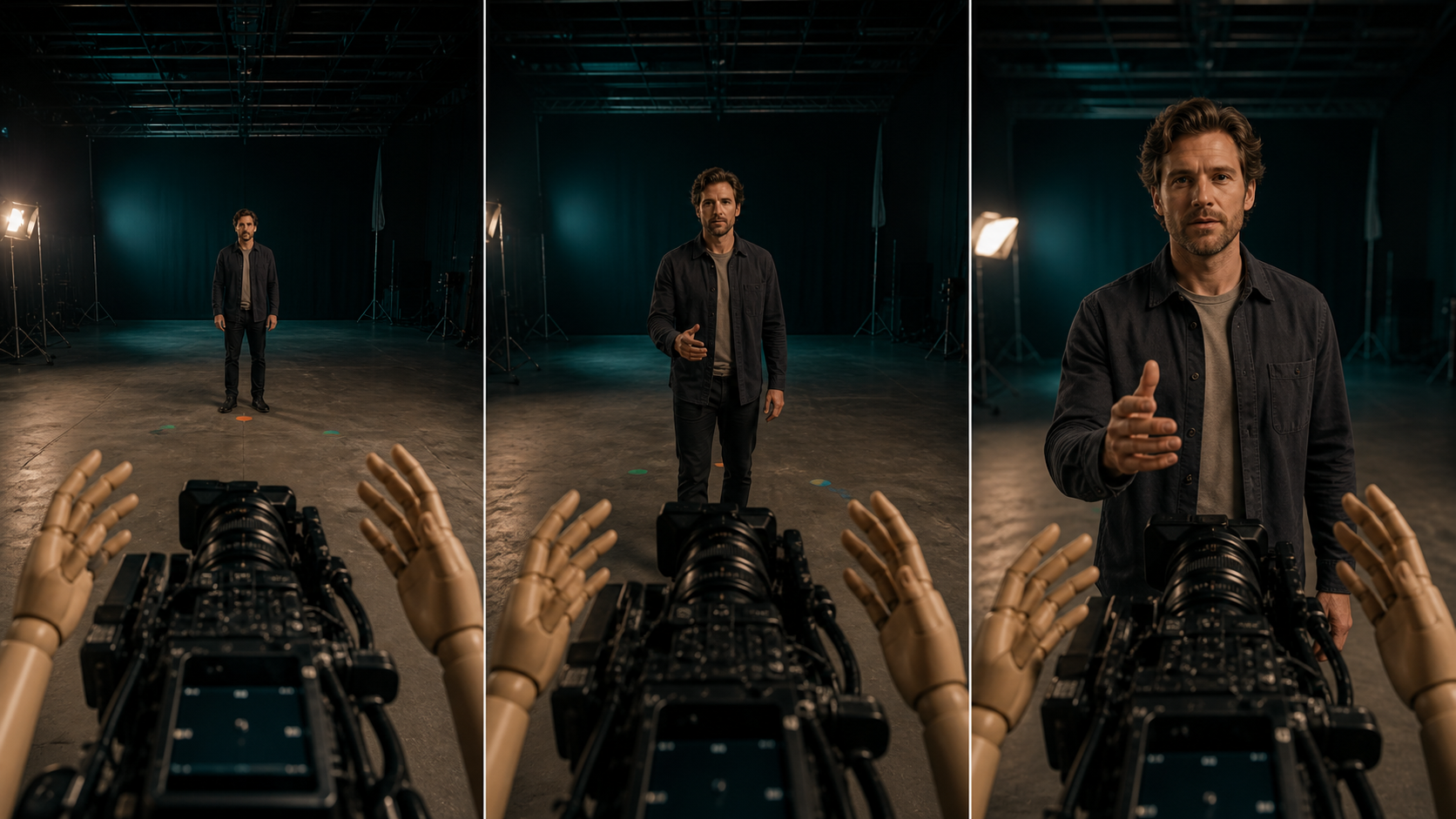
Use a fully clothed fictional adult in a simple studio. Ask the subject to look into the lens, walk from a far marker to a near marker, and extend one object toward the viewer. The scene tests eyeline, distance, hands, occlusion, and camera stability without sensitive content.
3. Upload the minimum reference data
If you test identity consistency, use an image you created or have explicit permission to use. Strip unnecessary metadata, avoid unrelated people in the frame, and record whether the service offers deletion controls. Do not upload private material merely because a landing page says the workspace is anonymous.
4. Lock output settings
Run the same prompt at one duration and aspect ratio before changing variables. Record generation time, charged credits, failure handling, watermarks, export dimensions, and whether a failed render consumes payment.
5. Download and remix once
Inspect the original export before a second pass. Then apply one controlled change—such as a warmer grade or slower camera move—to learn whether the remix preserves identity and composition. Multiple simultaneous changes hide the cause of any improvement or failure.
A POV Prompt Designed for Benchmarking
The reference page recommends combining subject, wardrobe, environment, lighting, camera, and motion. That is a sound structure. For a benchmark, make each part observable:
Fictional consenting adult performer, dark jacket and gray shirt, empty professional test stage, teal backlight and warm key light, first-person camera at adult eye level with natural perspective, performer maintains direct lens eyeline while walking from a far floor marker to a near marker and extending one hand, stable background, realistic hands, no text, no logos.
Save the exact prompt. If you test multiple services or models, do not rewrite it between runs. A benchmark is useful only when inputs, duration, aspect ratio, and reference files remain constant.
A Simple Scoring Matrix
Score each output from 0 to 2 on the following criteria: 0 means unusable, 1 means repairable, and 2 means ready for editing.
- POV fidelity: camera genuinely feels like the viewer’s eyes.
- Eyeline: performer looks at the lens throughout the action.
- Hand geometry: fingers, wrists, scale, and contact remain plausible.
- Camera motion: horizon and acceleration feel intentional and comfortable.
- Identity consistency: face, hair, body proportions, and clothing persist.
- Environment stability: floor markers, lights, and background edges do not mutate.
- Prompt adherence: requested action happens in the requested order.
- Export quality: resolution, compression, and frame pacing match the advertised settings.
- Control transparency: credit cost, queue time, failures, and reruns are understandable.
- Data controls: retention, deletion, gallery visibility, and training use are clearly documented.
A tool that scores highly on visual freedom but poorly on data controls may still be the wrong choice for identity-sensitive media.
Why Mainstream Tools Sometimes Refuse Adult Requests
The source says foundation-model filters block even mild adult intent and presents its pipeline as the alternative. Some refusals may indeed be overbroad. However, moderation also exists to reduce intimate deepfakes, exploitation, harassment, illegal sexual content, and non-consensual use of real identities.
Do not judge a service only by whether it accepts a prompt. Evaluate whether it blocks minors and non-consensual real-person content, offers reporting and deletion mechanisms, and explains how uploaded likenesses are handled. A responsible adult workflow needs both creative controls and enforceable boundaries.
Privacy, Ownership, and Billing Questions
The reference page claims private-by-default storage, no sharing of prompts, no need for a real name, full ownership, Google or email sign-in, and crypto checkout. Before relying on any of these claims, ask:
- Is the gallery private by default, and can public sharing be reversed?
- How long are prompts, uploads, previews, and exports retained?
- Can users permanently delete assets and accounts?
- Are inputs or outputs used for training or human review?
- Does “ownership” include commercial rights, or only access to a file?
- Are third-party models, storage providers, or payment processors involved?
- What happens to credits when a render fails moderation or generation?
- Does crypto payment change the account data or logs the service keeps?
Save a dated copy of the relevant terms for commercial work. Policies and pricing can change after an article is published.
Publishing Checklist for Adult POV Work
- Every depicted person is an adult and has explicitly authorized the use.
- No real person is represented in an intimate context without permission.
- Source images, video, music, voices, fonts, and logos are licensed.
- Hands, eyeline, reflections, shadows, and background geometry pass review.
- The export dimensions and bitrate match what the interface promised.
- Sensitive uploads have been deleted when no longer needed.
- AI disclosure and age-gating follow the destination platform’s rules.
- A human reviewer checks the final edit before it is published or sold.
FAQs
Is 1080p automatically “studio grade”?
No. 1080p describes pixel dimensions, not detail, temporal stability, bitrate, or compression. Inspect the downloaded file and watch it at full size.
Does crypto payment make generation anonymous?
Not by itself. Account identifiers, IP logs, browser data, uploads, and payment-provider records may still exist. Review the current privacy policy rather than inferring anonymity from a checkout option.
Should I benchmark with explicit content first?
No. A neutral adult test reveals POV fidelity, hands, motion, identity, export quality, and workflow cost without introducing sensitive media. Confirm policy and rights before testing anything else.
What is the most important POV metric?
Consistent spatial logic. If eyeline, camera height, hands, and environment disagree, high resolution will not make the shot believable.
Conclusion
The source page provides a clear list of the features adult creators are asked to value: broad generation modes, fast exports, flexible formats, privacy, ownership, and fewer restrictions. A good evaluation converts each promise into observable evidence. Test one variable at a time, verify the file and the policy, and put consent and identity rights ahead of marketing language.