Introduction
AI character video tools can turn an original design, reference image, or written scene into a moving sequence. For mature-audience creators, the attraction is not simply fewer creative constraints. It is the ability to develop a recognizable fictional character, test different settings, and produce short narrative clips without rebuilding the character for every shot.
That freedom still needs firm boundaries. Mature-content workflows should involve only lawful material featuring consenting adults. Do not use a real person's likeness without permission, and never create sexualized content involving minors, coercion, or an unauthorized identity. A fully original character or a properly licensed design is the safest starting point.
This guide follows the source article's core path: define the character, choose the right input method, generate a controlled test, assess practical costs, adapt the result for its destination, and publish only after a rights and quality review.
Start With a Character Brief, Not a One-Line Prompt
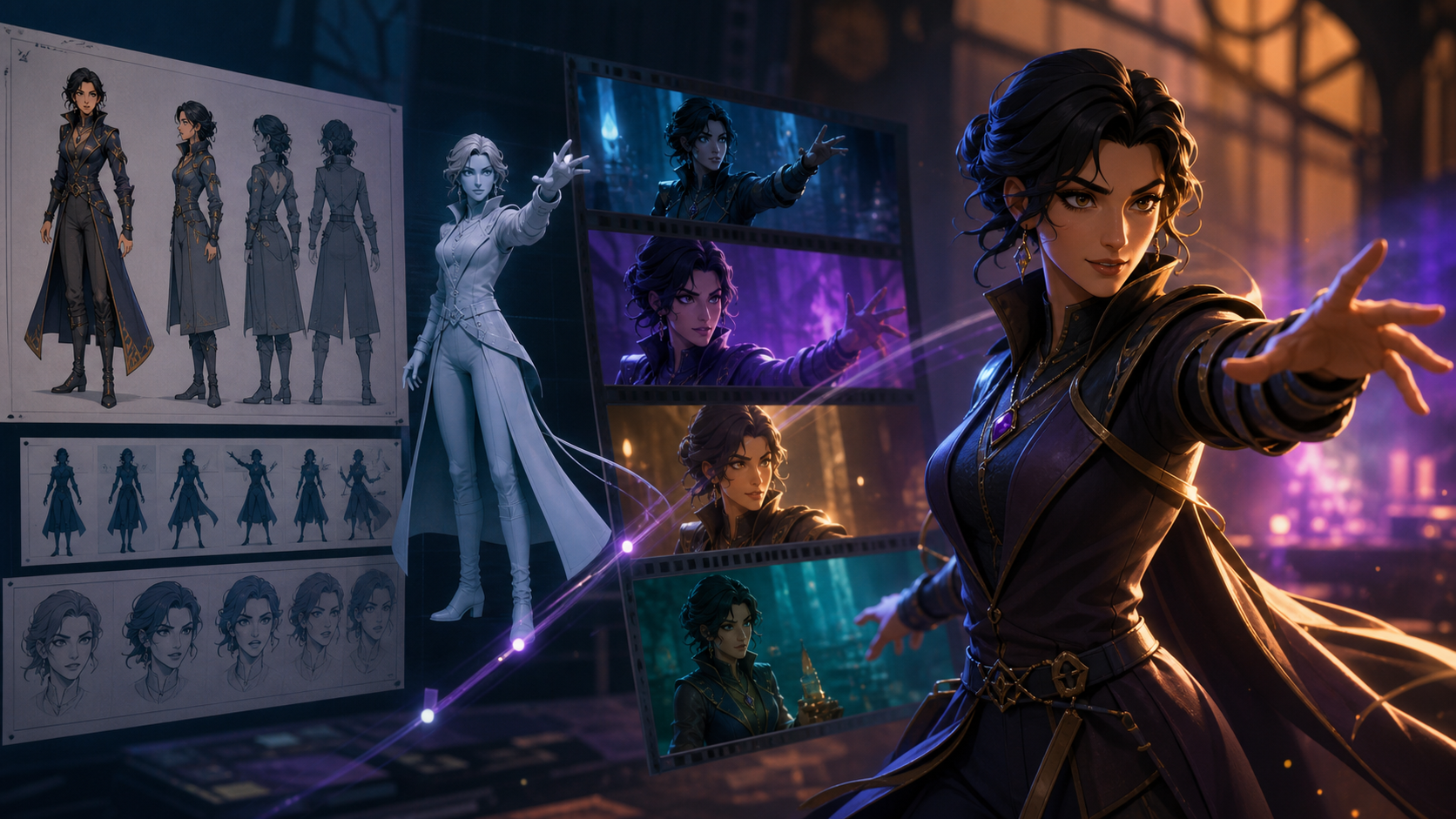
A character remains consistent when the creator makes key decisions before generation. Prepare a compact brief covering age as an adult, facial and wardrobe traits, color palette, setting, mood, camera language, and the actions the character should perform. Include the traits that must not change between shots.

For an original character, a small reference pack is more useful than a single glamorous image. A front view, three-quarter view, full-body silhouette, and two or three expressions give the generation process clearer visual anchors. Keep the costume readable and avoid intricate details that will be difficult to reproduce during motion.
If the character is based on commissioned or licensed art, record the permission terms with the source files. If a human performer supplied a reference, document their informed consent and the intended uses of the output before any generation begins.
Capabilities to Evaluate in an AI Character Workflow
The source article highlights several practical dimensions that matter more than a vague promise of “uncensored” generation:
- Input flexibility: Decide whether the scene is best started from text, a character reference, or an existing clip. Text is useful for exploration; a reference image provides stronger visual direction; video-to-video can preserve blocking and camera movement from footage you have the right to use.
- Character consistency: Check the face, hair, wardrobe, proportions, and key accessories across every shot. A clip can look attractive and still fail if the character changes halfway through.
- Motion control: Describe one clear action per short clip. Subtle head turns, walks, gestures, and camera pushes are easier to review than several simultaneous actions.
- Scene and style control: Separate character details from environment, lighting, lens, and art-direction notes. This makes it easier to identify which part of a prompt caused an unwanted result.
- Output suitability: Evaluate duration, resolution, aspect ratio, watermarking, download options, and commercial-use terms before committing to a production plan.
- Privacy and rights: Understand how uploads are stored, whether inputs may be reused for training, and how deletion requests work. Do not upload sensitive or unauthorized material.
You can compare generation approaches in VideoAny's model catalog, but assess the current model description and terms rather than assuming every model accepts the same inputs or produces the same kind of output.

A Five-Step Character Video Process
1. Define the final shot
Write the intended result in production terms: subject, action, setting, framing, duration, and mood. “A medium shot of an original adult fantasy character turning toward camera in a candlelit library” is easier to evaluate than a broad request for a complete story.
2. Prepare a rights-cleared input
Use artwork you created, commissioned, licensed, or have explicit permission to animate. Crop the reference cleanly, remove distracting overlays, and keep the character large enough to read. For reference-led animation, start with an image-to-video workflow and verify the selected model's current input rules.
3. Generate a short test
Begin with one shot and one action. Short tests reveal identity drift, unstable hands, wardrobe changes, background warping, and unwanted camera motion before they consume the rest of the production budget.
4. Review and iterate deliberately
Change one variable at a time. If the face is consistent but the motion is weak, preserve the character description and revise only the action or camera instruction. Keep successful prompts, seeds or model settings when the tool exposes them, and label each export clearly.
5. Edit and perform a final rights check
Assemble the selected clips in a conventional editor. Add sound, captions, color correction, and transitions there rather than forcing every element into one generation. Before publishing, confirm that all depicted people are fictional or authorized adults, all source assets are licensed, and the destination platform permits the material.
Where Character Videos Fit
The source article points to a broad range of uses. The most durable ones are character teasers, serialized fiction, visual roleplay, fantasy or cosplay concepts, subscription previews, animated profile content, and storyboards for a larger production. The same workflow can also support non-mature projects such as music visuals, game-character pitches, and experimental short films.
Keep promotional edits separate from age-restricted versions. A social teaser should use platform-safe framing, wardrobe, and captions even when the full project is intended for a verified adult audience.
Estimate Cost Without Relying on a Headline Price
Credit systems vary by model, duration, resolution, and retry count, so a single per-second claim is rarely enough for planning. Estimate the real cost from a test batch:
- Generate three to five short clips using the intended settings.
- Record credits consumed and usable seconds produced.
- Divide the total cost by the number of clips that pass review.
- Add a buffer for continuity fixes, upscaling, and alternate aspect ratios.
This “cost per accepted shot” is more useful than cost per generated second. Check the platform's current pricing page and model documentation before publication, because rates and limits can change.
Creative Control Versus Production Guardrails
Less restrictive tools may allow a wider range of fictional themes, but “no limits” should never be treated as permission to ignore consent, identity rights, or law. A professional workflow needs creator-controlled boundaries: an adult-only character specification, documented permissions, secure source files, and a pre-publication review.
For transformations of your own footage, a video-to-video workflow can help explore visual styles while retaining the shot's basic motion. It should not be used to disguise the identity of an unconsenting person or fabricate an event involving someone who never agreed to participate.
Aspect Ratios and Release Planning
Choose the destination before generating the final batch:
- 9:16 suits vertical feeds and short-form mobile viewing.
- 16:9 works for wide web video, presentations, and cinematic sequences.
- 1:1 remains useful for square social placements and some gallery layouts.
Leave safe space for captions and interface overlays. If the same scene will appear in several formats, create a wider master composition with enough room to crop rather than stretching the final render.
Frequently Asked Questions
Can I animate my own character image? Yes, when the chosen model supports reference images and you own or have permission to use the artwork. Keep proof of ownership or licensing with the project files.
How explicit can a character video be? That depends on applicable law, the generation model's rules, the hosting service, and the publication platform. Limit mature projects to consenting adults and never use unauthorized likenesses or prohibited content.
How long should the first generation be? Use the shortest clip that can test the intended action and character consistency. Extend the sequence only after the first shot passes review.
Can one prompt create a complete film? A shot-based workflow is more reliable. Plan the story, generate controlled clips, then assemble pacing, sound, and continuity in an editor.
What should I check before publishing? Review character consistency, anatomy, motion, continuity, caption space, audio, aspect ratio, licensing, consent records, age compliance, and the destination platform's rules.
Conclusion
Strong AI character videos come from disciplined preparation rather than unrestricted prompting alone. Build an original or authorized adult character, create one controlled shot at a time, measure cost by accepted output, and keep consent and identity rights in the review checklist. That approach preserves the source article's emphasis on creative control while turning it into a safer, repeatable production system.