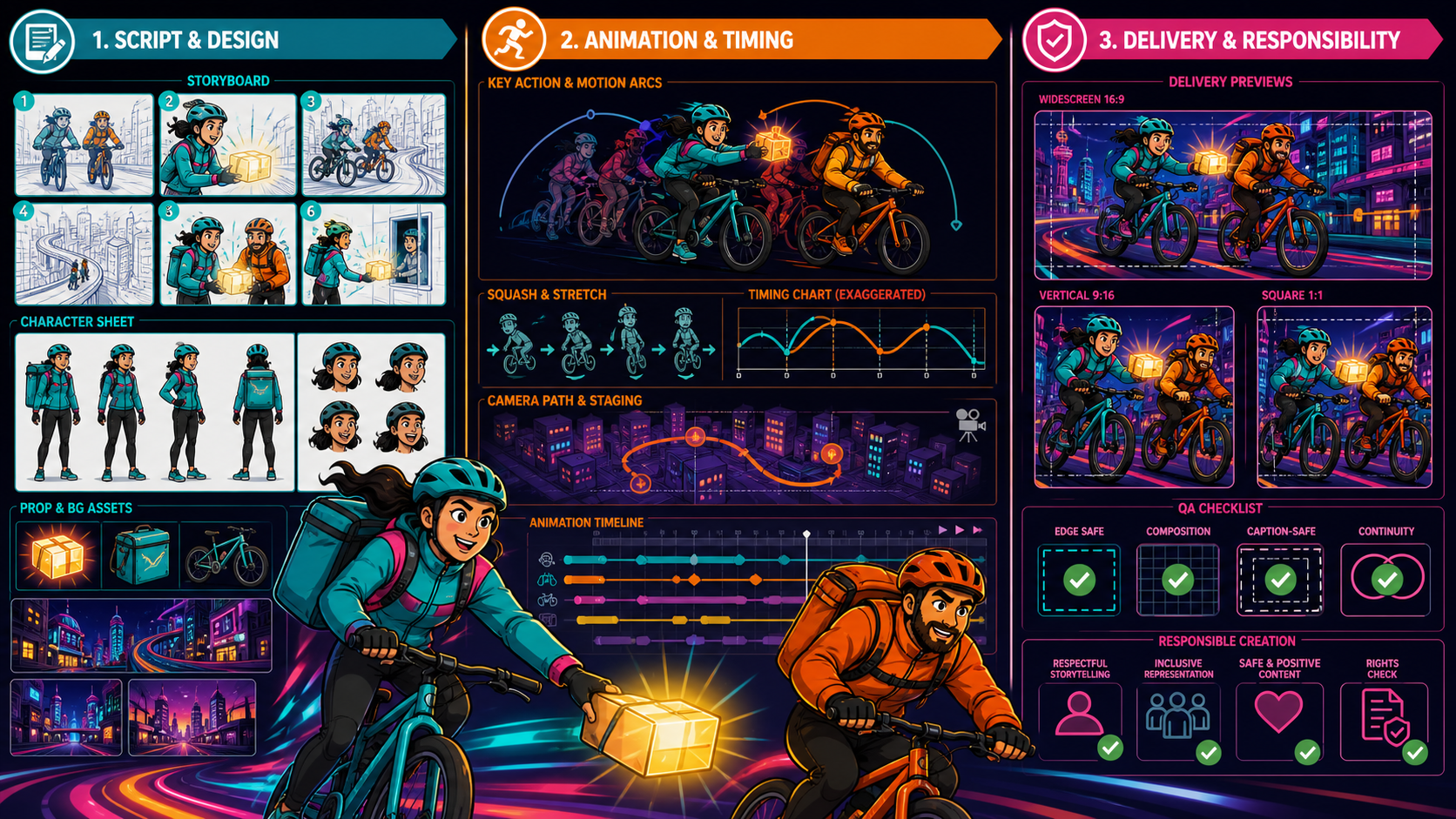
An NSFW AI cartoon video generator is only one part of a cartoon pipeline. The script determines what changes, the asset pack determines what must stay consistent, motion design determines how the scene feels, and delivery QA determines whether the result can actually be published. Skipping any layer turns “creative freedom” into costly regeneration.
The reference page is complete. It presents text, image, reference, and video generation; argues for unrestricted expression; explains its workflow and output; compares filtered alternatives; gives six getting-started steps; states a fixed price; and closes with a community section. This guide retains that information architecture while replacing fixed per-second pricing, universal 1080p, no-moderation, ownership, and quality guarantees with model-specific VideoAny facts and a responsible cartoon-short workflow. The source contains no FAQ, so none is attributed to it here.
Adult-only boundary: Any sexualized cartoon must involve clearly adult fictional characters or verifiably adult, consenting participants. Never depict minors, childlike or school-age-coded characters, or anyone whose age is uncertain. Never create non-consensual intimate media or use a real person’s likeness without explicit authorization.
Start with a script that can be boarded
Write one sentence describing the change in the short. For a safe technical example:
Two fictional bicycle couriers in their 30s race through a neon city, recover a misrouted glowing parcel, and deliver it together before the bridge closes.
This gives the scene a beginning, complication, and resolution. Split it into six beats:
- establish both adult couriers and the destination;
- reveal the parcel in the wrong bag;
- show the closing bridge signal;
- coordinate the route change;
- complete the handoff;
- hold on the relieved reaction.
Each beat should become one or more editorial shots. AI generation is more controllable when a shot contains one action and one camera idea.
Mark mature-content boundaries in the script
For mature projects, identify the adults, their consent, the permitted action, and the release destination before boarding. Remove any minor, age ambiguity, youth-coded design, coercion, incapacity, voyeurism, exploitation, or unauthorized real-person identity. A cartoon style never makes those elements acceptable.
Design for the delivery shape
Choose widescreen, vertical, or square before drawing boards. A wide two-person composition cannot always be cropped into a readable vertical shot. Mark caption areas, platform UI obstructions, and safe action zones on every board.
Build a rights-cleared asset pack
An asset pack is the production’s visual source of truth.
Character sheets
For each character, include:
- fictional status and explicit adult age;
- front, three-quarter, profile, and back views;
- mature facial structure and adult context;
- silhouette, height relationship, and body proportions;
- wardrobe construction, helmet, gloves, and bag;
- palette and signature prop;
- neutral plus limited expression range;
- prohibited youth cues and unauthorized resemblance.
Ask an independent reviewer to assess apparent age without reading the written number. If a sexualized character looks underage or uncertain, reject the design.
Background pack
Map the neon city as a small set of reusable spaces: start street, elevated curve, bridge approach, delivery door, and skyline. Define light direction, signs, road markings, depth treatment, and palette. Remove logos and unreadable pseudo-text that may flicker during motion.
Prop pack
Show the glowing parcel, bicycles, bags, helmets, and bridge signal from useful angles. Record which courier carries each object in every shot. Prop-state continuity is a common failure in generative sequences.
Provenance ledger
For every script, drawing, reference, video, font, sound, and music asset, record the creator, license, permitted transformations, attribution, commercial scope, and intended distribution. “Found online,” “fan art,” and “adapted from a book” are not licenses.
Choose the generation route by the strongest asset
The source’s four-method toolkit becomes a production decision table.
| Starting asset | First route to test | Strongest use | Main cartoon failure |
|---|---|---|---|
| Script or prompt | Text-to-video | Open establishing shot and visual exploration | Character and composition invention |
| Approved concept frame | Image-to-video | Preserve design and opening pose | Line wobble and anatomy during motion |
| Authorized character or style package | A selected reference-capable model | Model-dependent visual guidance | Uneven reference application |
| Owned or authorized motion plate | Video-to-video | Preserve blocking, timing, and camera | Flicker, identity shift, performer-rights risk |
Script-led generation
Use VideoAny text-to-video when the shot can tolerate visual invention. Separate subject, action, setting, camera, and cartoon treatment. Do not ask for a named artist or protected character; describe observable traits such as bold outer contours, flat colors, two-value shadows, and springy timing.
Concept-art animation
Use VideoAny image-to-video when the character sheet or storyboard frame is already approved. Prepare clean silhouettes, hands, prop contact, and background separation. Ask for one primary movement and restrained secondary response.
Selected models may expose end frames or additional image controls. Those options vary. If an end frame is available, align screen direction, costume, prop state, palette, and camera axis with the opening image.
Reference-capable models
Reference support is model-specific. Read what the selected model treats as a character, subject, style, or motion reference. Use only original, licensed, or explicitly authorized material. A reference guides a model; it does not guarantee exact identity, style, or continuity.
Motion-led restyling
Use VideoAny video-to-video when rights-cleared footage already solves cycling rhythm, body mechanics, or camera tracking. Cut it into editorial shots first. Source footage with multiple cuts can cause flashes and character resets. Obtain performer authorization for the exact transformation and distribution.
Design motion like a cartoon, not a moving still
Cartoon energy comes from pose, timing, spacing, and controlled exaggeration.
Key poses
Choose readable silhouettes for anticipation, action, and settle. The courier can lean before accelerating, extend during the handoff, and compress slightly on the landing. If a pose is unclear in a thumbnail, additional detail will not fix it.
Timing and spacing
Timing is how long an action takes; spacing is how far the subject moves between moments. A slow start followed by wider spacing communicates acceleration. Describe tempo and event order rather than only “dynamic motion.”
Arcs
Hands, heads, wheels, and the glowing parcel should follow plausible arcs. Random linear movement feels mechanical and increases the risk of a prop detaching from the hand.
Squash and stretch
Use restrained shape change to communicate impact or speed while protecting adult body proportions and identity. Do not ask the model to deform faces or bodies so aggressively that age, anatomy, or character recognition collapses.
Follow-through
Hair, jacket tails, and bags respond after the bike and torso. Keep their amplitude smaller than the primary action. Multiple independent cloth motions can create noisy flicker.
Camera path
Test subject motion with a locked camera before adding a pan or tracking move. If both camera and character fail together, it is difficult to know which instruction caused the problem.
A prompt for the non-sensitive motion test
Before any mature scene, verify the model on a fully clothed original cast:
Two clearly adult fictional bicycle couriers in their 30s, one in a turquoise jacket and one in an orange jacket, both wearing helmets and full street clothes; they ride side by side through a neon city while transferring one small glowing parcel from left courier to right courier; medium-wide tracking shot, readable anticipation and handoff, smooth wheel rotation, bold outer contours, flat turquoise-orange-magenta palette, stable adult faces, hands, helmets, bags, and parcel, no text or logos.
This shot tests two-character identity, moving limbs, wheel geometry, hand-object contact, event order, camera tracking, and palette stability. Mature content is unnecessary for technical validation.
Six production steps from source to export
The reference’s six onboarding steps can be preserved as a production loop.
1. Define the account, project, and destination
Confirm who owns the project, who may access sources and outputs, the intended audience, the delivery ratio, and the destination’s current content rules. Do not assume registration itself provides security or privacy.
2. Budget the selected configuration
VideoAny uses credits, but not one universal fixed rate. Many video models calculate credits from duration and may vary by resolution or settings; other tools use fixed generation costs. Record the model, mode, settings, and displayed cost before submission.
3. Choose the route per shot
Assign text, image, a supported reference, or video transformation based on what must remain stable. A six-shot cartoon may use more than one route, but each handoff needs its own rights and continuity review.
4. Prepare the exact input
Clean the prompt, concept frame, reference package, or motion plate. Record provenance and confirm that every mature character is clearly adult. Remove unauthorized identities, logos, and unclear anatomy.
5. Generate, review, and repair
Start with the simplest motion test. Watch at normal speed and frame by frame. Shorten, simplify, clean the source, or change a compatible model when the shot fails. Regenerate the smallest unit.
6. Download, edit, and release
Verify the actual output file, assemble approved shots, add licensed sound and captions, create ratio-specific versions, apply required disclosure, and archive the production record. Publishing rights are not automatically granted by generation.
How output controls really work
Duration, resolution, aspect ratio, reference inputs, end frames, and other controls depend on the selected model. Some VideoAny options expose common 16:9, 9:16, or 1:1 shapes; support is not universal. Some selected models offer higher-resolution modes, including options up to 4K, while others have different maximums.
Record the downloaded width, height, duration, frame rate, codec, container, and audio state. A selector label does not replace file inspection. Do not stretch a clip to a new ratio after generation if the action no longer fits the frame.
Compare cartoon generators with evidence
The source compares unrestricted and filtered alternatives across content limits, moderation, input flexibility, and quality. A responsible comparison keeps those dimensions but replaces absolute claims.
| Dimension | What to test | Avoid claiming |
|---|---|---|
| Permitted themes | Current policy plus benign and clearly unsafe text-only boundary cases | “Anything is allowed” |
| Safeguards | Minor, consent, identity, and reporting behavior | “No moderation” as a benefit |
| Input flexibility | Supported text, image, reference, and video routes by model | “Any file works” |
| Control | Visible duration, ratio, resolution, reference, and end-frame options | One control set for every model |
| Motion quality | Pose, arcs, contact, timing, camera, and temporal stability | Guaranteed professional results |
| Visual consistency | Face, age, line, costume, prop, palette, and world state | Exact identity or style replication |
| Cost | Displayed credits for the tested configuration | The source’s fixed per-second rate |
| Rights and data | Terms, account behavior, provenance, retention, deletion | Automatic ownership or privacy |
A strict refusal of harmful identity or minor-related requests is a positive safety signal, not a failure of creative control.
Cartoon-specific frame QA
Run four review passes.
Character pass
Check apparent age, face shape, hair, helmet, jacket, body proportions, hands, and expression across every frame. Reject a mature-work candidate if any character becomes childlike or ambiguous.
Motion pass
Inspect anticipation, action, settle, arcs, foot or pedal contact, wheel shape, handoff order, weight, follow-through, and camera stability. Pause on occlusions where identity and props often change.
Continuity pass
Compare adjacent shots for screen direction, courier side, bag and parcel owner, road geography, time of day, palette, damage state, and emotional progression.
Delivery pass
Verify safe areas, caption space, composition, file properties, sound, disclosure, and destination policy. Review widescreen, vertical, and square versions independently rather than assuming a crop remains usable.
Build a review circle, not an unverified community claim
The reference closes by promising a creator community. Do not convert that into a VideoAny product claim without a current public community feature. A project can still use a small, accountable review circle:
- an animation reviewer for pose, timing, and temporal artifacts;
- an adult-safety reviewer for age clarity and consensual context;
- a rights reviewer for sources, licenses, and likeness authorization;
- an editor for continuity, caption space, and delivery versions;
- the authorized participant or rights holder where applicable.
Share only the minimum media each reviewer needs. Do not place private or intimate sources in public feedback channels. Record decisions and remove access when the review ends.
Final release gate
Release only when:
- every sexualized character is unmistakably adult in every frame;
- the scene is lawful and consensual, with no coercion, incapacity, or voyeurism;
- all people and identities are fictional or explicitly authorized;
- scripts, art, references, footage, music, fonts, and other assets are owned or licensed;
- no dangerous identity drift, childlike frame, or unauthorized resemblance appears;
- cartoon motion, anatomy, contact, linework, continuity, and file properties pass review;
- the destination permits the work and required disclosures are present;
- prompts, settings, displayed credits, sources, approvals, and exports are archived.
The source’s creative breadth becomes more useful when it is connected to this evidence. A cartoon short is not finished when a generator returns a file. It is finished when its assets are lawful, its adult characters remain clearly adult, its motion communicates the story, and each delivery version survives review.