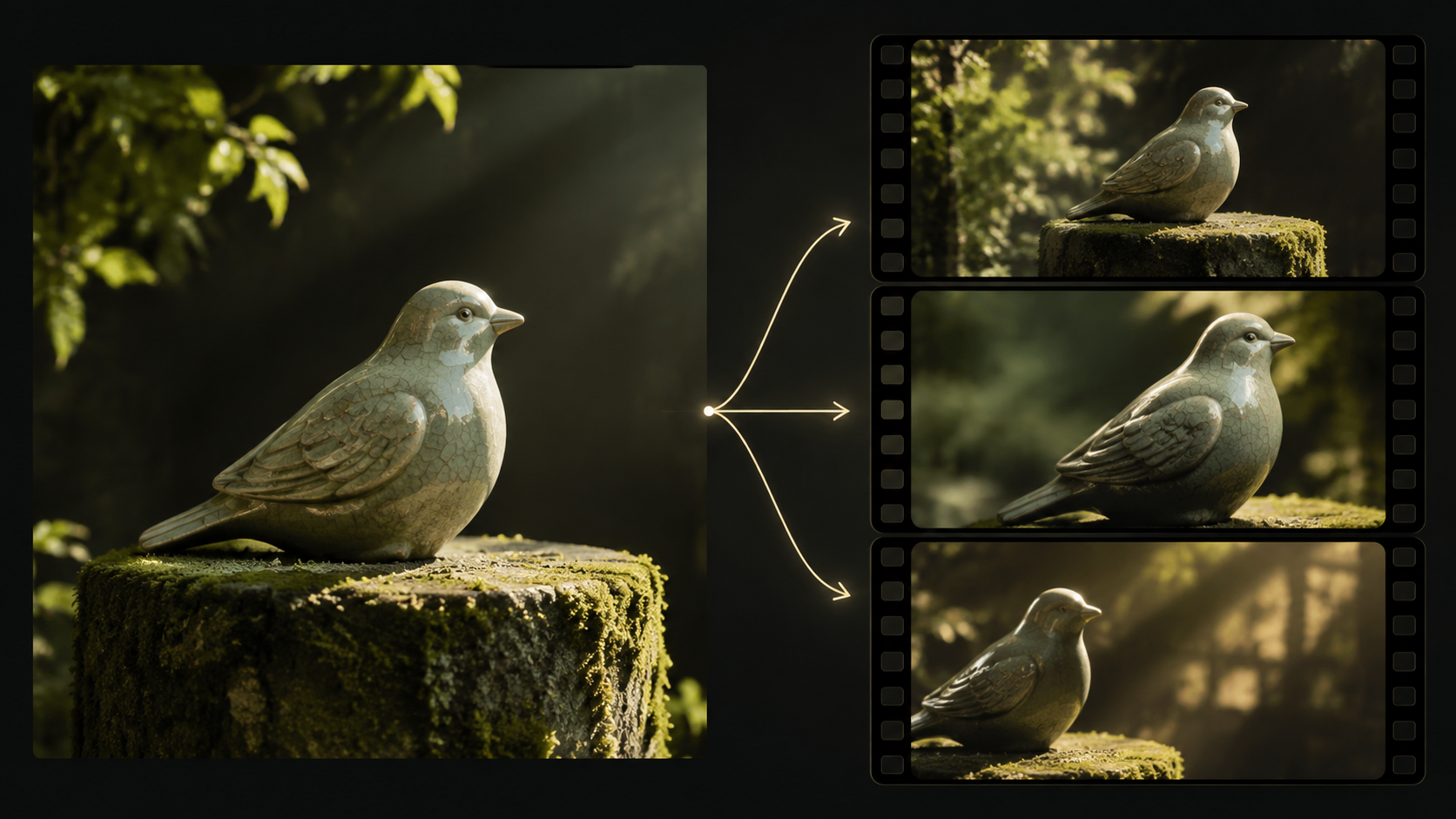
When transforming a static image into dynamic video, the core challenge lies in preserving the essence of the original visual while introducing compelling motion. Creators often begin with established assets—be it a product photograph, a character design, an architectural rendering, or a storyboard frame. The critical question then becomes: how much of that original, approved visual integrity survives the animation process?
This article outlines a structured approach to evaluating leading image-to-video models, focusing on how effectively they maintain subject fidelity, control motion, manage camera behavior, preserve style, and handle fine details. We will examine five prominent candidates: Veo, Seedance, Runway Gen-4, Kling, and Pika. Our evaluation framework uses an original ceramic bird sculpture example to highlight specific criteria, recognizing that different image types demand varied priorities. A playful, stylized transformation, for instance, requires a different set of considerations than a precise product presentation.
For our detailed comparison exercise, consider a unique ceramic bird sculpture resting on a moss-covered pedestal. This sculpture features a distinct narrow beak, a small blue glaze mark on its left wing, and a deliberately uneven, handmade rim at its base. The goal is to generate a video that subtly reveals its form and texture while ensuring it remains unmistakably the same object throughout the sequence. The following sections will guide you through a systematic evaluation, emphasizing practical questions over speculative claims.
Prioritizing What Must Be Preserved
Before engaging any generative model, it's crucial to establish a clear hierarchy of what elements in your source image are non-negotiable and what can be allowed to change. This seemingly counter-intuitive step clarifies the assignment and prevents unexpected distortions.
For our ceramic bird, for example, the exact placement of a background moss clump might be less critical than the integrity of the blue glaze mark, which could be a signature detail distinguishing this specific piece. Reflections on the ceramic surface might naturally shift with camera movement, but the bird's fundamental wing structure or beak shape must remain constant.
Develop a preservation hierarchy that places subject identity, critical product details, or character consistency at the top. Elements like decorative background details or ambient lighting effects can often be more flexible, unless the environment itself is the primary subject, as in a travelogue or real estate video.
Consider an app screenshot: the readability of the interface text and the layout of UI elements are paramount. In such a case, it might be more effective to treat the screenshot as a stable graphic within an external video editor rather than asking a generative model to animate or reinterpret its text, which could lead to illegibility. This is not a failure of image-to-video but a strategic production choice to ensure clarity.
Evaluating Key Image-to-Video Candidates
When assessing image-to-video models, it's essential to understand their documented capabilities and how they might apply to your specific needs. Each model offers distinct approaches to generating motion from a still image. We will frame our evaluation questions around the ceramic bird example, focusing on how each candidate might handle its unique characteristics.
Veo: Cinematic Motion and Material Fidelity
Google's documentation describes Veo 3.1 as capable of both image-to-video and audiovisual generation, supporting extension and frame/image direction. This positions Veo as a candidate for generating video with a cinematic quality.
Evaluation Questions for the Ceramic Bird with Veo:
- How effectively does Veo introduce subtle camera movements (e.g., a gentle push-in or orbit) around the ceramic bird while preserving its material texture and the delicate blue glaze mark?
- Does the model maintain the bird's distinct narrow beak and the uneven, handmade rim at its base throughout the motion?
- Can Veo generate realistic lighting changes that enhance the sculpture's form without distorting its appearance or introducing artifacts?
- When generating accompanying audio, does it complement the visual mood without implying animation of the inanimate object?
- Does the output retain the artistic style of the original photograph, or does it impose a different aesthetic?
Consult the official Veo overview for further details on its capabilities.
Seedance: Multimodal Input for Complex Scenes
ByteDance's Seedance 2.0 is described as supporting text, image, audio, and video inputs, allowing for a multimodal approach to video generation. This suggests its potential for scenarios where a single image isn't sufficient to convey the desired motion or context.
Evaluation Questions for the Ceramic Bird with Seedance:
- If provided with the ceramic bird image and a reference video of a slow, panning camera movement, how well does Seedance integrate this motion while keeping the bird's features (beak, glaze, rim) consistent?
- Can additional image references (e.g., a close-up of the glaze mark) help reinforce specific details that must be preserved?
- If an audio reference (e.g., ambient forest sounds) is used, does it influence the visual generation in a way that enhances the scene without causing the ceramic bird to animate unnaturally?
- How does Seedance handle the interaction between the static bird and a dynamic background element, such as a gently swaying leaf, if provided as a separate reference?
- Does the model allow for multi-shot outputs that maintain the bird's identity across different perspectives or focal points?
Explore the official Seedance release for more information on its multimodal capabilities.
Runway Gen-4: Reference-Guided Image Preparation
Runway's Gen-4 Image References system is designed for creating consistent images by incorporating subjects, objects, environments, or styles from reference images. These generated images can then be used as inputs for video models. It's important to distinguish this image-generation stage from the subsequent video animation.
Evaluation Questions for the Ceramic Bird with Runway Gen-4:
- Image Preparation Stage: How effectively can Runway's Gen-4 Image References generate multiple consistent still images of the ceramic bird from different angles, all preserving the narrow beak, blue glaze mark, and uneven rim?
- Video Generation Stage: When these consistent images are then fed into a Runway video model, how well does the video model animate the sequence while maintaining the fidelity of the ceramic bird across frames?
- Does the video model introduce motion (e.g., a subtle zoom or rotation) without causing the bird's features to distort or "melt"?
- How does the model handle the transition between different camera angles derived from the reference images, ensuring smooth continuity of the bird's form?
- Can the model animate environmental elements (like the moss or pedestal) while keeping the ceramic bird perfectly static and consistent?
The distinction between image generation and video input is explicit in Runway's Image References guide and its workflow example connecting image output to video input.
Kling: Controlled Motion and Object Interaction
Kling's official 3.0 announcement highlights its image-to-video and reference-based workflows, suggesting capabilities for controlled motion and object interaction. The key is to test how these controls translate to preserving a static subject within a dynamic scene.
Evaluation Questions for the Ceramic Bird with Kling:
- How precisely can Kling animate a specific camera path around the ceramic bird, ensuring the bird's form and details remain stable and undistorted?
- If a moving element, such as a hanging leaf, is introduced near the bird, how well does Kling render its motion and the resulting shadow changes without affecting the bird's ceramic integrity?
- Can the model maintain the distinct material properties of the ceramic bird (e.g., its reflective quality, handmade irregularities) while animating other scene elements?
- Does Kling offer controls to explicitly prevent the bird itself from animating, ensuring it remains an inanimate sculpture?
- How does the model handle the interplay between foreground and background elements, particularly when one is static and the other is in motion?
Review the Kling announcement for more context.
Pika: Fast Experimentation and Stylized Effects
Pika offers an image-to-video API route, often associated with fast creative experimentation, stylized transformations, and short-form content. The challenge is to see if its flexibility can be harnessed for precise preservation.
Evaluation Questions for the Ceramic Bird with Pika:
- Can Pika generate subtle, non-destructive motion (e.g., a slight zoom, gentle rotation, or atmospheric effect) around the ceramic bird while keeping its core identity (beak, glaze, rim) perfectly intact?
- How quickly can different motion styles be previewed, and how consistent are the bird's features across these variations?
- Does Pika allow for precise control over the degree of motion, preventing the ceramic bird from becoming overly animated or distorted?
- If the goal is a quick, engaging visual, does Pika prioritize the bird's recognizability over dramatic, potentially distorting, effects?
- Can Pika generate short, looping videos that maintain the bird's appearance consistently across the loop points?
Refer to Pika's official image-to-video API page for details on its documented capabilities.
Designing a Two-Part Test for the Ceramic Bird
To thoroughly evaluate these models, a structured test is invaluable. We'll use a two-part approach for our ceramic bird example: first, a restrained reveal focusing on object preservation, and second, a more demanding scenario introducing a moving environmental element. This helps isolate the model's ability to handle object fidelity versus its capacity for complex scene dynamics.
Part 1: Restrained Object Reveal The first test focuses on subtle camera movement to highlight the sculpture's details without altering the object itself.
Part 2: Static Object with Dynamic Environment The second test introduces a moving element in the environment, challenging the model to animate the background while keeping the foreground object perfectly still and consistent.
This pair of tests helps distinguish a model's ability to preserve a static subject from its capacity to generate dynamic environmental activity. If the ceramic bird were to unexpectedly flap its wings in response to the moving leaf, the model would have misunderstood the core assignment, regardless of how visually appealing the animation might be.
It is crucial to use the exact same source image and articulate the same story purpose for every candidate. If an interface offers different durations or control parameters, meticulously record these alongside the generated output. An unequal setup can never yield a perfectly controlled benchmark.
Here's a rubric to inspect the evidence from your generated videos:
| Review item | Evidence to inspect | Acceptable variation in this example |
|---|---|---|
| Object construction | Beak, wing outline, base opening | Perspective changes their apparent width |
| Distinctive mark | Position of the blue glaze patch | Brightness changes under moving light |
| Material | Ceramic surface and handmade irregularity | Reflections respond to the scene |
| Environment | Pedestal contact and nearby leaf | Leaf motion and shadow movement |
| Edit connection | Beginning and ending composition | A crop adjustment that preserves the subject |
Crafting an Effective Brief
Instead of a list of adjectives, a well-structured brief describes the desired event or action. This provides a shared, unambiguous basis for reviewing the generated output.
Here is an original adaptable brief for our ceramic bird example:
Present the supplied ceramic bird as an inanimate sculpture on its pedestal. The view shifts modestly so the handmade base becomes easier to see. A leaf above the sculpture moves enough to change its shadow. Keep the beak, wing construction, and blue glaze mark recognizable. The closing composition should leave a quiet area beside the sculpture for a separately added caption.
Always save your brief alongside the input image and the specific settings you used for generation. You can explore available workflows through VideoAny's image-to-video page, where you can verify the models and controls currently offered. Remember, the wording of your prompt defines the intended event; it does not guarantee a specific outcome, but it provides a clear standard for evaluation.
Adapting the Rubric for Different Image Types
The evaluation criteria must evolve with the source image. What constitutes "preservation" for a ceramic bird differs significantly from an anime character or a product shot.
- Anime Characters: Replace the "glaze mark" check with identity anchors such as facial structure, costume details, hair style, and characteristic expressions. The goal is to ensure the character remains recognizable across different poses or camera movements.
- Comic Panels: Focus on whether the hierarchy of characters, speech bubbles, and panel composition remains readable. Avoid models that might redraw the art style or distort the narrative flow.
- Album Covers: Determine if the typography should remain a separate, static layer or if it can be integrated into a generated texture. Preserve the artist's original design and branding.
- Travel Photographs: Distinguish between a stylized interpretation and a presentation that viewers might perceive as depicting an actual location. Carefully review any invented structures or altered geography.
- Product Shots: For a product, differentiate between a conceptual visual and a demonstration of a real function. An attractive generated action does not inherently prove the product performs that action. Prioritize accurate representation of shape, logo, label, and material.
- Music Visuals: When creating visuals for music, consider whether the model is generating sound or if you are fitting visuals to an existing, authorized audio track. Always preserve the chosen master audio if it's part of the brief.
Accounting for Post-Generation Work
The true cost and efficiency of an image-to-video workflow extend beyond the initial generation. For each candidate, record whether the output was accepted as-is, repairable with external editing, or rejected outright, noting the specific reasons.
Then, meticulously document any necessary post-generation corrections: cropping, precise caption placement, sound design, color grading, or replacing a defective shot. A model that generates a visually stunning preview might still be inefficient if it consistently requires extensive manual cleanup.
Consider the overall workflow: a low per-generation cost can be misleading if it necessitates numerous attempts to achieve a usable result. Conversely, a less elaborate preview might be the most practical choice if it consistently meets the brief with minimal post-production effort.
Finally, place the accepted video clip alongside the original image at its intended viewing size. Ask an unbiased third party which characteristics unequivocally identify the object in both the still and the moving image. This objective feedback helps validate your choice. Ultimately, the most effective workflow is the one that reliably preserves those essential characteristics while delivering the precise movement your project demands.