
Categories: AI Video Workflow, Creator Strategy, Production Process
Tags: videoany, ai creation studio, ai video workflow, content strategy, creator toolkit
Introduction
Boomerang-style videos work because they are short, repeatable, and easy to watch. A clean loop can make a simple gesture, product shot, or reaction moment feel more alive than a still image, which is why this format keeps showing up across TikTok, Instagram Stories, and other short-form feeds.
The problem is that basic looping tools often look rough. The restart point is obvious, the reverse motion feels jerky, and the finished clip can look more like an app gimmick than polished content. A stronger workflow is to use AI to plan motion, keep the transition smooth, and export a loop that feels intentional.
What Makes a Good AI Boomerang Workflow?
A good AI boomerang workflow is not just about making a clip move forward and backward. It needs to keep the loop point nearly invisible, preserve the main subject, and match the framing to the platform where the clip will be published.
Using VideoAny, you can build that workflow around existing tools such as Image to Video, Text to Video, and finishing tools for variation or polish. The goal is the same one highlighted in the source article: turn a still image or short visual idea into a seamless, high-quality loop that looks ready for social publishing rather than obviously stitched together.

How to Make Boomerang-Style Videos with VideoAny
Creating a boomerang-style clip with VideoAny is a simple three-step process:
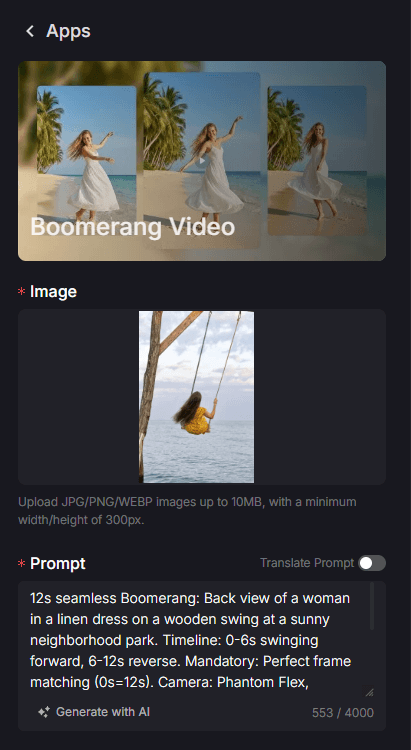
Step 1: Upload Your Content or Provide a Prompt
Start with a strong source visual. If you already have a photo, upload it in Image to Video. If you are still exploring the concept, sketch it out first in Text to Video and then refine the best result into a shorter loop.
The source article emphasizes a useful pattern here: pair the visual with a prompt that clearly describes the motion you want. Instead of writing something vague, describe the exact back-and-forth action, camera feel, and subject behavior you want the loop to repeat.
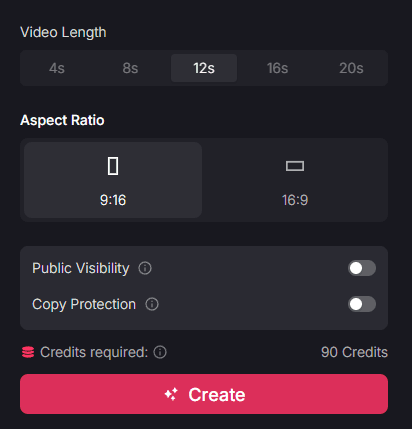
Step 2: Select Duration and Aspect Ratio
Next, define the shape of the output:
- Choose Duration: The source highlights loop lengths such as 4s, 8s, 12s, 16s, or 20s. In practice, shorter loops usually work better when you want a clean, repeatable moment.
- Choose Aspect Ratio: The original guide specifically recommends
9:16for Instagram Stories and TikTok so the clip fills the mobile screen naturally. - Keep the Motion Focused: Boomerang-style clips perform best when the action is simple and readable. One clear subject, one clear movement, and one obvious emotional beat usually outperform a busy frame.
Step 3: Generate and Share
Generate the clip, review the loop point, and export the strongest version. Once you have a clean base result, you can:
- Download the MP4: Save a high-quality version for posting.
- Create Variants: If you want a different visual style, run the result through Video to Video.
- Add More Motion Flavor: If the clip needs extra personality, layer in finishing touches from Effects.
The important part is not just generating once. Review whether the transition feels invisible, whether the subject remains centered, and whether the loop still looks strong after multiple viewings.
Why Use an AI Boomerang Workflow?
This format is effective for the same reasons outlined in the source page:
Professional Smoothness without Jerky Transitions
Traditional looping tools often show a visible jump when the clip reverses or restarts. AI-driven motion planning helps smooth that handoff, making the loop point feel far less noticeable. That single improvement can make the difference between a disposable social post and something that feels polished enough to reshare.
Professional Results with Zero Editing Experience
The source makes this point clearly: most creators do not want to manage keyframes, masks, or manual timeline edits just to produce a short looping moment. With an AI workflow, you can focus on the shot idea, prompt, duration, and format instead of technical editing.
Simplified High-Frequency Posting
Boomerang-style clips are useful because they are fast to make and easy to slot into a publishing calendar. They can fill the gaps between larger content pieces, keep a feed active, and give creators more chances to stay visible without building every post from scratch.
High Engagement and Viral Potential
Short looping videos naturally support high retention because the viewer often watches at least one extra cycle before scrolling away. That makes them strong candidates for reach, shares, and repeated plays, especially when the motion is clean and the subject is instantly readable.
Final Thoughts
The core lesson from the source article is straightforward: boomerang clips work best when they are smooth, simple, and easy to publish at high frequency. AI helps by reducing the technical work behind the loop, which lets you spend more time on format, pacing, and consistency.
With VideoAny, the most practical way to apply that idea is to treat boomerang videos as one part of a broader short-form content system. Use them for quick social updates, reaction moments, product details, outfit reveals, travel snippets, and other micro-moments that benefit from repetition.
Related VideoAny Tools
If you want to build on this workflow, these pages are the most relevant next steps:
- Image to Video for turning still visuals into motion-ready clips
- Text to Video for testing prompt-first concepts before refining the loop
- Video to Video for style variations and visual remixing
- Effects for adding extra motion treatment or finishing polish
Explore the full toolkit at https://videoany.io.
FAQs
1) Can this workflow work for a solo creator? Yes. Short looping clips are especially useful for solo creators because they are lightweight to produce and easy to reuse across multiple publishing slots.
2) How many variants should I test per post? 2 to 4 focused variants are usually enough. Test one movement change, one framing change, or one duration change at a time so you can tell what actually improved the result.
3) Should I prioritize trends or consistency? Use trends for reach, but keep a repeatable workflow underneath them. That balance gives you faster publishing without making your feed feel random.