
Categories: AI Video Workflow, Creator Strategy, Social Media Growth
Tags: videoany, ai creation studio, ai video workflow, facebook video, creator toolkit
Introduction
Facebook is still one of the most competitive places to publish video because the feed is crowded and attention is short. A user does not decide whether to keep watching in thirty seconds. They decide almost immediately. If the opening frame feels static, dull, or confusing, the scroll wins.
That is the core idea behind the source article, and it is a strong one: the creators who consistently grow are the ones who can produce eye-catching videos fast enough to stay visible. In practice, that means building a workflow that turns simple prompts, reference visuals, or product ideas into polished motion content without a heavy editing process every time.
On VideoAny, the most realistic way to do that is to treat Facebook video creation as a system. You use Text to Video, Image to Video, Video to Video, and Effects to build content that is designed to stop the scroll, hold attention, and earn more engagement.
What Makes a Facebook Video Eye-Catching?
The source article defines an eye-catching Facebook video as something built to stop users within the first few seconds. That is the right frame. A high-performing Facebook video is not just a moving post. It is a retention asset.
In practical terms, that means the video needs:
- A clear visual hook in the opening seconds
- Strong motion instead of flat static framing
- Composition that reads well on mobile
- Enough polish to feel intentional rather than improvised
- A pacing rhythm that keeps people from dropping off immediately
This is why AI is so useful here. You are not using it just to "make a video." You are using it to generate motion, lighting, transitions, and visual emphasis fast enough to keep up with content demands.
The source article also connects this to cinematic transitions and professional-looking visuals. That matters because Facebook content competes against creators, brands, media pages, and ad creatives all in the same feed. If your video looks weak, it gets filtered out psychologically before the algorithm even has enough signals to help it.
Who Needs Eye-Catching Facebook Videos?
One of the better parts of the source article is that it grounds the format in real use cases instead of treating it as a generic creator toy.
Social Media Managers
If you run a brand or community page, Facebook videos are one of the fastest ways to keep a feed active without relying only on static graphics. A repeatable AI workflow helps you publish more consistently without turning every post into a manual editing project.
E-commerce Owners
Product-led Facebook videos often perform better when they feel dynamic. Motion, camera movement, and cleaner scene styling can make a basic item feel much more premium. That is especially useful for product showcases, seasonal campaigns, and direct-response creative tests.
Meme and Community Pages
Fast-moving pages win by turning trends into shareable content quickly. AI shortens the gap between idea and post, which matters when speed is part of the content advantage.
Digital Marketers
Marketers need multiple creative angles, hooks, and pacing options. AI makes it easier to generate variants and test which visual direction gets stronger click-through or lower acquisition cost.
How to Create Eye-Catching Facebook Videos with VideoAny
The source article lays this out as a simple three-step process. That sequence still works well when translated into VideoAny.
Step 1: Define Your Vision
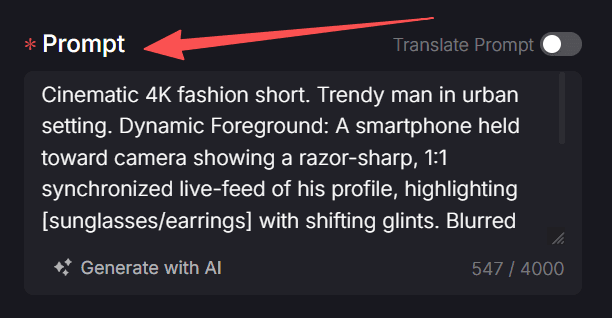
Start with the hook, not the tool. Before you generate anything, decide what should make the viewer stop scrolling. The source article suggests describing the scene, lighting, and mood in the prompt, which is exactly the right place to start.
Ask:
- Is the video selling a product, mood, or reaction?
- Is the emotional tone energetic, cozy, dramatic, or humorous?
- Is the first frame visually strong enough to interrupt passive scrolling?
If you are generating from scratch, use Text to Video to build the scene from a prompt. If you already have still assets such as product images, posters, or branded visuals, start with Image to Video.
The goal is not just to describe the content. It is to describe the reason someone would stop for it.

Step 2: Configure Aspect Ratio and Duration
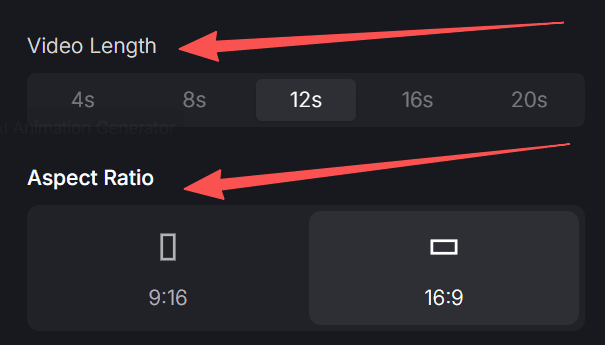
The source article makes this step operational: choose the aspect ratio and video length to match your content strategy. That matters more on Facebook than many creators realize, because different placements reward different framing.
A good baseline looks like this:
- Use
1:1or4:5for main-feed content where vertical space helps visibility - Use
9:16for Facebook Reels and story-style placements - Keep shorter cuts for testing hooks and paid social
- Use slightly longer cuts when the story needs setup before payoff
This is also where you decide how aggressive the pacing should be. A product reveal, community joke, and educational snippet should not all run at the same speed.
The source article mentions public visibility and brand control as part of setup. The more general principle is still useful: decide whether the piece is a public-facing social asset, a test creative, or part of a larger campaign library before you finalize the render.
Step 3: Generate the Video and Review It Like a Feed Post
Generation is not the end of the workflow. It is the point where the feed test starts. Once the first render is done, evaluate it from the perspective of a distracted viewer:
- Does the opening frame feel alive?
- Is the motion clean or generic?
- Does the subject stay readable on mobile?
- Does the pace make sense for the message?
If the base render is close but not fully there, use Video to Video to try alternate visual treatments or cleaner style alignment. If the clip needs more energy, emphasis, or finishing polish, layer in Effects.
The source article presents this as "click create and download the final video," which is accurate at a high level. The more useful production habit is to treat the first render as a draft that you optimize for Facebook behavior rather than accepting it as final by default.
How to Turn This into a Real Growth Workflow
The original article shifts from the basic how-to into a broader growth toolkit. That is the right move, because single videos rarely build a page on their own. Growth comes from repeatable output.
For VideoAny, the practical framework looks like this:
Use AI for Volume, Not Just Novelty
The real advantage is not that AI can make one flashy clip. It is that it can help you produce more high-quality variants without rebuilding the process from zero each time.
Match the Format to the Content Type
Different Facebook content goals need different creative treatment:
- Product storytelling needs visual clarity and controlled pacing
- Community content needs fast hooks and shareability
- Educational content needs readable structure and clear sequencing
- Ad creative needs multiple testable variants
Build for Retention First
The source article is correct to emphasize high retention. On Facebook, polished visuals help, but they only matter if the viewer stays. Strong retention usually comes from a combination of motion, framing, timing, and immediate clarity.
Beyond the Feed
The source article also points toward broader Facebook strategy, and that is worth keeping. AI video is not only useful for one-off viral attempts. It becomes more powerful when tied to a broader content plan:
- Seasonal campaigns
- Emotional storytelling
- Product showcases
- Educational snippets
- Ongoing brand series
This is where VideoAny becomes more useful as a workflow layer than as a single feature. You can concept with Text to Video, animate stills with Image to Video, refine style with Video to Video, and add extra finish with Effects.
Explore the full toolkit at https://videoany.io.
Final Thoughts
The source article gets the main strategic point right: creators who can create more while editing less will usually have the advantage. Facebook rewards consistency, clarity, and posts that can compete for attention immediately. AI helps because it removes part of the production bottleneck.
For VideoAny users, the practical takeaway is simple: start with a sharper hook, build the visual around that hook, format it correctly for the feed, and use AI tools to iterate faster than a manual workflow would allow. That is how a simple idea turns into a video strong enough to earn attention instead of being scrolled past.
FAQs
1) What is the most important part of a Facebook video?
The first few seconds. If the opening frame or motion does not create immediate curiosity, most viewers will keep scrolling.
2) Should I make Facebook videos horizontally or vertically?
It depends on placement. 1:1 and 4:5 often work well in the main feed, while 9:16 is stronger for Reels and story-style distribution.
3) Can this workflow work for ads as well as organic content?
Yes. The same structure works for product videos, creator-style posts, educational clips, and testable ad variants. The difference is in the pacing, message, and CTA.