
Categories: AI Video Workflow, Creator Strategy, Educational Content
Tags: videoany, ai creation studio, ai video workflow, storytelling, creator toolkit
Introduction
Biographical storytelling keeps working because people want more than a face or a highlight reel. They want context. They want to see how a public figure moved from an ordinary beginning into a defining era, a breakthrough moment, or a lasting legacy.
That is why celebrity biography videos consistently perform across YouTube, TikTok, Instagram Reels, and history-focused social accounts. A well-made clip can compress childhood, ambition, setbacks, fame, and influence into a format that feels emotional, informative, and easy to watch.
The source article frames this well: people are naturally curious about the early lives and turning points of the icons they follow. The practical question is how to turn that curiosity into a visually coherent video without building a documentary pipeline from scratch. On VideoAny, the most realistic answer is to treat celebrity biography content as a workflow, not a single feature. You combine scene planning, prompt-driven generation, image animation, and style refinement into one repeatable production system.
Why This Format Works
Celebrity biography videos sit at the intersection of education and entertainment. They are easy to position for multiple audiences:
- People who want quick facts and timelines
- Fan communities who enjoy anniversaries, milestones, and tribute content
- Teachers and educational creators who need more visual storytelling
- Media pages that want highly shareable clips with a clear narrative hook
The source article also points to a key retention advantage: a biography clip does more than show what someone looks like. It shows progression. That progression gives viewers a reason to keep watching because each scene answers a quiet question: what happened next?
What Makes a Strong AI Celebrity Biography Workflow?
A strong biography workflow should do three things well:
- Break a life story into distinct eras rather than one generic montage.
- Match each era with the right environment, mood, and framing.
- Export a format that fits the platform where the story will be published.
This is the core idea behind the Pollo source page, and it translates cleanly into VideoAny. Instead of relying on a dedicated celebrity-life-story generator, you can build the same outcome with Text to Video, Image to Video, Video to Video, and Effects.
The result is not just "a video about a celebrity." It is a visual timeline that moves through different chapters of a life in a way that feels intentional and cinematic.
How to Create AI Celebrity Biography Videos with VideoAny
The source article presents a simple three-step model. The best way to adapt it for VideoAny is to keep that sequence but map each step to tools that already exist in the product.
Step 1: Designate Your Subject and Story Angle
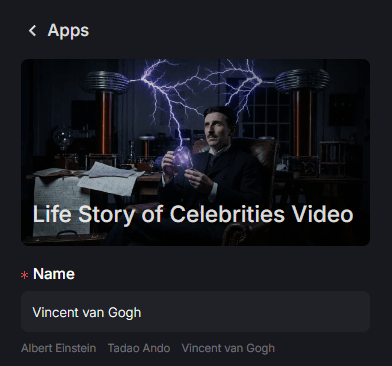
Start by choosing the public figure or historical character you want to feature. The source page suggests beginning with a single name and letting that name anchor the storyboard. That is the right starting point, but you will get a much stronger result if you define the angle before you generate anything.
Ask:
- Is this a "from obscurity to fame" story?
- Is this a "turning points in one career" story?
- Is this a "legacy and influence" story?
- Is this a fast facts short or a more emotional mini-documentary?
Once the angle is clear, split the story into 3 to 6 scenes. For example:
- Early life or formative environment
- First breakthrough
- Peak fame or defining achievement
- Conflict, setback, or transformation
- Lasting cultural impact
This is where Text to Video becomes useful. You can prompt each era separately instead of trying to force an entire life story into one generation.
Step 2: Define the Visual Canvas
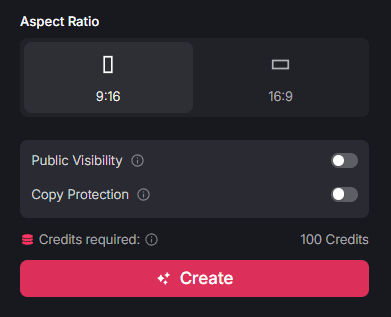
The source article puts real emphasis on aspect ratio and publishing context, and that is a detail worth keeping. Different biography formats need different framing:
- Use
9:16for Reels, Shorts, and TikTok-style fact videos - Use
16:9for YouTube explainers or more cinematic documentary edits - Use tighter framing for emotional or intimate storytelling
- Use wider framing for era-setting environments and cultural context
This is also the stage where you decide whether to begin from text or images:
- Use Text to Video if you need to create scenes from scratch, such as a historical city, a concert era, or a dramatized "young version" setup.
- Use Image to Video if you already have a portrait, poster, or reference image and want to animate it into a richer biography segment.
The original article describes this as choosing the visual canvas and setting other parameters. In practice, that means locking the look of the video before you scale production. If every scene has a different visual logic, the final biography will feel fragmented.
Step 3: Render, Refine, and Export
Once the scene list and format are set, generate the sequences and review them as a narrative, not as isolated clips. This is where many AI biography videos fail: individual shots look interesting, but the full sequence does not feel like a story.
A good review pass should check:
- Does each scene clearly represent a distinct life era?
- Is the emotional arc easy to follow?
- Are the transitions abrupt or coherent?
- Does the subject remain visually recognizable across scenes?
If the raw scenes need a stronger style or more consistency, use Video to Video to align the look across segments. If you want extra motion polish, stylized transitions, or more visual punch for short-form publishing, use Effects.
The source article ends this step with "render and export your story," which is the right high-level summary. The real publishing advantage comes from treating export as the start of distribution, not the end of production. Once the clip is rendered, adapt it for platform-specific captions, hooks, and posting cadence.
Who Can Benefit from Biographical Video Stories?
This section is one of the strongest parts of the source article because it grounds the format in real publishing use cases rather than just product features.
Educational Content Creators
Teachers, explainers, and history-focused creators can use visual biographies to make timelines easier to remember. A short video on a scientist, artist, inventor, or political leader is often more memorable than a text-only recap.
Fan Page Managers
Fan communities need steady publishing formats. Biography clips work especially well for birthdays, anniversaries, comeback periods, tribute posts, and "before they were famous" content.
Trivia and Fact Accounts
Quick-fact pages benefit from visuals that do more than decorate a caption. Biography-driven clips give each fact more context, which makes the post feel more valuable and less disposable.
Social Media Managers
A biography format can diversify a content calendar. Instead of posting only reactions, memes, or trend-following clips, a brand or media page can add cultural storytelling that invites comments and shares.
Practical Content Structure
If you want this format to scale, avoid treating every biography video as a blank page. A repeatable structure works better:
- Hook with a transformation or surprising fact.
- Show the early-life or pre-fame environment.
- Move into the breakthrough moment.
- Highlight the defining era or cultural peak.
- End with legacy, influence, or one memorable takeaway.
This mirrors the narrative logic embedded in the source page: biography videos work because they show development over time. The more clearly your structure communicates that progression, the stronger the retention tends to be.
Final Thoughts
The source article is right about the core opportunity here: biography videos make narrative history easier to publish and easier to consume. Viewers do not need to commit to a full documentary to understand a person's journey. They can absorb that journey in a short, visually driven format.
For VideoAny users, the practical takeaway is not that you need a single celebrity-biography button. It is that you can already build this format by combining text-driven scene generation, image animation, style refinement, and export discipline into one workflow. That gives you a flexible system for creators, educators, fan communities, and media pages that want stories with more substance than a typical short-form post.
Related VideoAny Tools
If you want to build this workflow in production, these are the most relevant pages to use next:
- Text to Video for era-by-era biography scene generation
- Image to Video for animating portraits, posters, or reference stills
- Video to Video for aligning style across scenes
- Effects for finishing polish and more attention-grabbing motion
Explore the broader toolkit at https://videoany.io.
FAQs
1) Can this format work for historical figures as well as celebrities?
Yes. The same structure works for inventors, political leaders, artists, athletes, and other public figures. The key is organizing the story into distinct eras instead of relying on one generic summary.
2) Should I make one long biography or several short clips?
Short series usually perform better. Break one life story into multiple posts if the subject has several major turning points or cultural eras.
3) Which format is better for biography content: vertical or widescreen?
Use 9:16 for short-form social distribution and 16:9 when you want a more documentary-like presentation for YouTube or embedded editorial content.