AI Deep Sea
Turn one photo into a dreamlike underwater clip: the scene becomes deep blue water as the person floats gently, with drifting hair and clothing, soft light rays and distant fish.
Use a sharp photo of one person with a clear face and room around the head and shoulders. The clip is silent; facial details and motion may vary.
568 credits per 5-second video
External scene references, not VideoAny-generated results. Your 5-second clip may differ.
Explore the underwater look
Use these external scene references to explore deep-blue water, soft light rays and a calm floating mood.
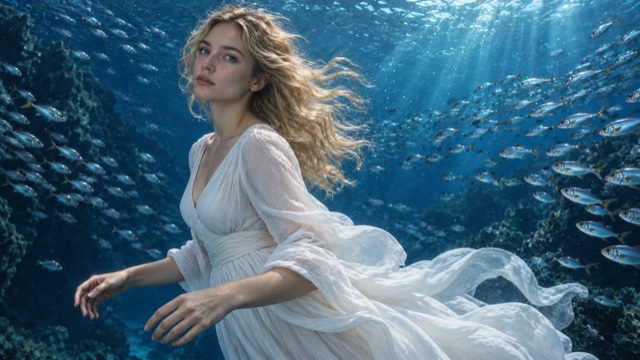
Floating fabric in blue water
A white dress and long hair drift through deep-blue water, with fish around the subject and light from the surface.
SuperMaker ↗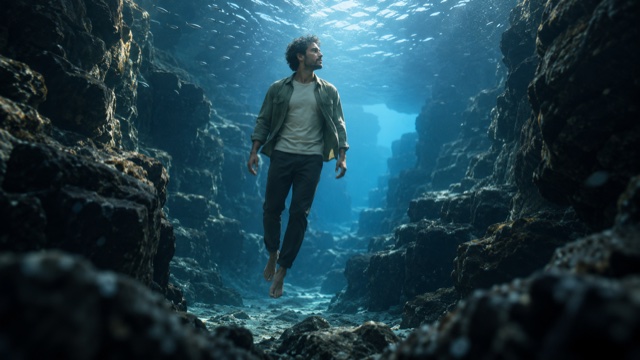
Light from the surface
Soft light from above separates the floating figure from the surrounding blue water and rocks.
SuperMaker ↗External scene references, not VideoAny-generated results. Your 5-second clip may differ.
Upload your photo
Choose one clear photo of one person with space around the head and shoulders.
Generate your video
Sign in and check that you have 568 credits. Select Generate to start your 5-second clip.
Preview and download
When the video is ready, watch the result and download it. Faces, motion and backgrounds can vary.
AI Deep Sea FAQ
A photo-to-video effect that smoothly turns the surroundings into deep blue water. The person floats gently with a small shoulder turn, while hair and clothing drift, bubbles rise beside them and small fish pass in the distance. The effect aims to keep their face and outfit recognizable.
A sharp, well-lit photo of one person with an unobscured face and some room around the head and shoulders. Flowing clothing or long hair can make the drift more visible.
No. Everything underwater is generated from a normal photo taken on land.
Each generation requires 568 credits. If you have fewer than 568 credits, add credits to continue.
Not in this version. The effect uses a fixed prompt for a calm deep-blue ocean scene. Facial details, fish and other scene elements can vary.
Image quality, content checks and temporary service issues can affect generation. AI may change facial details or the background. If progress cannot be checked, review your generation history before starting another task.
Each generation uses Seedance 2.5 to create a silent 5-second, 720p video at 568 credits. The aspect ratio follows your photo. Five seconds is the video length, not the generation time.
Ready to create your next release?
Upgrade for faster queues, higher resolutions, and expanded usage options.